

Self-Hosted Deployment Requirements
Self-hosted means you run the RunWhen Platform inside Kubernetes clusters you own, with task execution from RunWhen Local runners deployed into the same or separate clusters. RunWhen ships the platform as a Helm chart (runwhen-platform) and supplies a per-customer registry credential; everything else — clusters, DNS, registry, LLM, secrets — stays in your environment.
This page is for architecture, security, and platform-engineering reviewers evaluating self-hosted before procurement. If you are mid-install, your onboarding pack contains the version-pinned runbook; this page is the durable reference.
Start by contacting RunWhen
Self-hosted is not a public open-source install. The platform images and the OCI Helm chart live in a private Google Artifact Registry repository that requires a per-customer credential issued by RunWhen.
Before procurement, infrastructure design, or registry setup, contact support@runwhen.com or sales@runwhen.com to:
| Item | What you receive |
|---|---|
| Self-hosted entitlement | License terms, support tier, chart version channel, upgrade cadence |
| Registry credential | GCP service-account JSON (or Workload Identity Federation config) scoped read-only to your dedicated runwhen-self-hosted/<repo> |
| Onboarding pack | Image inventory with pinned tags, JFrog apply.sh (Pro/Enterprise), values-example-*.yaml overlays, install checklist, verification scripts |
| Companion image access | Anonymous ghcr.io/runwhen-contrib/* for MCP server, code-collection catalog, cortex-tenant, and codecollections |
RunWhen retains the right to revoke the registry credential. The credential is scoped to a single Artifact Registry repository — it cannot read any other RunWhen registry, and it is the only path to private images.
Architecture overview
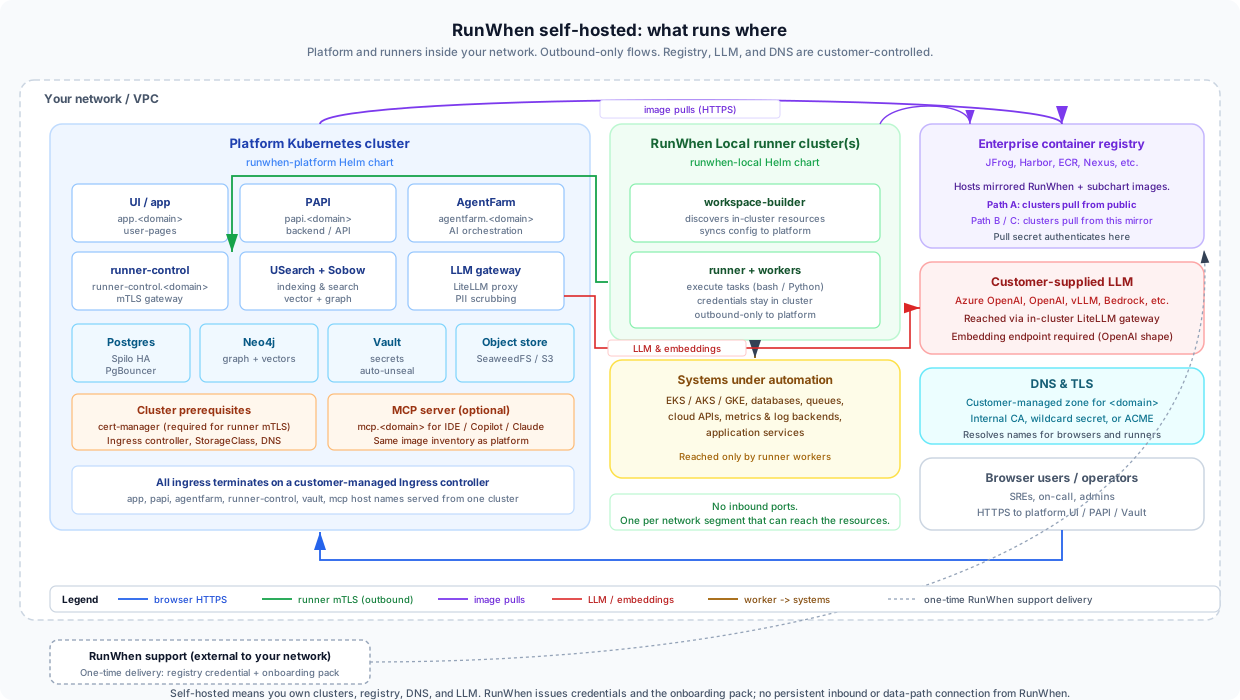
Trust boundaries at a glance
| Boundary | Owned by | Crosses | Notes |
|---|---|---|---|
| Platform cluster | You | Browser HTTPS in, registry pulls out, LLM out | Hosts UI, PAPI, AgentFarm, search index, Vault, Postgres, Neo4j, object store |
| Runner cluster(s) | You | Outbound mTLS to the platform | Where every task executes; no inbound ports |
| Systems under automation | You | Reached only by runner workers | Cloud APIs, databases, queues, application services |
| Enterprise registry | You | Pulls upstream once; serves cluster pulls | RunWhen, contrib, and subchart images flow through here for Paths B/C |
| LLM endpoint | You | Reached via the in-cluster LiteLLM gateway | Azure OpenAI, vLLM, Bedrock, OpenAI, etc. |
| RunWhen | RunWhen | One-time credential delivery + upgrade tags | No persistent inbound or data-path connection from RunWhen into your environment |
What the platform cluster runs
| Layer | Components |
|---|---|
| Edge | Ingress controller, cert-manager, optional MCP server |
| Application | UI, PAPI, AgentFarm, runner-control, USearch + Sobow, LiteLLM gateway, webhooks |
| Stateful | Postgres (Spilo HA + PgBouncer, or external PostgreSQL), Neo4j (graph + vectors), Vault (auto-unseal), Object store (SeaweedFS or external S3), Redis |
| Cluster prereqs | StorageClass, DNS, ingress, cert-manager (required for runner mTLS) |
What runner clusters run
| Component | Purpose |
|---|---|
workspace-builder | Discovers in-cluster resources, syncs config to the platform |
runner + workers | Execute tasks (bash, Python). Credentials and raw infrastructure data stay in the runner cluster |
Runner clusters initiate connections outbound only to the platform’s papi, runner-control, and Vault hostnames over HTTPS / mTLS.
A single runner can discover and operate against many Kubernetes clusters and cloud environments. Placement is bounded by network reachability, not cluster count: deploy one runner per network segment that can reach the resources you want it to manage. Most customers run two or three (e.g. one per VPC / region) rather than one per discovered cluster.
Choose your install path
Three patterns satisfy most enterprise registry policies. The Helm chart, namespace, and Kubernetes resources are identical across all three; only where clusters pull images differs.
| Path | When to pick it | Cluster outbound | Mirror outbound |
|---|---|---|---|
| A — Direct pull | Cluster has egress to *.docker.pkg.dev and accepted public registries | RunWhen GAR, GHCR, Docker Hub | n/a |
| B — Enterprise mirror | Corporate policy mandates internal registry pulls (most enterprises) | Your registry only | One-time, scheduled, or pull-through |
| C — Air-gapped | Regulated, classified, or fully disconnected networks | None (your registry only) | Manual transfer across the gap |
Path B is the most common enterprise choice. JFrog Artifactory is covered in detail in the JFrog Registry Setup guide; Google Artifact Registry is covered in the GAR Registry Setup guide. Harbor, ECR pull-through, and Nexus follow the same model with different specifics.
Plan the registry first. Procurement of registry capacity, vulnerability-scanning policy, and upstream-FQDN egress approvals tend to be the slowest items on enterprise self-hosted timelines.
Kubernetes prerequisites
These must exist before helm install. The chart assumes a production-grade cluster; single-node lab clusters are supported with reduced replica counts via the values-example-single-node.yaml overlay.
Required platform services
| Prerequisite | Why it matters |
|---|---|
| Kubernetes 1.28+ | Tested baseline; chart dependencies require modern API versions |
| OpenShift / OKD (if applicable) | SCC and cluster-scoped RBAC require cluster-admin steps before Helm — see OpenShift / OKD self-hosted guide |
| StorageClass (default or per-component) | Backs Postgres, Neo4j, Vault, object store, and vector DB PVCs |
| cert-manager (Ready) | Hard dependency — runner mTLS certificates are minted at registration time, regardless of how ingress TLS is solved |
| Ingress controller | Routes app., papi., agentfarm., runner-control., vault., and related hostnames |
| DNS | global.domain and service subdomains resolve to the ingress load balancer |
Recommended resource quotas
The platform uses emptyDir scratch volumes for caches, working directories, and binary copies. While the chart sets sizeLimit on every emptyDir, this is an eviction signal — the kubelet will not block writes at the moment the limit is exceeded (see emptyDir scratch volumes for details).
To protect against node disk overrun, configure a ResourceQuota and LimitRange in the install namespace before deploying the chart:
apiVersion: v1kind: ResourceQuotametadata: name: runwhen-platform-quotaspec: hard: # Cap total ephemeral storage across all pods in the namespace. # Adjust based on your node disk size and replica count. requests.ephemeral-storage: "50Gi" limits.ephemeral-storage: "100Gi" # PVC caps — match or exceed the per-component defaults below. requests.storage: "200Gi" persistentvolumeclaims: 20 # CPU / memory quotas (optional — uncomment if you need them). # requests.cpu: "32" # requests.memory: "128Gi" # limits.cpu: "64" # limits.memory: "256Gi"---apiVersion: v1kind: LimitRangemetadata: name: runwhen-platform-limitsspec: limits: - type: Container default: ephemeral-storage: "2Gi" # per-container hard limit defaultRequest: ephemeral-storage: "256Mi" # per-container request (scheduling) max: ephemeral-storage: "10Gi" # single container capOn OpenShift, bake these into the cluster’s ProjectRequestTemplate so every new namespace gets them automatically — see the Resource quotas for disk protection section for the template YAML.
Workstation tools
| Tool | Minimum version | Used for |
|---|---|---|
| Helm | 3.13+ | Chart pull, dependency materialization, install/upgrade |
| kubectl | 1.28+ (matching cluster) | Pull secret, namespace, verification |
| Docker or crane / skopeo | Current | Registry login; required for air-gap image transfer |
Helm subchart materialization
The released chart is thin. Your install workstation registers five Helm-repo aliases before helm dependency update. Names must match exactly — Chart.yaml references them as @bitnami, @neo4j, @hashicorp, @qdrant, @seaweedfs.
| Alias | Connected (Path A) | Mirrored (Paths B/C) |
|---|---|---|
bitnami | https://charts.bitnami.com/bitnami | https://<registry>/helm-bitnami |
neo4j | https://helm.neo4j.com/neo4j | https://<registry>/helm-neo4j |
hashicorp | https://helm.releases.hashicorp.com | https://<registry>/helm-hashicorp |
qdrant | https://qdrant.github.io/qdrant-helm | https://<registry>/helm-qdrant |
seaweedfs | https://seaweedfs.github.io/seaweedfs/helm | https://<registry>/helm-seaweedfs |
The RunWhen chart itself is an OCI artifact in the same private registry as the platform images — pulled with helm pull oci://..., not via a classic Helm repo index.
Enterprise registry requirements
For Paths B and C, the enterprise container registry is the gating prerequisite. Treat this section as the minimum bar for security and platform review.
Why an enterprise registry
- Policy compliance — clusters never pull directly from the public internet
- Vulnerability scanning — images scanned and approved before production clusters see them
- Air-gap readiness — the same mirror workflow supports fully disconnected installs
- Credential isolation — the RunWhen pull credential lives on the mirror / CI host, not on every node
- Tag pinning — point your overlays at locally-cached tags so RunWhen registry availability never gates your deploys
Upstream registries to proxy or mirror
| Upstream | Required? | Contents | Auth |
|---|---|---|---|
us-docker.pkg.dev | Yes | RunWhen platform images + OCI Helm chart (runwhen-self-hosted/platform-images/**) | RunWhen-issued GCP SA |
ghcr.io | Yes | runwhen-contrib/** — MCP, catalog, cortex-tenant, codecollections, LiteLLM, Spilo | Anonymous |
registry-1.docker.io | Yes | Subchart images (Vault, Redis, Mimir, Qdrant, Neo4j, SeaweedFS) | Anonymous (creds optional) |
| Helm chart repos | Conditional | charts.bitnami.com, helm.neo4j.com, helm.releases.hashicorp.com, qdrant.github.io, seaweedfs.github.io | Anonymous |
quay.io, registry.k8s.io | Optional | cert-manager and cluster-prerequisite images if you proxy them too | Anonymous |
Registry routing in Helm values
How you point the chart at your mirror depends on layout:
| Mirror layout | Pattern | Example |
|---|---|---|
| Single host, flat namespace (Harbor project, ECR pull-through, generic Distribution) | registryOverride (chart-wide) | harbor.corp/runwhen/<image>:<tag> |
| Per-upstream paths (JFrog virtual repos, Harbor with one project per upstream) | Per-image registry: overrides | <jcr-host>/docker/<remote>/<upstream-path>:<tag> |
Worked overlays for both patterns ship in your onboarding pack. JFrog customers have a dedicated setup guide.
Cluster pull secret
Create a kubernetes.io/dockerconfigjson Secret in the install namespace. The chart default expects the name gcr-pull-secret (images.pullSecrets[0].name). Override in values if your naming policy requires a different name.
| Path | Pull-secret authenticates against | Credential |
|---|---|---|
| A | *.docker.pkg.dev | RunWhen-issued GCP SA JSON (_json_key username) |
| B / C | Your enterprise registry | Read-scoped JFrog / Harbor / ECR token |
Code-collection container images
The runner pulls per-task code-collection containers at dispatch time. The in-cluster cc-catalog-svc discovers tags via the OCI Distribution tags/list API — your ghcr.io mirror must allow listing remote folder items (a critical JFrog checkbox; equivalent setting on Harbor/Nexus). Tags roll on RunWhen’s release schedule; pre-scan the baseline tags from your onboarding inventory and re-scan on each release if your security pipeline requires it.
Cluster sizing
These are starting points; RunWhen validates final sizing during onboarding based on workspace size and concurrent runner load.
Proof of concept / evaluation
| Resource | Minimum |
|---|---|
| Kubernetes | 1.28+, 3 worker nodes |
| Per node | 4 vCPU, 16 GiB RAM |
| Storage | ~410 GiB allocatable PVC capacity — see Storage Requirements for per-component sizing |
| Postgres / Redis | Chart-managed (bundled subcharts) |
| Network | One ingress LB IP, DNS for global.domain |
Production (recommended)
| Resource | Minimum |
|---|---|
| Kubernetes | 1.28+, 6+ worker nodes |
| Per node | 8 vCPU, 32 GiB RAM |
| Storage | 500 GiB+ SSD-backed StorageClass — see Storage Requirements for per-component sizing and NFS guidance |
| Postgres | Spilo HA + PgBouncer (overlay in onboarding pack) |
| Redis | Bitnami HA |
| Network | Dedicated ingress LB; consider PodAntiAffinity for stateful subcharts |
Resource quotas: At this scale, set
requests.ephemeral-storage: "100Gi"andlimits.ephemeral-storage: "200Gi"in your ResourceQuota, and add CPU/memory quotas (requests.cpu: "48",requests.memory: "192Gi") to prevent one team’s run-away query or workspace from starving the rest of the platform. See Storage Requirements — Resource quotas for the full YAML.
See also Deployment Options — Option 3 for a feature-level SaaS-vs-self-hosted comparison.
Storage requirements
The platform uses two kinds of storage:
- PersistentVolumeClaim (PVC) — for state that must survive pod restarts (Postgres, Vault, Neo4j, object store, Redis, Qdrant, Mimir).
- emptyDir — for scratch, caches, and working directories that can be recreated. Every first-party emptyDir has a
sizeLimitthat signals the kubelet to evict the pod if it exceeds the limit.
Required StorageClass
You need at least one default StorageClass (or a named class you configure per component). The chart works with any CSI driver that provides ReadWriteOnce volumes. For Postgres HA (Spilo) each replica needs its own PV — a non-shared block storage (SSD/NVMe) is strongly recommended.
| Scenario | StorageClass requirement | Notes |
|---|---|---|
| NFS only | No RWO StorageClass available | Set postgresql.spilo.persistence.kind: emptyDir, metricstore.persistence.kind: emptyDir, qdrant.useSubchart: false. State rebuilds on pod restart. See values-example-storage-nfs.yaml |
| Production | Regional SSD-backed RWO | Postgres needs low-latency writes; NFS for Postgres causes data-loss risk (see PostgreSQL and NFS) |
| OpenShift | Any provisioner | No special requirements beyond a working default StorageClass |
Per-component storage matrix
| Component | Backing store | Default size | Rebuildable? | Notes |
|---|---|---|---|---|
| Postgres (Spilo) | PVC (persistence.kind: pvc) | 10 Gi | Yes — WAL-G → S3 | Durability anchor. HA via Patroni. kind: emptyDir for NFS-only clusters requires WAL-G enabled. |
| Vault | PVC | 10 Gi | Yes — snapshot tarball → S3 | Durability anchor. Raft backend; the PVC holds both data and Raft log. |
| Neo4j | PVC (volumes.data.mode: defaultStorageClass) | 10 Gi | Yes — re-index from Postgres | Graph + vector index. Loss = re-index cost (minutes). |
| Object store (SeaweedFS) | PVC (volume server), PVC (filer) | 100 Gi volume, 5 Gi filer | No — durability anchor for Vault/Postgres backups | The S3 gateway that backs all backup pipelines. |
| Redis | PVC (master.persistence.enabled: true) | 8 Gi | Yes — cache loss means cold-cache startup cost | Session store, cache, task queues. |
| Qdrant (subchart) | PVC (useSubchart: true) | 5 Gi | Yes — re-embed from Postgres/LLM | Vector DB for RAG. useSubchart: false + NFS = emptyDir, full re-embed on restart. |
| MetricStore (Mimir) | PVC (persistence.kind: pvc) | 10 Gi | Yes — re-sync from S3 bucket store | TSDB blocks. kind: emptyDir for NFS-only clusters. |
| PgBouncer | emptyDir (socket) | 10 Mi limit | n/a | Unix socket only — negligible. |
emptyDir scratch volumes
Every first-party pod has writable scratch volumes (/tmp + /home/app) backed by emptyDir with sizeLimit: 1Gi (configurable via global.scratchVolumes.sizeLimit). Additional component-specific emptyDirs handle binary copies, caches, and working directories.
| Component | Volumes | sizeLimit | Est. actual usage |
|---|---|---|---|
| Vault (server) | vault-tmp | 1 Gi | ~5 MiB (config render) |
| Vault init | vault-bin | 100 Mi | ~70 MiB (binary copy) |
| Vault backup | vault-bin, tmp | 100 Mi, 1 Gi | ~80 MiB combined |
| Vault unsealer | vault-bin | 100 Mi | ~70 MiB (binary copy) |
| PgBouncer | socket | 10 Mi | <1 MiB |
| Spilo (Postgres) | spilo-run, spilo-tmp, spilo-varlog | 1 Gi each | ~50 MiB combined |
| LLM Gateway | litellm-tmp, litellm-cache, litellm-migrations, litellm-prisma-work | 1 Gi each | ~200 MiB combined |
| User Pages v2 | html | 100 Mi | ~50 MiB |
| CC Catalog | data (SQLite), tmp | 1 Gi each | ~30 MiB combined |
| Neo4j | neo4j-confdir, neo4j-run, neo4j-tmp | 100 Mi, 100 Mi, 1 Gi | ~150 MiB combined |
| SeaweedFS (each of 4 components) | tmp | 1 Gi each | ~100–500 MiB (multipart staging) |
| Global scratch (× 20 deployments) | platform-tmp + platform-home | 1 Gi each | ~50 MiB per pod |
Estimated total emptyDir footprint: ~3–5 GiB across all pods (vs. ~95 GiB sum of sizeLimits). The sizeLimit is an eviction ceiling, not a reservation.
SeaweedFS master logs: The chart ships with
seaweedfs.master.logs.type: "", which directs master logs to stderr (captured by the container runtime) instead of a file volume. If you override to"emptyDir", the upstream subchart creates an unbounded emptyDir that requires a Helm post-renderer or Kustomize patch to add a sizeLimit.
Resource quotas for disk protection
emptyDir.sizeLimit is an eviction signal, not a hard quota. For write-time enforcement against node disk overrun, configure namespace-level ResourceQuota and per-container LimitRange with ephemeral-storage limits:
apiVersion: v1kind: ResourceQuotametadata: name: runwhen-platform-quotaspec: hard: requests.ephemeral-storage: "50Gi" limits.ephemeral-storage: "100Gi" requests.storage: "200Gi" persistentvolumeclaims: 20---apiVersion: v1kind: LimitRangemetadata: name: runwhen-platform-limitsspec: limits: - type: Container default: ephemeral-storage: "2Gi" defaultRequest: ephemeral-storage: "256Mi" max: ephemeral-storage: "10Gi"On OpenShift, bake these into your ProjectRequestTemplate so every new namespace gets them automatically:
apiVersion: template.openshift.io/v1kind: Templatemetadata: name: project-requestobjects: - apiVersion: project.openshift.io/v1 kind: Project metadata: name: ${PROJECT_NAME} - apiVersion: v1 kind: ResourceQuota metadata: name: platform-quota namespace: ${PROJECT_NAME} spec: hard: requests.ephemeral-storage: "50Gi" limits.ephemeral-storage: "100Gi" - apiVersion: v1 kind: LimitRange metadata: name: platform-limits namespace: ${PROJECT_NAME} spec: limits: - type: Container default: ephemeral-storage: "2Gi" defaultRequest: ephemeral-storage: "256Mi" max: ephemeral-storage: "10Gi"See the charts test file for a validation pod that demonstrates the enforcement difference.
DNS and TLS
DNS
You provide a DNS zone (or delegated subdomain) for global.domain. Typical records created at install include:
| Hostname | Component |
|---|---|
app.<domain> | Web UI |
papi.<domain> | Platform API |
agentfarm.<domain> | AI orchestration |
runner-control.<domain> | Runner mTLS endpoint |
vault.<domain> | Secret store (operator access) |
s3.<domain> (optional) | Object store endpoint |
mcp.<domain> (optional) | MCP server for IDE / AI clients |
Records can be managed manually or with external-dns if you grant it API access to your DNS provider.
TLS modes
| Mode | Air-gap compatible? | When to use |
|---|---|---|
Chart-managed CA (runwhenCA.deploy: true) | Yes | Self-signed wildcard; distribute the CA to browsers / runners |
| Your ClusterIssuer (internal PKI) | Yes | Most common enterprise mode — bring a corporate CA-backed issuer |
| Existing wildcard Secret | Yes | Pre-provisioned TLS Secret; no cert-manager involvement for ingress (still required for runner mTLS) |
| Public ACME (Let’s Encrypt) | No | Requires reachability to ACME servers; not viable for air-gap |
If outbound HTTPS passes through a TLS-inspecting proxy, configure global.trustBundle with your corporate CA — platform pods validate JWTs, OIDC discovery, and webhook destinations over HTTPS.
LLM and embedding requirements
Core AI features (issue analysis, summaries, semantic search, agentic chat) require models you provide. RunWhen ships the in-cluster LiteLLM gateway and Vault-backed credential storage; you point them at your endpoints.
| Capability | What you supply | Notes |
|---|---|---|
| Chat / completion | Endpoint + API key | Azure OpenAI, OpenAI, Bedrock, vLLM, Vertex — anything LiteLLM speaks. See BYO LLM and Self-Hosted LLM Configuration. |
| Embeddings | OpenAI-compatible POST /v1/embeddings endpoint with fixed dimension (default 1536) | Changing dimension requires re-indexing the search graph — pin once, then leave alone. |
PII scrubbing happens before prompts leave the cluster. Hosted OpenAI defaults in sample values are for evaluation only; production self-hosted points at internal endpoints.
Security and compliance
| Area | Default | Configurable |
|---|---|---|
| Pod hardening | Pod Security Standard restricted (non-root, read-only rootfs, dropped capabilities, seccompProfile: RuntimeDefault) | Yes — relax via global.podSecurityContext / global.containerSecurityContext. On OpenShift/OKD, bundled Postgres needs a documented SCC exception or external database — see OpenShift / OKD guide |
| Secrets | HashiCorp Vault, auto-unsealed via the in-cluster unsealer | Bring your own KMS for production unseal; capture root token at install |
| Service accounts | Chart creates them | Set serviceAccount.*.create: false and pre-provision for namespace-scoped admins (BYO-SA) |
| Trust bundle | Empty | global.trustBundle projects your corporate CA into every first-party pod |
| Data residency | All workspace data in your cluster | LLM traffic only to endpoints you configure |
| Observability | Customer-managed | Add chart overlays for metrics / logs scraping |
| Resource quotas | Not set by the chart | Recommended — apply ResourceQuota + LimitRange to the install namespace. See the Resource quotas prerequisite and the Storage requirements section for copy-pasteable YAML. On OpenShift, bake into ProjectRequestTemplate. |
Network summary
Path A — connected cluster
Outbound HTTPS from cluster nodes and install workstation to:
- RunWhen registry (
*.docker.pkg.dev) authenticated with your issued credential ghcr.io,registry-1.docker.io, and the five Helm chart hosts listed under Enterprise registry requirements- Your LLM endpoints (if external)
Path B / C — mirrored or air-gapped
- Cluster nodes: pull only from your enterprise registry — no public internet required
- Mirror / install workstation: scheduled or one-time sync from upstreams; RunWhen credential lives only here
- Air-gap transfer: image manifest + chart tarball cross the gap on approved media
RunWhen Local runner clusters always need outbound HTTPS to the platform endpoints (papi.<domain>, runner-control.<domain>, vault.<domain>).
Installation workflow (high level)
- RunWhen entitles you and ships registry credentials + onboarding pack.
- Stand up (or extend) your enterprise registry — see the JFrog guide or the equivalent for Harbor / ECR / Nexus.
- Verify cluster prerequisites: cert-manager, ingress, StorageClass, DNS.
- Register Helm subchart aliases on the install workstation.
helm pull oci://<registry>/.../charts/runwhen-platform --version <X.Y.Z> --untarhelm dependency update ./runwhen-platform- Apply your values overlay (domain, TLS, registry routing, secrets, LLM bootstrap).
- Create the namespace pull secret and
helm upgrade --install. - Run the bundled
install-checklist.sh verifyscript. - Deploy RunWhen Local runner(s) pointed at your platform URL.
Detailed commands, placeholder tables, and troubleshooting live in the onboarding pack so they stay in lockstep with your pinned chart version.
Related documentation
| Topic | Link |
|---|---|
| Enterprise SSO (OIDC) | Single Sign On — Self-hosted |
| JFrog / Artifactory registry setup | JFrog Registry Setup guide |
| Google Artifact Registry setup | GAR Registry Setup guide |
| Private runners (task execution) | SaaS with Private Runner — same chart, self-hosted platform URL |
| LLM configuration | Bring Your Own LLM · Self-Hosted LLM Configuration |
| Slack integration (optional) | Slack Integration — Self-Hosted |
| Azure OpenAI worked example | Azure OpenAI BYO LLM Setup |
| Deployment model comparison | Deployment Options |
| Storage Requirements | Storage Requirements guide — PVC sizing, emptyDir scratch volumes, NFS guidance, resource quotas |
| OpenShift / OKD install | OpenShift & OKD — Self-Hosted |
| External PostgreSQL | External PostgreSQL requirements |
| External S3 | External S3 requirements |
| Security model | Security Model Overview |
Get started
Email support@runwhen.com with:
- Target environment (cloud provider, air-gap yes/no, preferred enterprise registry)
- Expected cluster count (platform + runners)
- Compliance drivers (FedRAMP, FISMA, data residency, etc.)
- Timeline and chart-version requirements
RunWhen schedules a technical onboarding session, issues registry credentials, and delivers the install pack matched to your path (direct, mirror, or air-gap).