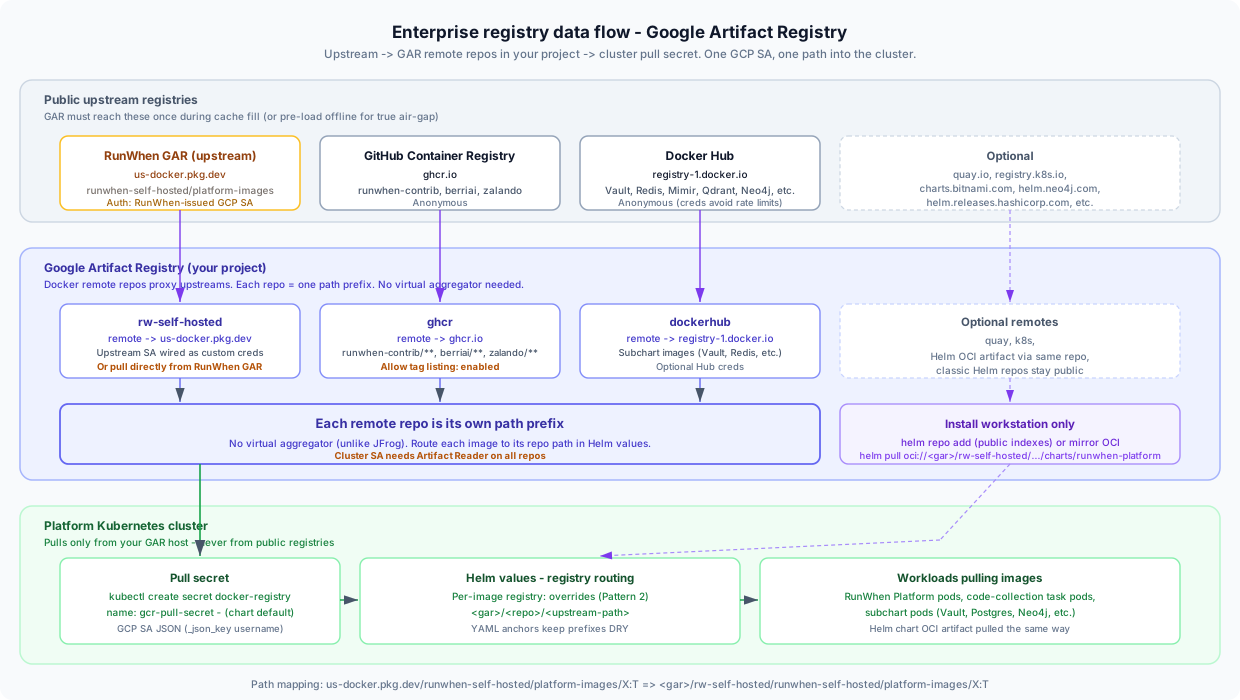
Google Artifact Registry Setup for RunWhen Self-Hosted
This guide is for platform engineering and GCP teams standing up Google Artifact Registry (GAR) as the enterprise registry that will host RunWhen images before the Self-Hosted RunWhen Platform install. It is the native-GCP companion to the JFrog Artifactory setup guide — the same data-flow shape, but using GAR’s remote repository feature instead of JFrog remotes and virtual repos.
Prerequisites — read first
Self-hosted entitlement is required. RunWhen does not publish platform images to a public registry. Contact support@runwhen.com to request access — onboarding delivers a dedicated repository, a per-customer GCP service-account key, and the version-pinned image inventory.
GCP project owner (or Artifact Registry Administrator) on the project that will own these repositories.
Outbound HTTPS (443) from your GAR project to the upstream registries listed below — for the initial cache fill, or for ongoing pull-through caching. (Air-gap: pre-load images offline; see Air-gap notes.)
The Remote repositories feature must be enabled on your GAR project (available on standard GAR; not available on the legacy GCR gcr.io path).
How RunWhen flows through Google Artifact Registry
The shape mirrors the JFrog guide, with one key difference: GAR has no virtual aggregator. Each remote repository is its own path prefix, so cluster pulls point at one repo path per upstream rather than a single virtual host path.
One Docker remote repo per upstream registry in your GAR project. RunWhen images get a dedicated, authenticated remote; everything else uses anonymous remotes.
No virtual aggregator — each remote repo resolves to a distinct path under your GAR hostname. Helm values route each image to the correct repo path (Pattern 2 in the chart’s registry routing).
One Kubernetes pull secret authenticates against your GAR host using a read-scoped GCP service account. The chart names it gcr-pull-secret by default — appropriate here, since this is a GCR-compatible registry.
Helm values route each image to the correct repo path. RunWhen ships a worked overlay for GAR (values-example-airgap-gar.yaml) in your onboarding pack.
The Helm chart itself is an OCI artifact in the same RunWhen repository as the images, so it rides through the same remote repo — no second credential.
1. Pick the registry mode
Mode
Remote repos
Virtual aggregation
Recommended for
GAR with remote repos (this guide)
Yes
No (per-repo paths)
GCP-native customers wanting caching, audit, and single-SA access control
Pull directly from RunWhen GAR
No
No
Smallest footprint — cluster pulls us-docker.pkg.dev directly with the RunWhen-issued SA (no proxy)
Recommendation: Use GAR remote repos (this guide) when you need pull-through caching, an audit trail in your own project, or a single SA boundary. If your cluster can reach us-docker.pkg.dev directly and you don’t need caching, the direct-pull mode skips this guide entirely — just wire the RunWhen-issued SA into the pull secret (Step 6) and point Helm values at the upstream paths as-is.
2. Whitelist upstream FQDNs from your GAR project
Your GAR project’s egress (or your offline mirror) needs to reach these upstreams. After setup, only GAR talks to them — cluster pods talk only to GAR.
Create one GAR remote repo per upstream using the Docker format with Remote repository mode. Repo names below drive pull paths under your GAR hostname — keep them exactly as shown unless you have a strong reason to deviate (RunWhen’s example values overlay assumes these names).
Repo name
Upstream registry
Auth
rw-self-hosted
us-docker.pkg.dev
GCP service-account JSON (RunWhen-issued) wired as custom upstream credentials
ghcr
https://ghcr.io
Anonymous
dockerhub
https://registry-1.docker.io
Anonymous (optional Hub creds avoid rate limits)
quay
https://quay.io
Anonymous (optional)
k8s
https://registry.k8s.io
Anonymous (optional)
Direct-pull shortcut: Because RunWhen images already live in GAR (us-docker.pkg.dev), you can skip the rw-self-hosted remote repo and grant your cluster’s pull-secret SA Artifact Reader on the RunWhen-issued repository directly. The remote repo adds caching + your-project audit; direct pull is simpler but has no cache layer. Choose based on whether your network policy requires a single egress point.
Required settings per remote repo
Setting
Value
Why it matters
Upstream registry
Per table above
The public source this repo proxies
Allow tag listing
Enabled on ghcr
Required so RunWhen’s code-collection catalog can list image tags via GET /v2/<image>/tags/list. Without it, the runner gets an empty catalog and tasks fail to dispatch.
Custom upstream credentials (on rw-self-hosted only)
RunWhen GCP SA JSON
GAR remote repos proxy an upstream using the repo’s own project SA by default. For the RunWhen GAR repo, you must supply the RunWhen-issued SA so the proxy can authenticate upstream.
Wire the RunWhen GCP service-account key
On rw-self-hosted only, configure Custom upstream credentials:
Username:_json_key
Password / key file: the contents of the GCP service-account JSON file RunWhen issued to your organization
Verify with a workstation docker pullbefore going further:
Terminal window
# Login to the GAR registry hostname only — not the project/repo path.
# (--password-stdin works with Docker and Podman; avoid --password-file.)
A 403 Forbidden or manifest unknown here almost always means an expired or wrongly-scoped RunWhen GCP key — contact RunWhen support before continuing. Do not apply a broken credential to your cluster.
4. Understand the path mapping (no virtual aggregator)
Unlike JFrog, GAR has no virtual repository layer. Each remote repo resolves to a distinct path prefix under your GAR hostname. After Step 3 the path translation is mechanical:
The Helm chart artifact (charts/runwhen-platform) sits inside the same RunWhen GAR repo as the images, so it pulls through rw-self-hosted (or directly from us-docker.pkg.dev) — no second credential or repo.
5. (Optional) Handle Helm chart dependencies
GAR does not mirror classic HTTP Helm chart indexes (the helm repo add model). You have two options for the subchart dependencies (Bitnami, Neo4j, HashiCorp, Qdrant, SeaweedFS):
Option
When to use
How
Keep public indexes
Install workstation can reach public Helm repos during helm dependency update
helm repo add bitnami https://charts.bitnami.com/bitnami etc. — no GAR involvement
OCI mirror into GAR
Policy-restricted or air-gap installs
Copy chart OCI artifacts into a GAR standard repo, then helm repo add the GAR OCI path
For most installs, keep the public indexes — the subchart deps are resolved once on the install workstation, not by the cluster at runtime.
Register the public Helm aliases on the install workstation. The alias names must match exactly — Chart.yaml references them as @bitnami, @neo4j, @hashicorp, @qdrant, @seaweedfs:
Pull the RunWhen chart via OCI through the rw-self-hosted remote repo (or directly from us-docker.pkg.dev). The helm registry login must run beforehelm pull so the credential is cached for the OCI fetch.
Terminal window
GAR_REGISTRY="<region>-docker.pkg.dev"
GAR_HOST="${GAR_REGISTRY}/<your-project>"
CHART_VERSION="0.2.58"# replace with the version from your onboarding pack
# Option A — short-lived access token (operator is `gcloud auth login`'d with
# a principal that has Artifact Reader on the repo). Token expires in ~1 h.
# Resolve subchart dependencies on the install workstation
helmdependencyupdate./runwhen-platform
Direct-pull variant: If you skipped the rw-self-hosted remote repo (Step 3 shortcut) and pull the chart straight from RunWhen’s GAR, login to us-docker.pkg.dev with the RunWhen-issued SA instead, and drop the rw-self-hosted/ prefix from the oci:// path:
Create a read-scoped GCP service account in your project (not the RunWhen-issued one — that’s for the upstream proxy only). Grant it Artifact Reader (roles/artifactregistry.reader) on all remote repos above, then generate a JSON key.
Use a read-scoped SA key (not your admin credential). The chart default expects the secret named gcr-pull-secret under images.pullSecrets[0].name. Override the name in your values if your naming policy requires something different.
Workload Identity alternative: If your cluster runs on GKE with Workload Identity enabled, bind the platform namespace’s Kubernetes service account to the GCP SA and skip the JSON key entirely — no docker-registry secret needed. This is the recommended production pattern on GKE.
7. Wire the GAR paths into Helm values
Use per-image registry: overrides (“Pattern 2” in the chart’s registry routing) since each upstream maps to a different repo prefix. RunWhen ships a worked example (values-example-airgap-gar.yaml) that uses YAML anchors to keep prefixes DRY:
kubectl get secret gcr-pull-secret -n <namespace> shows the docker-config secret
9. Troubleshooting
Symptom
Most likely cause
403 Forbidden pulling RunWhen images through rw-self-hosted
RunWhen GCP SA expired, wrong upstream credentials, or SA not wired as custom creds on the remote repo
403 Forbidden pulling in-cluster
Cluster pull-secret SA missing roles/artifactregistry.reader on one or more repos
manifest unknown on first pull through a remote
GAR remote repo created but upstream not reachable — check egress / FQDN allowlist
Empty code-collection catalog at runtime
Allow tag listing disabled on ghcr remote repo
Helm chart pull fails with mime-type error
Pulling the chart through the wrong repo — the OCI artifact must come via rw-self-hosted, not a dockerhub repo
helm dependency update → no such repository
Alias name mismatch — must be bitnami, not bitnami-mirror etc.
ImagePullBackOff on subchart pods only
Missing per-image registry: override — the value still points at docker.io/...
Random pulls fail at scale
Docker Hub anonymous rate limits — add Hub creds to the dockerhub remote repo’s upstream credentials
Pull-secret auth fails with denied
Using the RunWhen-issued upstream SA as the cluster pull secret instead of a SA in your own project
Air-gap notes
For fully disconnected installs:
Do not rely on GAR’s pull-through cache. Pre-stage images on a connected host using crane or skopeo, then crane copy (or equivalent) into a GAR standard repo (not a remote repo) across the gap.
Mirror all five Helm chart repos as OCI artifacts into a GAR standard repo and complete helm dependency update on a host inside the gap.
The RunWhen Helm chart OCI artifact is included in the same runwhen-self-hosted repo as the images — copy it across with the same tooling.
See the self-hosted requirements page for the full list of cluster prerequisites that also need air-gap-friendly defaults (cert-manager mode, internal DNS, customer-supplied LLM, etc.).
Need the version-pinned image inventory, the GAR apply.sh script (gcloud Terraform equivalent), or the complete values-example-airgap-gar.yaml? Email support@runwhen.com — these ship in your onboarding pack.