

Azure OpenAI & AI Foundry — BYO LLM Setup
This guide walks through configuring RunWhen to use your Azure OpenAI or Azure AI Foundry Models endpoint as a Bring Your Own LLM (BYO LLM) integration. Both options keep all enterprise data within your Azure tenancy and require no secrets to be stored inside RunWhen.
Prerequisites
- An active Azure subscription with Owner or User Access Administrator rights on the target resource
- The RunWhen-provided Service Principal
appId— contact support@runwhen.com to receive this before starting
How the trust model works
RunWhen uses a cross-tenant Service Principal trust model. The key principle is that RunWhen never stores your credentials, and you never store RunWhen’s secrets. Trust is established entirely through Azure RBAC.
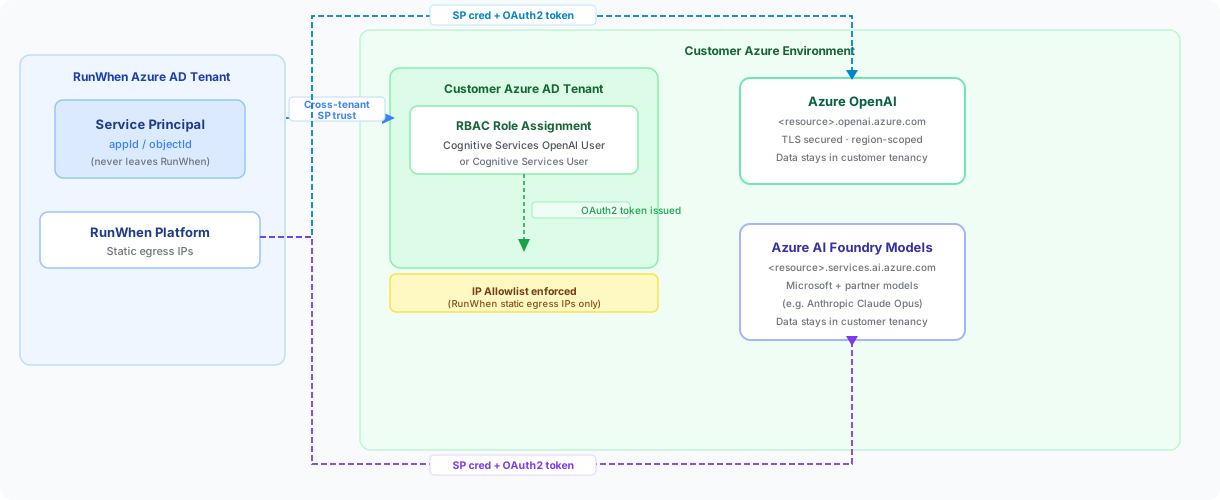
Here is how the flow works end-to-end:
- RunWhen owns a Service Principal (
appId,objectId) in RunWhen’s own Azure AD tenant. This identity never leaves RunWhen’s control. - You assign a scoped RBAC role on your Azure resource to that SP. This grants RunWhen the minimum permissions needed to call your inference endpoint.
- RunWhen authenticates against your Azure AD tenant using its SP, receives an OAuth2 token, and calls your endpoint directly with it.
- You enforce network controls — restricting your endpoint to RunWhen’s static egress IPs so only authorized traffic reaches it.
No API gateways, APIM layers, or custom intermediaries are required. Azure AD handles identity; Azure’s native network controls handle access restriction. All data processing occurs within your Azure environment.
Azure OpenAI (classic) setup
Endpoint format
Each Azure OpenAI resource publishes a per-resource FQDN:
https://<resource-name>.openai.azure.com/Endpoints are region-specific (for example eastus, canadacentral), TLS-secured, and managed entirely by Microsoft within your chosen region. Because the endpoint is tied to your Azure resource, all data remains within your Azure tenancy.
Required role assignment
Assign the following role to the RunWhen Service Principal at the Azure OpenAI resource scope — not at subscription or resource group scope:
| Role | Scope | Purpose |
|---|---|---|
Cognitive Services OpenAI User | Azure OpenAI resource | Grants SP access to call the inference API via Entra ID |
Optional elevated roles (only if your team needs to manage deployments, not just run inference):
Cognitive Services OpenAI Contributor— for model deployment managementCognitive Services Usages Reader(subscription scope) — for quota visibility
Steps
- Open the Azure Portal and navigate to your Azure OpenAI resource.
- Select Access control (IAM) → Add role assignment.
- Choose role: Cognitive Services OpenAI User.
- Under Assign access to, choose User, group, or service principal.
- Search for the RunWhen SP by the
appIdprovided by the RunWhen team and select it. - Click Review + assign to save.
- Share the following with RunWhen:
- Your endpoint URL:
https://<resource-name>.openai.azure.com/ - Your Azure Tenant ID
- The model deployment name (for example
gpt-4o)
- Your endpoint URL:
Azure AI Foundry Models setup
Azure AI Foundry supports both Microsoft model families and partner models (for example Anthropic Claude Opus) within your Azure environment. Authentication and governance work the same way as Azure OpenAI — the same cross-tenant SP trust model applies.
Endpoint format
Azure AI Foundry endpoints follow this pattern depending on your resource type:
https://<resource-name>.services.ai.azure.com/For project-specific endpoints in a Foundry hub, the format may vary — the RunWhen team can confirm the exact endpoint for your setup.
Required role assignment
Assign the following role to the RunWhen Service Principal at the Foundry / AI Services resource scope:
| Role | Scope | Purpose |
|---|---|---|
Cognitive Services User | Foundry / AI Services resource | Grants SP access to call all inference endpoints, including partner models such as Anthropic Claude Opus |
Optional elevated roles:
Cognitive Services Contributor— for managing model deployments within FoundryCognitive Services Usages Reader(subscription scope) — for quota visibility
Steps
- Open the Azure Portal and navigate to your Azure AI Services or Azure AI Foundry resource.
- Select Access control (IAM) → Add role assignment.
- Choose role: Cognitive Services User.
- Under Assign access to, choose User, group, or service principal.
- Search for the RunWhen SP by the
appIdprovided by the RunWhen team and select it. - Click Review + assign to save.
- Share the following with RunWhen:
- Your Foundry endpoint URL
- Your Azure Tenant ID
- The model deployment name (for example
claude-opus-4-5orgpt-4o)
Network security and IP allowlisting
For both Azure OpenAI and Azure AI Foundry, restrict your endpoint to RunWhen’s static egress IPs. This ensures only RunWhen’s authenticated requests — and nothing else — can reach your resource.
- In the Azure Portal, navigate to your resource → Networking.
- Set Allow access from to Selected networks and private endpoints.
- Under Firewall, add RunWhen’s static egress IP(s) — the RunWhen team will supply these.
- Save and verify that your resource still responds to a test call from RunWhen.
Optionally, you can configure Private Endpoints or VNet integration to enforce fully private access paths. The RunWhen team can assist with this for environments that require it.
Role requirements summary
| Endpoint type | Minimum role for inference | Scope |
|---|---|---|
| Azure OpenAI | Cognitive Services OpenAI User | Azure OpenAI resource |
| Azure AI Foundry Models | Cognitive Services User | Foundry / AI Services resource |
Why no API gateway is needed
Azure OpenAI and Azure AI Foundry both act as their own secured API boundary. Identity validation via Azure AD and network restrictions via IP allowlists are natively managed by the platform. This removes the operational overhead of deploying APIM, WAF, or custom gateways as intermediaries — and it keeps the integration surface minimal.
Related
- Bring Your Own LLM overview — options, supported endpoints, and SP role reference
- Self-Hosted LLM Configuration — Helm values for
llmGatewayandllmBootstrap - support@runwhen.com — to receive the RunWhen SP
appId, static egress IPs, and end-to-end validation support