

JFrog Artifactory / JCR Setup for RunWhen Self-Hosted
This guide is for platform engineering and registry teams standing up the enterprise registry that will host RunWhen images before the Self-Hosted RunWhen Platform install. It covers JFrog Artifactory (Pro / Enterprise / Cloud) and the free JCR edition.
Prerequisites — read first
- Self-hosted entitlement is required. RunWhen does not publish platform images to a public registry. Contact support@runwhen.com to request access — onboarding delivers a dedicated repository, a per-customer GCP service-account key, and the version-pinned image inventory.
- JFrog admin rights on the host that will own these repositories.
- Outbound HTTPS (443) from JFrog to the upstream registries listed below — for the initial cache fill, or for ongoing pull-through caching. (Air-gap: pre-load images offline; see Air-gap notes.)
How RunWhen flows through JFrog
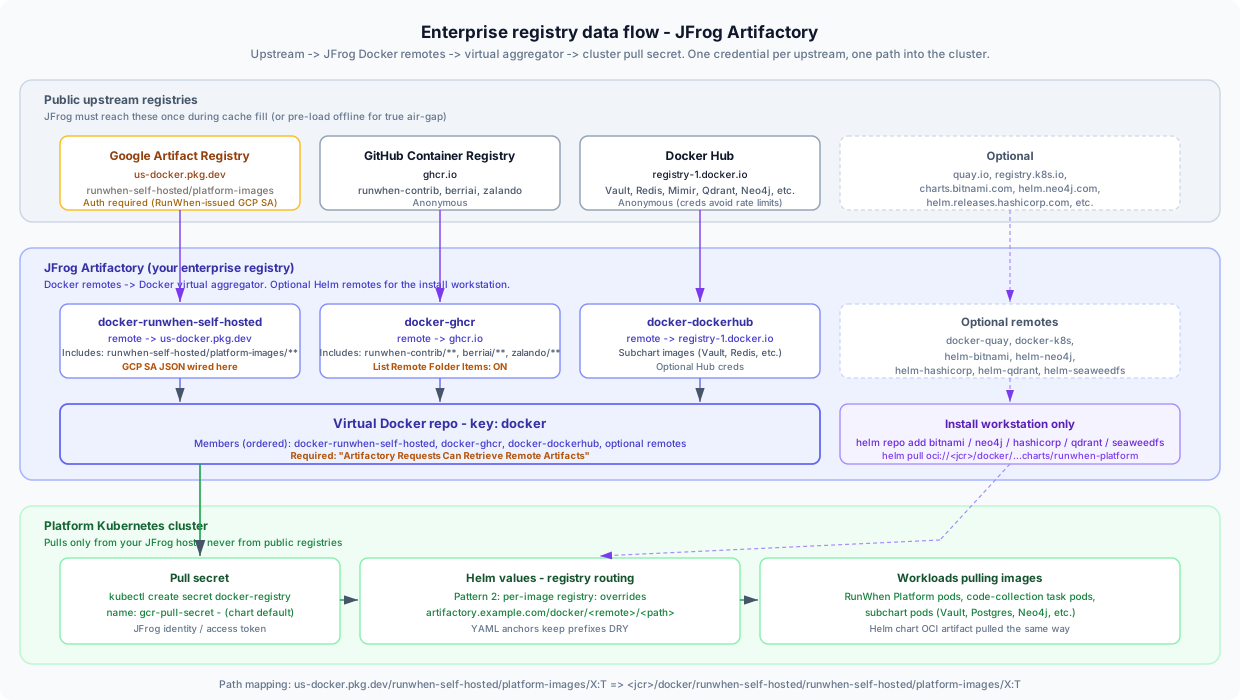
The shape is the same for every enterprise install:
- One Docker remote per upstream registry in JFrog. RunWhen images get a dedicated, authenticated remote; everything else uses anonymous remotes.
- One Docker virtual repository aggregates the remotes behind a single host path so cluster pulls don’t have to know about individual upstreams.
- One Kubernetes pull secret authenticates against your JFrog host. The chart names it
gcr-pull-secretby default — feel free to keep that name even though no GCR is involved at this point. - Helm values route each image to the correct path under the virtual repo. RunWhen ships a worked overlay for JFrog (
values-example-airgap-jcr.yaml) in your onboarding pack.
The Helm chart itself is an OCI artifact in the same RunWhen repository as the images, so it rides through the same docker-runwhen-self-hosted remote — no second credential.
1. Pick the JFrog edition
| Edition | Helm remote repos | REST bulk config | Recommended for |
|---|---|---|---|
| Artifactory Cloud / Enterprise+ | Yes | Yes | Multi-site, federated, project-scoped enterprise installs |
| Artifactory Pro | Yes | Yes | Standard enterprise self-hosted installs (most customers) |
| JCR Free | Yes | Limited | Small to mid-size single-site installs |
Recommendation: Artifactory Pro or Enterprise for production. JCR Free is a viable starting point for single-site or proof-of-concept installs — both Docker and Helm remotes work — but you give up federation, projects, and most of the bulk-management REST surface.
2. Whitelist upstream FQDNs from JFrog
JFrog’s egress (or your offline mirror) needs to reach these upstreams. After setup, only JFrog talks to them — cluster pods talk only to JFrog.
| FQDN | Required? | What it serves |
|---|---|---|
us-docker.pkg.dev | Yes | RunWhen platform images + Helm chart OCI artifact |
ghcr.io | Yes | MCP server, code-collection catalog, cortex-tenant, codecollections, LiteLLM, Spilo |
registry-1.docker.io | Yes | Subchart images: Vault, Redis, Mimir, Qdrant, Neo4j, SeaweedFS |
charts.bitnami.com | Helm only | Redis / PostgreSQL subcharts |
helm.neo4j.com | Helm only | Neo4j subchart |
helm.releases.hashicorp.com | Helm only | Vault subchart |
qdrant.github.io | Helm only | Qdrant subchart |
seaweedfs.github.io | Helm only | SeaweedFS subchart |
quay.io | Optional | cert-manager images (if proxied through JFrog) |
registry.k8s.io | Optional | ingress-nginx, external-dns (if proxied) |
3. Create the Docker remote repositories
Create one remote per upstream. Remote keys below are the names that drive pull paths under the virtual aggregator — keep them exactly as shown unless you have a strong reason to deviate (RunWhen’s example values overlay assumes these names).
| Remote key | Upstream URL | Auth |
|---|---|---|
docker-runwhen-self-hosted | https://us-docker.pkg.dev | GCP service-account JSON (RunWhen-issued) |
docker-ghcr | https://ghcr.io | Anonymous |
docker-dockerhub | https://registry-1.docker.io | Anonymous (optional Hub creds avoid rate limits) |
docker-quay | https://quay.io | Anonymous (optional) |
docker-k8s | https://registry.k8s.io | Anonymous (optional) |
Required settings per remote
| Setting | Value | Why it matters |
|---|---|---|
| Includes pattern | See table below | Scopes the cache to RunWhen-needed paths and prevents accidental proxying of unrelated content |
| List remote folder items | Enabled on docker-ghcr | Required so RunWhen’s code-collection catalog can list image tags via GET /v2/<image>/tags/list. Without it, the runner gets an empty catalog and tasks fail to dispatch. |
| Block mismatching mime types | Disabled | OCI Helm artifacts use a non-Docker mime type. Leaving this enabled blocks chart pulls. |
Includes patterns
| Remote | Includes pattern |
|---|---|
docker-runwhen-self-hosted | runwhen-self-hosted/platform-images/** |
docker-ghcr | runwhen-contrib/**, berriai/**, zalando/** |
docker-dockerhub | Narrow to known third-party paths from your onboarding inventory (Vault, Redis, Mimir, Qdrant, Neo4j, SeaweedFS) — avoid * in production |
Wire the RunWhen GCP service-account key
On docker-runwhen-self-hosted only:
- Username:
_json_key - Password: the contents of the GCP service-account JSON file RunWhen issued to your organization
Verify with a workstation docker pull before going further:
docker login <jcr-host> --username <jfrog-user> --password <jfrog-token>docker pull <jcr-host>/docker/runwhen-self-hosted/runwhen-self-hosted/platform-images/backend-services:<tag-from-onboarding>A 403 Forbidden or manifest unknown here almost always means an expired or wrongly-scoped GCP key — contact RunWhen support before continuing. Do not apply a broken credential to your cluster.
4. Create the Docker virtual aggregator
Create one virtual Docker repository so cluster pods see a single host path.
- Repository key:
docker - Members (ordered):
docker-runwhen-self-hosted,docker-ghcr,docker-dockerhub, plus optional remotes - Advanced setting: “Artifactory Requests Can Retrieve Remote Artifacts” — enabled. Without this flag the virtual returns only locally-cached artifacts and every first-time pull 404s with no upstream attempt.
Path-mapping reference
After Step 4 the path translation is mechanical:
| Upstream path | Path through JFrog |
|---|---|
us-docker.pkg.dev/runwhen-self-hosted/platform-images/backend-services:2026-05-20.1 | <jcr-host>/docker/runwhen-self-hosted/runwhen-self-hosted/platform-images/backend-services:2026-05-20.1 |
ghcr.io/runwhen-contrib/runwhen-platform-mcp:2026-05-12.1 | <jcr-host>/docker/ghcr/runwhen-contrib/runwhen-platform-mcp:2026-05-12.1 |
docker.io/hashicorp/vault:1.16.1 | <jcr-host>/docker/dockerhub/hashicorp/vault:1.16.1 |
The Helm chart artifact (charts/runwhen-platform) sits inside the same RunWhen GAR repo as the images, so it pulls through docker-runwhen-self-hosted — no second credential or repo.
5. (Optional) Create Helm remote repositories
Skip this step if your install workstation can reach public Helm chart indexes during helm dependency update. For policy-restricted or air-gap installs, mirror them through JFrog. Helm remotes are supported on every JFrog edition, including JCR Free.
| Remote key | Upstream URL | Required when |
|---|---|---|
helm-bitnami | https://charts.bitnami.com/bitnami | Always (redis subchart; postgres if postgresql.kind=bundled) |
helm-neo4j | https://helm.neo4j.com/neo4j | neo4j.deploy=true (default) |
helm-hashicorp | https://helm.releases.hashicorp.com | vault.deploy=true (default) |
helm-qdrant | https://qdrant.github.io/qdrant-helm | qdrant.useSubchart=true |
helm-seaweedfs | https://seaweedfs.github.io/seaweedfs/helm | seaweedfs.deploy=true (default) |
On the install workstation, register these as Helm aliases. The alias names must match exactly — Chart.yaml references them as @bitnami, @neo4j, @hashicorp, @qdrant, @seaweedfs:
export JCR_HOST="artifactory.example.com"export JCR_USER="<jfrog-user>"export JCR_PASS="<jfrog-token>"
helm repo add bitnami    "https://${JCR_HOST}/artifactory/helm-bitnami"   --username "$JCR_USER" --password "$JCR_PASS"helm repo add neo4j      "https://${JCR_HOST}/artifactory/helm-neo4j"     --username "$JCR_USER" --password "$JCR_PASS"helm repo add hashicorp  "https://${JCR_HOST}/artifactory/helm-hashicorp" --username "$JCR_USER" --password "$JCR_PASS"helm repo add qdrant     "https://${JCR_HOST}/artifactory/helm-qdrant"    --username "$JCR_USER" --password "$JCR_PASS"helm repo add seaweedfs  "https://${JCR_HOST}/artifactory/helm-seaweedfs" --username "$JCR_USER" --password "$JCR_PASS"helm repo update
Pull the RunWhen chart via OCI through the Docker virtual (helm registry login is not used for classic Helm repo indexes):
helm registry login "${JCR_HOST}" --username "$JCR_USER" --password "$JCR_PASS"
helm pull \  oci://${JCR_HOST}/docker/runwhen-self-hosted/runwhen-self-hosted/platform-images/charts/runwhen-platform \  --version <CHART_VERSION> --untarhelm dependency update ./runwhen-platform
6. Create the cluster pull secret
NS=runwhen-self-hostedkubectl create namespace "$NS" --dry-run=client -o yaml | kubectl apply -f -
kubectl create secret docker-registry gcr-pull-secret \  --docker-server="<jcr-host>" \  --docker-username="<jfrog-reader-user>" \  --docker-password="<jfrog-identity-or-access-token>" \  --docker-email="ops@yourcompany.example" \  -n "$NS" \  --dry-run=client -o yaml | kubectl apply -f -
Use a read-scoped JFrog identity / access token (not your admin credential). The chart default expects the secret named gcr-pull-secret under images.pullSecrets[0].name. Override the name in your values if your naming policy requires something different.
7. Wire the JFrog paths into Helm values
Use per-image registry: overrides (“Pattern 2” in the chart’s registry routing) when each upstream maps to a different virtual-repo prefix. RunWhen ships a worked example (values-example-airgap-jcr.yaml) that uses YAML anchors to keep prefixes DRY:
x-jcr-anchors:  jcr-host:         &jcr_host         "artifactory.example.com"  jcr-rwsh:         &jcr_rwsh         "artifactory.example.com/docker/runwhen-self-hosted/runwhen-self-hosted/platform-images"  jcr-ghcr:         &jcr_ghcr         "artifactory.example.com/docker/ghcr/runwhen-contrib"  jcr-dh:           &jcr_dh           "artifactory.example.com/docker/dockerhub"  jcr-ghcr-zalando: &jcr_ghcr_zalando "artifactory.example.com/docker/ghcr/zalando"
global:  imagePullSecrets:    - name: gcr-pull-secret
images:  backendServices: { registry: *jcr_rwsh }  agentFarm:       { registry: *jcr_rwsh }  runnerControl:   { registry: *jcr_rwsh }  webhooks:        { registry: *jcr_rwsh }  usearch:         { registry: *jcr_rwsh }  ui:              { registry: *jcr_rwsh }  sharedServices:  { registry: *jcr_rwsh }  mcpServer:       { registry: *jcr_ghcr }  ccCatalogSvc:    { registry: *jcr_ghcr }  cortexTenant:    { registry: *jcr_ghcr }
Rotate the JFrog host? With YAML anchors, change the
&jcr_hoststring in one place — every image rewires automatically.
Run helm template -f values.yaml -f values-jcr.yaml and confirm every rendered image string resolves in your JFrog UI before install day.
8. Verification checklist
-
curl -sf https://<jcr-host>/artifactory/api/system/pingreturnsOK - Each Docker remote returns HTTP 200 from
/api/repositories/<key>(Pro / Enterprise) - Test pulls succeed against the virtual:
-
<jcr-host>/docker/dockerhub/library/busybox:1.36 -
<jcr-host>/docker/ghcr/berriai/litellm:<tag> -
<jcr-host>/docker/runwhen-self-hosted/runwhen-self-hosted/platform-images/backend-services:<tag>
-
- List Remote Folder Items enabled on
docker-ghcr— verifyGET /v2/runwhen-contrib/<image>/tags/listreturns tags through your virtual -
helm pull oci://...charts/runwhen-platformsucceeds -
helm dependency update ./runwhen-platformsucceeds (Helm aliases resolve) -
kubectl get secret gcr-pull-secret -n <namespace>shows the docker-config secret
9. Troubleshooting
| Symptom | Most likely cause |
|---|---|
403 Forbidden pulling RunWhen images | RunWhen GCP SA expired, wrong includesPattern, or SA not wired on docker-runwhen-self-hosted |
manifest unknown on first pull through the virtual | Virtual repo missing “Artifactory Requests Can Retrieve Remote Artifacts” |
| Empty code-collection catalog at runtime | List Remote Folder Items disabled on docker-ghcr |
| Helm chart pull fails with mime-type error | Block Mismatching Mime Types is enabled on docker-runwhen-self-hosted — disable it |
helm dependency update → no such repository | Alias name mismatch — must be bitnami, not bitnami-mirror etc. |
ImagePullBackOff on subchart pods only | Missing per-image registry: override — the value still points at docker.io/... |
| Random pulls fail at scale | Docker Hub anonymous rate limits — add Hub creds to docker-dockerhub |
Air-gap notes
For fully disconnected installs:
- Do not rely on JFrog’s pull-through cache. Pre-stage images on a connected host using
craneorskopeo, thencrane copy(or equivalent) into JFrog across the gap. - Mirror all five Helm chart repos as JFrog Helm remotes (Step 5) and complete
helm dependency updateon a host inside the gap. - The RunWhen Helm chart OCI artifact is included in the same
runwhen-self-hostedrepo as the images — copy it across with the same tooling. - See the self-hosted requirements page for the full list of cluster prerequisites that also need air-gap-friendly defaults (cert-manager mode, internal DNS, customer-supplied LLM, etc.).
Related
- Self-Hosted Deployment Requirements — when to use this guide and what else self-hosted requires
- Bring Your Own LLM — customer-supplied chat / completion endpoint
- Azure OpenAI BYO LLM Setup — worked LLM example
- Deployment Options — feature comparison across SaaS and self-hosted
Need the version-pinned image inventory, the JFrog REST apply.sh script (Pro / Enterprise), or the complete values-example-airgap-jcr.yaml? Email support@runwhen.com — these ship in your onboarding pack.