

Knowledge in Chat
When you chat with an AI Assistant, it automatically pulls in the Knowledge notes your team has written that are relevant to whatever it is investigating — you don’t have to search for them or even know they exist. This is how operational know-how (runbooks, gotchas, escalation steps) reaches the assistant’s answers.
How the assistant chooses what to include
As the assistant investigates a resource — a cluster, namespace, or SLX — it matches that resource against the resource path on each of your Knowledge notes and sorts the matches into three tiers:
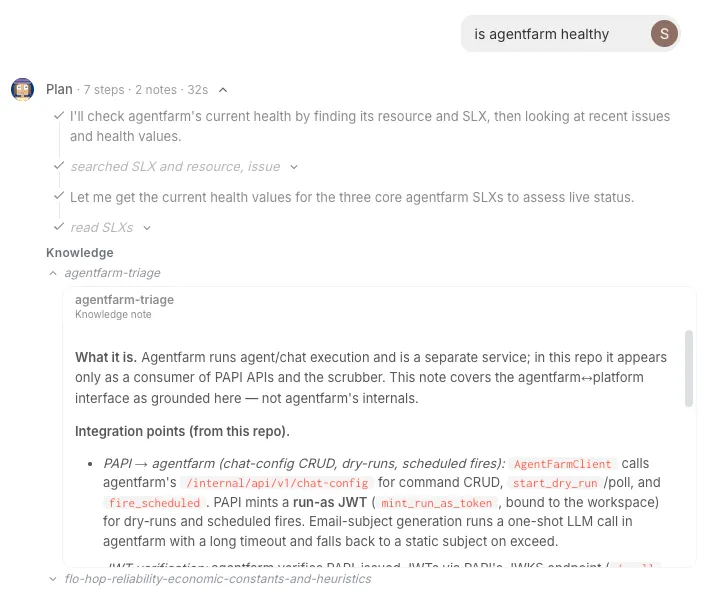
- The resource itself — notes scoped to the exact resource the assistant is looking at are brought directly into its context. These are the ones you see applied (they appear in the assistant’s Knowledge section, shown below).
- Parent resources — notes scoped to something above it (the namespace or cluster it belongs to) are offered to the assistant by title; it reads one in full only if the title looks relevant.
- Workspace-wide — notes with no resource path apply everywhere, and are likewise offered by title.
Up to 10 notes are brought in directly per step; if more than 10 match the exact resource, the rest are offered by title instead. Each note is used at most once per session, so a long investigation never repeats one.
Example
Suppose your workspace has three Knowledge notes:
| Note | Resource path |
|---|---|
| Escalation contacts | (none — workspace-wide) |
| Prod cluster upgrade window | k8s/prod-cluster |
| Checkout restart runbook | k8s/prod-cluster/checkout/checkout-deploy |
You ask about the checkout deployment, and the assistant reads k8s/prod-cluster/checkout/checkout-deploy:
- Checkout restart runbook matches the exact resource → brought in directly, and it appears in the assistant’s Knowledge section.
- Prod cluster upgrade window sits on a parent (the cluster) → offered by title, pulled in only if the upgrade window turns out to matter.
- Escalation contacts is workspace-wide → always offered by title.
Ask about the whole cluster instead and “Prod cluster upgrade window” becomes the exact match that’s brought in directly.
Authoring notes so they match
Scope a note through its resource path, set in Workspace Studio → Knowledge:
- Set a resource path to attach the note to that resource and everything under it. Scope a service’s runbook to that service’s path and it’s included exactly when that service is investigated.
- Leave it empty to make the note workspace-wide.
What you see in chat
As it works, the assistant lists the notes it applied in a Knowledge section under its plan — each note by title, expandable to read in place — and the plan header rolls the count up, for example Plan · 7 steps · 2 notes · 32s.
Good to know
- On by default — there’s no per-workspace setting to turn it on.
- Works everywhere chat does — the same behavior applies in the Slack app.
- Scrubbed — injected Knowledge passes through the same PII scrubbing as the rest of the conversation.
- No special permission — every member’s chat benefits from it.