

Build a Custom Discovery CodeCollection
Two ways to read this guide. Skim the short story below for the 60-second summary, or jump into the long story for the full ~20-minute walkthrough with copy-pasteable YAML and screenshots.
Short story (TL;DR)

- You want SLXs for a resource type that isn’t in any published CodeCollection — e.g. a Kubernetes CRD, a workload with a specific label, or a cloud resource with a custom tag.
- Ship a private CodeCollection with a single Skill Template that contains no Robot code — only a generation rule and three Jinja templates (SLX, SLI, TaskSet).
- Every rendered SLX points its
codeBundle.repoUrlat a generic Skill Template in the RunWhen Generic CodeCollection — usuallyk8s-kubectl-cmd. That shared collection suppliessli.robot/runbook.robot; your templates supply the concreteKUBECTL_COMMAND(plus its jq post-processing). - Wire the private repo into your RunWhen Local runner alongside the shared collection. The workspace-builder clones both, lists CRDs in your cluster, and renders one SLX per matched resource — no runner image rebuild required.
- Worked example (below): monitor Crossplane GCP Bucket CRDs with a fractional-conditions SLI and a TaskSet that files issues on
Ready=FalseorSynced=False.
Ready for the details? Continue to the full walkthrough →
Long story (full walkthrough)
A CodeCollection is a Git repository that groups related Skill Templates — the same concept surfaced as Skill Templates on registry.runwhen.com and as CodeBundles in the repo layout. Each Skill Template normally ships two things: discovery rules (which tell the workspace-builder what to look for in your infrastructure) and runtime code (Robot Framework .robot files that actually run checks and produce SLI values or issues).
This guide walks through the Custom Discovery CodeCollection pattern: a private CodeCollection whose Skill Template extends what RunWhen can see — Kubernetes CRDs, labeled workloads, cloud tags that aren’t covered by any published CodeCollection — by shipping only rules and templates and delegating the runtime to an already-published generic Skill Template in the RunWhen Generic CodeCollection (repo: rw-generic-codecollection). It’s the fastest way to teach RunWhen about organization-specific resources without maintaining any Python or Robot code of your own.
We’ll use the Crossplane GCP Bucket as the concrete example, but the same steps apply to any Kubernetes CRD.
What you’ll build
By the end of this guide you’ll have a private CodeCollection that:
- Lives in your own Git host (GitHub, GitLab, Gitea, Bitbucket — anywhere your RunWhen Local runner can clone from).
- Contains no Robot code of its own. It ships only:
- Generation rules — YAML under
.runwhen/generation-rules/that tells the workspace-builder which resources to enumerate and how many SLXs to render for each match. - Templates — Jinja files under
.runwhen/templates/that render theServiceLevelX,ServiceLevelIndicator, andRunbookresources for each matched Kubernetes object.
- Generation rules — YAML under
- Reuses an existing generic Skill Template —
k8s-kubectl-cmdfrom the RunWhen Generic CodeCollection — as the runtime for every generated SLI and TaskSet. Your templates supply the concretekubectlcommand; the generic bundle handles execution, secrets, and output shaping. - Discovers a concrete example resource type — Crossplane GCP Bucket custom resources (
buckets.storage.gcp.upbound.io) — and produces one SLX per Bucket with a fractional health SLI and a condition-based TaskSet that files issues when a bucket is degraded.
The pattern in one diagram
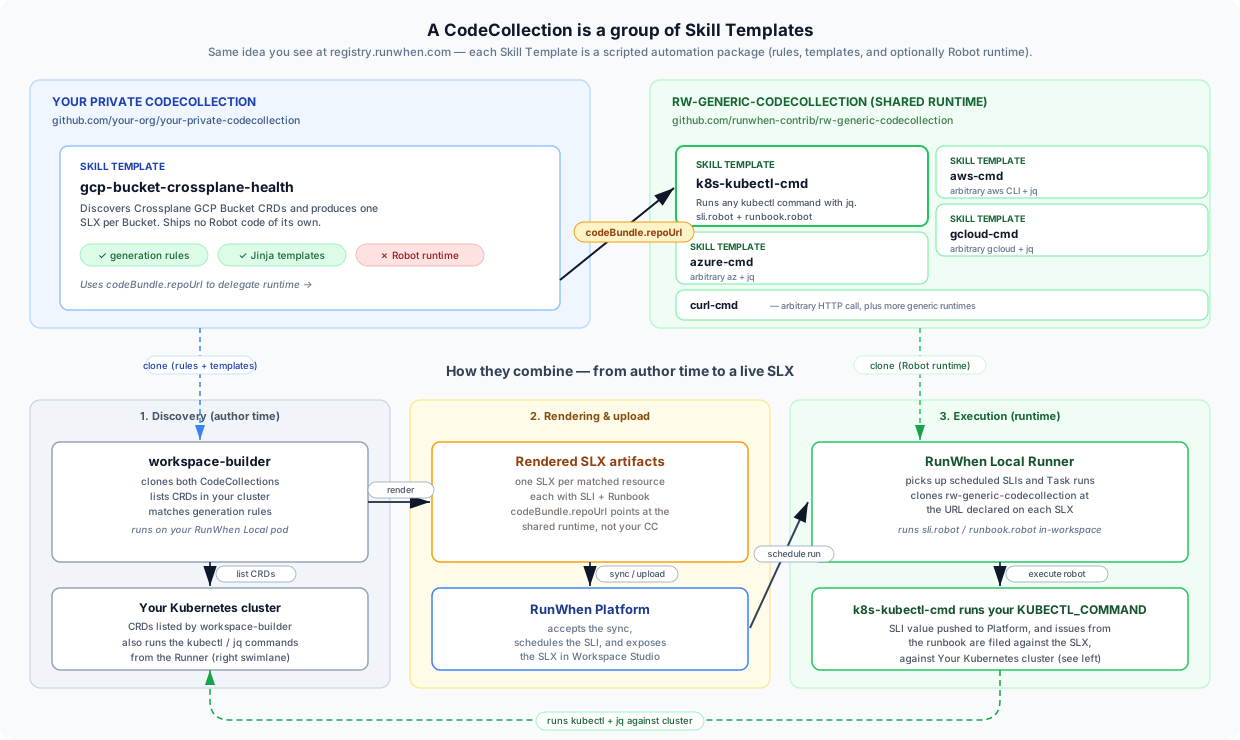
The workspace-builder loads your rules, enumerates the CRDs in the cluster, and renders one SLX per matched resource. Every rendered SLX points its codeBundle.repoUrl at rw-generic-codecollection, so the runner never needs to know about — or clone — your private repo again at execution time.
When to use this pattern
Choose the Custom Discovery CodeCollection pattern when:
- You want to discover organization-specific resources (CRDs, tagged workloads, labeled namespaces) without forking a shared collection.
- The runtime you need already exists as a Skill Template in the RunWhen Generic CodeCollection. Common candidates:
k8s-kubectl-cmd— arbitrarykubectlcommands withjq(used in this guide)aws-cmd— arbitraryawsCLI commandsazure-cmd— arbitraryazCLI commandsgcloud-cmd— arbitrarygcloudCLI commandscurl-cmd— arbitrary HTTP callstool-builder— a full Bash or Python script, for logic too complex to express as a single CLI +jqone-liner. The script is passed as a base64-encoded value inGEN_CMD— see thetool-builderblurb below, and the Author Custom Tasks with MCP guide for the end-to-end authoring flow.
- You want your discovery rules to update without a runner image rebuild. The workspace-builder re-clones your repo on each reconcile, so changes land quickly.
Don’t use it when you need custom Robot keywords or a runtime that isn’t already generic. For complex Bash or Python logic that just doesn’t fit a single CLI + jq invocation, see the tool-builder alternative below — it stays inside the Custom Discovery CodeCollection pattern. Only reach for a traditional CodeCollection with .robot files when even a full script isn’t enough — see Tasks & CodeBundles.
Prerequisites
You’ll need:
- A running RunWhen Local runner (SaaS with a private runner, or a self-hosted install). If you don’t have one yet, follow the Quick Start.
- Cluster access for the workspace-builder — the service account must have
get/list/watchon the CRD you want to discover. See Kubeconfigs & Service Accounts for the RBAC pattern. - A Git host you can commit to — public or private, as long as the workspace-builder pod can reach it. For a private repo you’ll also need an access token with read scope.
Vocabulary primer
| Term | Meaning |
|---|---|
| CodeCollection | A Git repository that RunWhen clones. Contains one or more CodeBundles / Skill Templates. |
| CodeBundle / Skill Template | A subdirectory of a CodeCollection (codebundles/<name>/) — one scripted automation package. “CodeBundle” is the on-disk name; “Skill Template” is how the same thing is labelled on registry.runwhen.com. Traditionally ships Robot code plus discovery rules; in this pattern ours ships only rules and templates. |
| Generation rule | YAML under .runwhen/generation-rules/. Declares which resource types to scan and how to build SLXs from each match. |
| Template | Jinja YAML under .runwhen/templates/. Rendered per matching resource by the workspace-builder into the final SLX / SLI / Runbook artifacts. |
| SLX | Service Level Expectation — the top-level unit of monitoring in RunWhen. Bundles an SLI, an optional SLO, and one or more Runbooks. |
| SLI | Service Level Indicator — a numeric health signal (here 0.0 to 1.0) pushed on an interval. |
| Runbook / TaskSet | The interactive troubleshooting sequence — called a “Runbook” in kind, “TaskSet” in the UI. |
| workspace-builder | The pod (image runwhen-local) that clones CodeCollections, indexes resources, matches rules, renders templates, and uploads SLXs to the platform. |
Repository layout
The whole CodeCollection is just this:
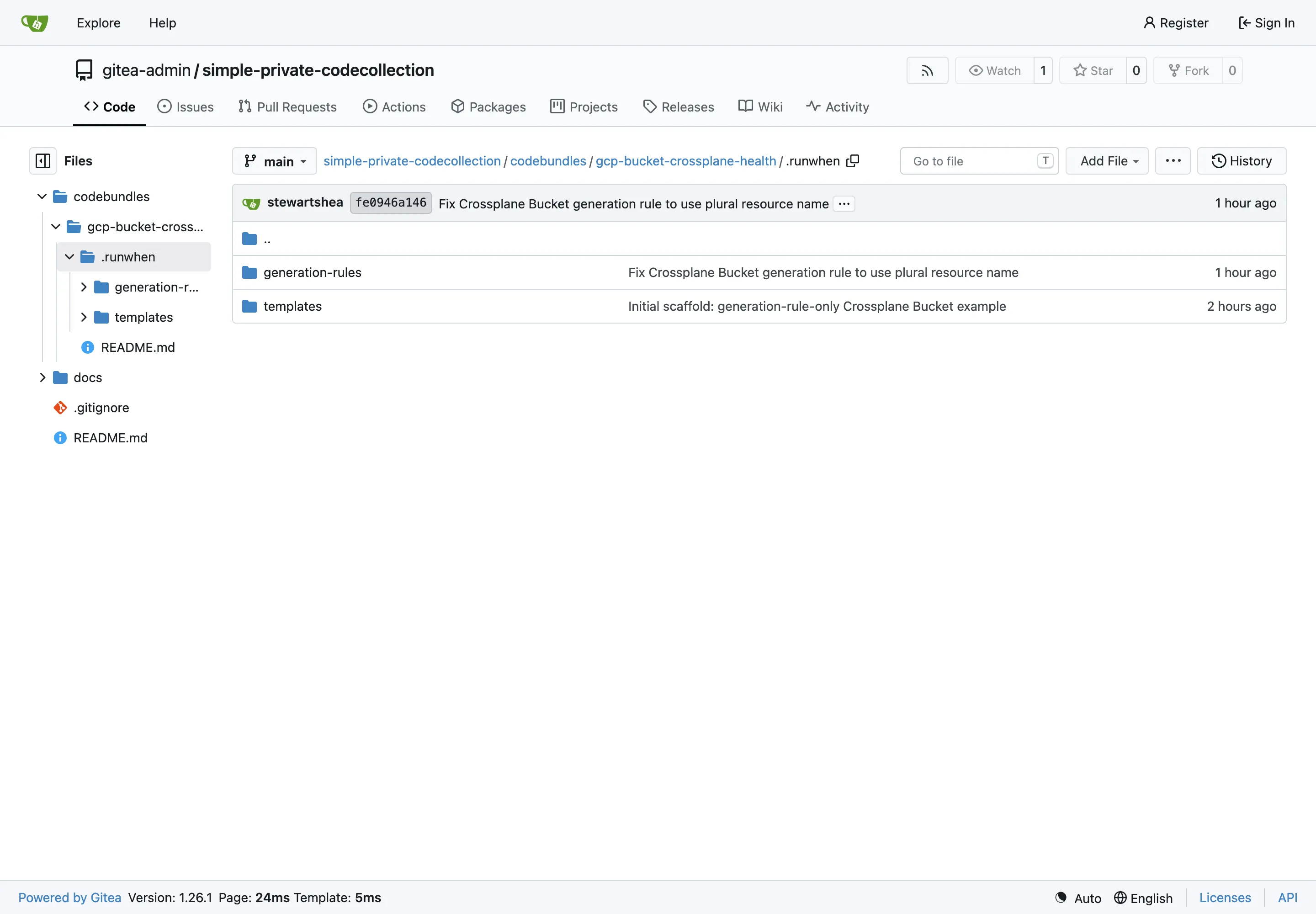
your-private-codecollection/├── README.md└── codebundles/ └── gcp-bucket-crossplane-health/ ├── README.md └── .runwhen/ ├── generation-rules/ │ └── gcp-bucket-crossplane-health.yaml └── templates/ ├── gcp-bucket-crossplane-health-slx.yaml ├── gcp-bucket-crossplane-health-sli.yaml └── gcp-bucket-crossplane-health-taskset.yamlNo meta.yaml, no runbook.robot, no sli.robot. The templates reference Robot files, but they point at a different repository — see Step 3 below.
Here’s the same layout as it appears in the private Gitea repo used for this walkthrough — one YAML per file, no hidden .robot or Python code alongside them:
Step 1 — Inspect the target CRD
Before writing a single line of YAML, use kubectl to confirm what the API server actually calls the resource. Small typos here (singular vs plural, wrong group) are the single most common reason discovery silently returns zero matches.
kubectl api-resources | grep storage.gcp.upbound.ioYou’ll get output roughly like this:
NAME SHORTNAMES APIVERSION NAMESPACED KINDbuckets storage.gcp.upbound.io/v1beta2 false Bucketbucketiammembers storage.gcp.upbound.io/v1beta1 false BucketIAMMemberhmackeys storage.gcp.upbound.io/v1beta1 false HMACKeyThree columns matter:
NAME(buckets) — the plural resource name. This is what you put in the generation rule, not the singularBucketand not theKINDcolumn.APIVERSION(storage.gcp.upbound.io/v1beta2) — the API group and version. The part before the/is the group; the part after is the version.NAMESPACED(false) — whether the resource is scoped to a namespace. Crossplane managed resources are all cluster-scoped, which affects the qualifiers you pick below.
Confirm you actually have some instances to discover:
kubectl get buckets.storage.gcp.upbound.io -o wideNAME READY SYNCED EXTERNAL-NAMErunwhen-nonprod-shared-litellm-logging True True runwhen-nonprod-shared-litellm-loggingrunwhen-nonprod-shared-loki True True runwhen-nonprod-shared-lokirunwhen-nonprod-shared-mimir True True runwhen-nonprod-shared-mimirrunwhen-nonprod-shared-tempo True True runwhen-nonprod-shared-tempoThen look at the health signal you’ll turn into an SLI. For Crossplane, .status.conditions[] is the natural choice — every managed resource carries Ready and Synced:
kubectl get buckets.storage.gcp.upbound.io <name> -o json | jq .status.conditions[ { "lastTransitionTime": "2025-11-14T10:15:11Z", "reason": "Available", "status": "True", "type": "Ready" }, { "lastTransitionTime": "2025-11-14T10:15:10Z", "reason": "ReconcileSuccess", "status": "True", "type": "Synced" }]Ready— the external resource (the actual GCS bucket in Google Cloud) exists and is available.Ready=Falsemeans something in GCP is wrong: missing IAM, quota, deleted out-of-band, etc.Synced— the last reconcile between the Crossplane spec and the provider succeeded.Synced=Falsemeans Crossplane couldn’t talk to the provider or hit a validation error.
We’ll compute the SLI as (#True conditions) / (#total conditions) in Step 3. A two-condition resource with one failing condition returns 0.5.
Step 2 — Write the generation rule
Create the file at codebundles/gcp-bucket-crossplane-health/.runwhen/generation-rules/gcp-bucket-crossplane-health.yaml:
apiVersion: runwhen.com/v1kind: GenerationRulesspec: platform: kubernetes generationRules: - resourceTypes: - buckets.storage.gcp.upbound.io matchRules: - type: pattern pattern: ".+" properties: [name] mode: substring slxs: - baseName: xp-bkt-hlth qualifiers: ["resource", "cluster"] baseTemplateName: gcp-bucket-crossplane-health levelOfDetail: detailed outputItems: - type: slx - type: sli - type: runbook templateName: gcp-bucket-crossplane-health-taskset.yamlThe same file viewed in Gitea — this is what the workspace-builder actually clones on every reconcile:
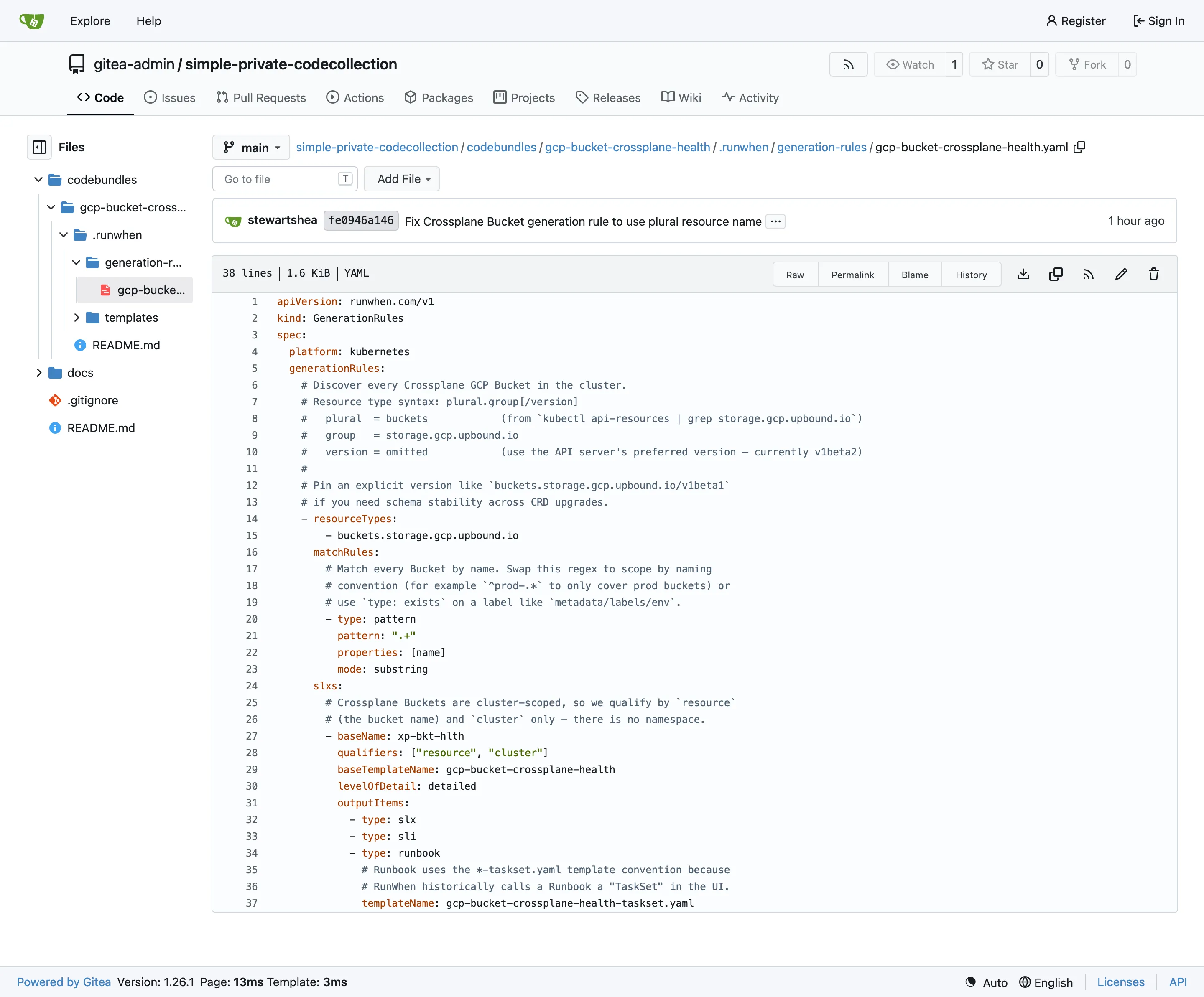
Walk through it block-by-block:
Envelope. kind must be GenerationRules (plural). spec.platform sets the default platform for every rule in the file. spec.generationRules is a list — one file can define many rules.
resourceTypes uses the syntax plural.group[/version]. Copying buckets and storage.gcp.upbound.io straight from kubectl api-resources and omitting the version means the indexer will use the API server’s preferred version — which is usually what you want because it survives CRD version bumps. Pin /v1beta2 (or whatever) only when you rely on a specific schema shape.
This string is also the selective discovery signal: the Kubernetes indexer only lists CRDs that appear in a loaded generation rule. Declaring buckets.storage.gcp.upbound.io here is what causes it to be enumerated at all. There’s no separate customResourceTypes: list to maintain elsewhere in your workspace config.
matchRules are ANDed together. The pattern predicate here says “the resource’s name property must contain a substring matching the regex .+” — true for every named resource, so every Bucket matches. Tighten it as needed:
# Only buckets whose name starts with prod-- type: pattern  pattern: "^prod-"  properties: [name]  mode: substring
# Only buckets that carry a specific label- type: exists  path: "resource/metadata/labels/env"
# Combine predicates with and/or- type: and  matches:    - type: pattern      pattern: "^runwhen-prod-.*"      properties: [name]      mode: substring    - type: exists      path: "resource/status/conditions"
slxs controls the output. baseName (short — keep it under 15 chars) is appended to the qualifier prefix to form the final slx_name. qualifiers controls cardinality: ["resource", "cluster"] means “one SLX per matching resource, prefixed with the cluster name so it stays stable across multi-cluster workspaces”. Do not include namespace for Crossplane managed resources — they’re cluster-scoped and have no namespace.
baseTemplateName is the file-name stem for the templates. Each outputItem resolves to <baseTemplateName>-<type>.yaml unless overridden with templateName. We explicitly override type: runbook to point at -taskset.yaml because that’s the convention used across most public RunWhen bundles — the file is a Runbook kind, but the naming reflects the “TaskSet” label used in the UI.
For a Bucket named runwhen-nonprod-shared-litellm-logging on cluster shared-cluster, the rule produces an SLX named roughly:
shared-cluster-runwhen-nonprod-shared-litellm-logging-xp-bkt-hlthLong names get truncated with a hash suffix; the exact rendering happens in the workspace-builder.
Common rule pitfalls
- Wrong plural. The single biggest cause of “nothing gets discovered”. Always copy the plural directly from
kubectl api-resources. Never guess it from theKind:Bucket→bucketsis intuitive, butEndpoints→endpoints(already plural) andNetworkPolicy→networkpoliciesare not. - Version pinning against a moving CRD. If a provider bumps a CRD version and drops the old one, your rule silently returns nothing. Omit the version unless you have a schema reason to pin it.
- Missing RBAC. The workspace-builder needs
get/list/watchon the CRD. If the CRD was installed after the runner’s RBAC was applied, you may need to add a newClusterRole/ClusterRoleBindingexplicitly. - Cluster vs namespace scope. For namespaced CRDs, include the CRD’s namespaces in your
cloudConfig.kubernetes.namespaceslist (or leave that list empty to scan all namespaces). For cluster-scoped CRDs, this is irrelevant.
Step 3 — Write the templates
Three files, one per output item. The most important thing about all three is what they don’t contain: any pointer to Robot code in this repo. The SLI and TaskSet templates delegate to k8s-kubectl-cmd in the RunWhen Generic CodeCollection — that’s the “delegation trick” that makes this pattern rules-only.
The SLX template
Create codebundles/gcp-bucket-crossplane-health/.runwhen/templates/gcp-bucket-crossplane-health-slx.yaml:
apiVersion: runwhen.com/v1kind: ServiceLevelXmetadata: name: {{slx_name}} labels: {% include "common-labels.yaml" %} annotations: {% include "common-annotations.yaml" %}spec: imageURL: https://storage.googleapis.com/runwhen-nonprod-shared-images/icons/kubernetes.svg alias: Crossplane GCP Bucket {{match_resource.resource.metadata.name}} Health asMeasuredBy: Fraction of Crossplane .status.conditions[] that are True (Ready + Synced). configProvided: - name: OBJECT_NAME value: {{match_resource.resource.metadata.name}} - name: API_GROUP value: storage.gcp.upbound.io - name: KIND value: Bucket owners: - {{workspace.owner_email}} statement: >- Crossplane GCP Bucket {{match_resource.resource.metadata.name}} should have every status condition (Ready, Synced) in state True 99.5% of the time. additionalContext: {% include "kubernetes-hierarchy.yaml" ignore missing %} qualified_name: "{{ match_resource.qualified_name }}" tags: {% include "kubernetes-tags.yaml" ignore missing %} - name: access value: read-only - name: managed-by value: crossplane - name: provider value: upbound-gcpA few notes:
configProvidedon the SLX itself is metadata, not runtime input. It’s shown in the UI under the SLX’s “configured properties” panel. Use it for values that describe the thing being monitored, not values passed to the robot doing the monitoring — that’s what the SLI and RunbookconfigProvidedblocks are for.kubernetes-hierarchy.yamlandkubernetes-tags.yamlare shared includes shipped by the workspace-builder. They emit thehierarchy:list (used for the UI breadcrumb: platform → cluster → resource) and a standard set of tags (platform,cluster,resource_type,resource_name, plus every Kubernetes label as[k8s]<key>).workspace.owner_emailis populated automatically fromworkspaceInfo.workspaceOwnerEmail.
The SLI template
Create .runwhen/templates/gcp-bucket-crossplane-health-sli.yaml:
apiVersion: runwhen.com/v1kind: ServiceLevelIndicatormetadata: name: {{slx_name}} labels: {% include "common-labels.yaml" %} annotations: {% include "common-annotations.yaml" %}spec: displayUnitsLong: Percentage displayUnitsShort: '%' locations: - {{default_location}} description: >- Fraction of Crossplane .status.conditions[] that are True for GCP Bucket {{match_resource.resource.metadata.name}}. Healthy = 1.0. codeBundle: repoUrl: https://github.com/runwhen-contrib/rw-generic-codecollection.git ref: main pathToRobot: codebundles/k8s-kubectl-cmd/sli.robot intervalStrategy: intermezzo intervalSeconds: 300 configProvided: - name: TASK_TITLE value: 'Crossplane GCP Bucket {{match_resource.resource.metadata.name}} condition health' - name: KUBECTL_COMMAND value: | kubectl get buckets.storage.gcp.upbound.io {{match_resource.resource.metadata.name}} -o json | jq -r '(.status.conditions // []) as $c | if ($c|length)==0 then 0 else ([$c[]|select(.status=="True")]|length)/($c|length) end' - name: TIMEOUT_SECONDS value: '120' secretsProvided: {% include "kubernetes-auth.yaml" ignore missing %} alertConfig: tasks: persona: eager-edgar sessionTTL: 10mThis is where the delegation happens. The codeBundle block points at the RunWhen Generic CodeCollection, not at your private CC. The runner will clone that repo, load k8s-kubectl-cmd’s sli.robot, and run whatever KUBECTL_COMMAND you passed in.
The jq expression computes the fraction of True conditions:
| Fragment | Meaning |
|---|---|
(.status.conditions // []) as $c | Bind the conditions array (or empty if missing) to $c |
if ($c|length)==0 then 0 | No conditions yet → return 0 (unhealthy). Signals “the resource has not reconciled”. |
else ([$c[]|select(.status=="True")]|length) / ($c|length) | Otherwise: fraction of True conditions over total |
The generic robot picks up whatever gets printed to stdout, parses it as a float, and pushes it as the metric.
About the include. kubernetes-auth.yaml is a workspace-builder include that resolves to the kubeconfig secret configured on your runner (via the custom.kubeconfig_secret_name in workspaceInfo.yaml). You don’t need to hardcode the secret name here.
The TaskSet template
Create .runwhen/templates/gcp-bucket-crossplane-health-taskset.yaml:
apiVersion: runwhen.com/v1kind: Runbookmetadata: name: {{slx_name}} labels: {% include "common-labels.yaml" %} annotations: {% include "common-annotations.yaml" %}spec: location: {{default_location}} codeBundle: repoUrl: https://github.com/runwhen-contrib/rw-generic-codecollection.git ref: main pathToRobot: codebundles/k8s-kubectl-cmd/runbook.robot configProvided: - name: TASK_TITLE value: 'Inspect Crossplane GCP Bucket {{match_resource.resource.metadata.name}} conditions' - name: TIMEOUT_SECONDS value: '300' - name: ISSUE_JSON_QUERY_ENABLED value: 'true' - name: ISSUE_JSON_TRIGGER_KEY value: issuesIdentified - name: ISSUE_JSON_TRIGGER_VALUE value: 'true' - name: ISSUE_JSON_ISSUES_KEY value: issues - name: KUBECTL_COMMAND value: | kubectl get buckets.storage.gcp.upbound.io {{match_resource.resource.metadata.name}} -o json | jq -c '(.status.conditions // []) as $c | { issuesIdentified: (($c|length)==0 or ([$c[]|select(.status!="True")]|length > 0)), issues: ( if ($c|length)==0 then [ { title: "Crossplane Bucket {{match_resource.resource.metadata.name}} has no status conditions yet", severity: 3, expected: "Bucket should have Ready and Synced conditions populated by the provider", actual: "status.conditions is empty or missing", reproduce_hint: "kubectl get buckets.storage.gcp.upbound.io {{match_resource.resource.metadata.name}} -o yaml", next_steps: "1. Check the crossplane-system provider pod is Running. 2. kubectl describe the bucket to see reconciliation events. 3. Verify the ProviderConfig exists and is Healthy.", details: (.status | tostring) } ] else [ $c[] | select(.status!="True") | { title: ("Crossplane Bucket " + .type + " condition is not True: {{match_resource.resource.metadata.name}}"), severity: (if .type=="Ready" then 2 else 3 end), expected: (.type + " condition should be True"), actual: (.type + "=" + .status + " reason=" + (.reason // "n/a") + " message=" + (.message // "n/a")), reproduce_hint: "kubectl get buckets.storage.gcp.upbound.io {{match_resource.resource.metadata.name}} -o yaml", next_steps: "1. kubectl describe the bucket. 2. Inspect provider pod logs for reconcile errors. 3. Verify ProviderConfig credentials. 4. Check GCP IAM permissions.", details: (. | tostring) } ] end ) }' secretsProvided: {% include "kubernetes-auth.yaml" ignore missing %}Same shape as the SLI: delegate to k8s-kubectl-cmd/runbook.robot, pass a KUBECTL_COMMAND. The key differences are the four ISSUE_JSON_* variables, which enable JSON-issue mode in the generic runbook:
ISSUE_JSON_QUERY_ENABLED=truetells the runbook to parse stdout as JSON.ISSUE_JSON_TRIGGER_KEY=issuesIdentifiednames the boolean field it inspects to decide whether to emit issues.ISSUE_JSON_ISSUES_KEY=issuesnames the array to iterate — one RunWhen issue per element.
The jq expression emits the envelope the runbook expects:
{ "issuesIdentified": true, "issues": [ { "title": "Crossplane Bucket Synced condition is not True: my-bucket", "severity": 3, "expected": "Synced condition should be True", "actual": "Synced=False reason=ReconcileError message=...", "reproduce_hint": "kubectl get buckets.storage.gcp.upbound.io my-bucket -o yaml", "next_steps": "1. kubectl describe the bucket. 2. Inspect provider pod logs...", "details": "..." } ]}One issue per non-True condition. Ready failures get severity 2 (data-plane visible); others (Synced, etc.) get severity 3.
Useful template variables
At render time, the workspace-builder passes each template a rich context. The most useful entries for a Kubernetes CRD generation rule:
| Variable | Value |
|---|---|
slx_name | Generated SLX name, e.g. shared-cluster-<resource>-<baseName> |
match_resource.resource | The full Kubernetes object as returned by the API server |
match_resource.resource.metadata.name | The resource’s name |
match_resource.kind | The Kind string (Bucket for our example) |
match_resource.qualified_name | The hierarchical ID used by the resource registry |
qualifiers | Dict populated per your qualifiers list in the rule (resource, cluster, namespace) |
cluster.name | The Kubernetes cluster name |
default_location | Workspace default runner location |
workspace.owner_email | From workspaceInfo.workspaceOwnerEmail |
custom.kubeconfig_secret_name | From the custom: block in workspaceInfo.yaml |
Step 4 — Wire the CodeCollection into your runner
Push the codebundle to your Git host:
git add codebundles/gcp-bucket-crossplane-healthgit commit -m "Initial rules-only codebundle: Crossplane GCP Bucket"git push -u origin mainThen tell your runwhen-local runner where to clone from. Edit the runner’s workspaceInfo.yaml (or the equivalent field in your Helm values if you deploy via Helm) and add your repo to the codeCollections list:
codeCollections: # ... any existing entries - repoURL: https://github.com/your-org/your-private-codecollection.git ref: mainIf your repo is private, provide credentials. The most common options:
-
Token-in-URL (fastest to test, least tidy):
- repoURL: https://<user>:<token>@github.com/your-org/your-private-codecollection.gitref: mainThe token becomes visible to anyone with read on the workspace-builder ConfigMap. Fine for a test token you can rotate; not production hygiene.
-
A Kubernetes secret (recommended for production). Reference the secret via
authUser/authTokenfields, then mount the secret into the workspace-builder pod. See CodeCollection Config for the full field reference.
You do not need to add your private CC to the runner’s runner.codeCollections list — that list is only for CodeCollections that the worker pods actually execute. In this pattern the runtime (and its worker image) is provided by the rw-generic-codecollection, which each rendered SLX points at via codeBundle.repoUrl. Make sure rw-generic-codecollection is present in runner.codeCollections; your private CC only participates in the earlier discovery/rendering phase run by the workspace-builder.
Trigger a reconcile
The workspace-builder re-runs on a schedule (typically every 5 minutes). If you’re using Flux, force it:
flux reconcile hr runwhen-local -n <runner-namespace> --with-sourceOr restart the pod directly:
kubectl -n <runner-namespace> rollout restart deploy/runwhen-localStep 5 — Validate discovery
Tail the workspace-builder logs and watch for:
kubectl -n <runner-namespace> logs \ -l runwhen.com/component=workspace-builder \ -c workspace-builder --tail=200 -fYou should see (paraphrased):
Cloning from git source: https://.../your-private-codecollection.gitLoading generation rules from ...gcp-bucket-crossplane-health.yamlProcessing generation rule for codebundle: gcp-bucket-crossplane-healthTrying custom resource buckets.storage.gcp.upbound.ioRendered N SLXsWhere N is the number of Buckets in your cluster.
Common errors and their meaning:
| Log line | Cause |
|---|---|
fatal: Authentication failed on clone | Token missing, expired, or lacks read scope |
KeyError: 'match_resource' in a template | Jinja variable typo, or trying to use a variable that isn’t populated for the platform |
Validation failed for ... required "outputItems" | Schema drift — check the generation rule against the JSON schema |
No matches for resource type buckets.storage.gcp.upbound.io | The CRD isn’t installed on this cluster, or the plural is wrong |
Forbidden ... cannot list buckets.storage.gcp.upbound.io | Missing RBAC for the workspace-builder service account |
Error: (404) Reason: Not Found on a cluster-scoped CRD | You’re on runwhen-local < 0.12; upgrade to a version that includes PR #806 |
Browse discovered resources in the Workspace Explorer
Log tailing tells you how many SLXs rendered — but not which resources they came from or what the fully rendered YAML actually looks like. The workspace-builder pod exposes a Workspace Explorer UI on port 8000. Port-forward and open it in your browser:
kubectl -n <runner-namespace> port-forward \ $(kubectl -n <runner-namespace> get pod \ -l runwhen.com/component=workspace-builder \ -o name | head -n1) \ 8000:8000Then visit http://localhost:8000/explorer/. Three tabs cover different debugging questions:
- Discovered Resources — every resource the indexers saw this reconcile, including your Crossplane Buckets. Each entry shows the resolved
resource_typeand the computedqualified_namethat the generation rule matched against. Useful when the log saysRendered N SLXsbut N is smaller than you expected — you can confirm which resources actually made it through discovery and inspect the manifest the workspace-builder is holding. - SLX Bundles — one card per rendered SLX, grouping its
slx.yaml,sli.yaml,runbook.yaml, and overlaidSkill.md. Clicking a card shows the fully rendered YAML that gets uploaded to the RunWhen Platform, so you can catch template mistakes (wrongqualified_name, missing values, mangledconfigProvided) before they ship. - All Artifacts — a flat search across every file in the render output.
The same data is available as JSON at /explorer/api/summary, /explorer/api/artifacts, and /api/overview — handy for scripting checks in CI. See the runwhen-local Workspace Explorer docs for the full endpoint list.
Step 6 — See it in the RunWhen UI
Sign into your workspace and open Workspace Studio → Tasks. Search for bucket (or any name fragment your rule matches) to filter the tree. You’ll see one SLX per discovered Bucket, all sitting directly under KUBERNETES → DEFAULT because Crossplane managed resources are cluster-scoped (no namespace row in the tree).
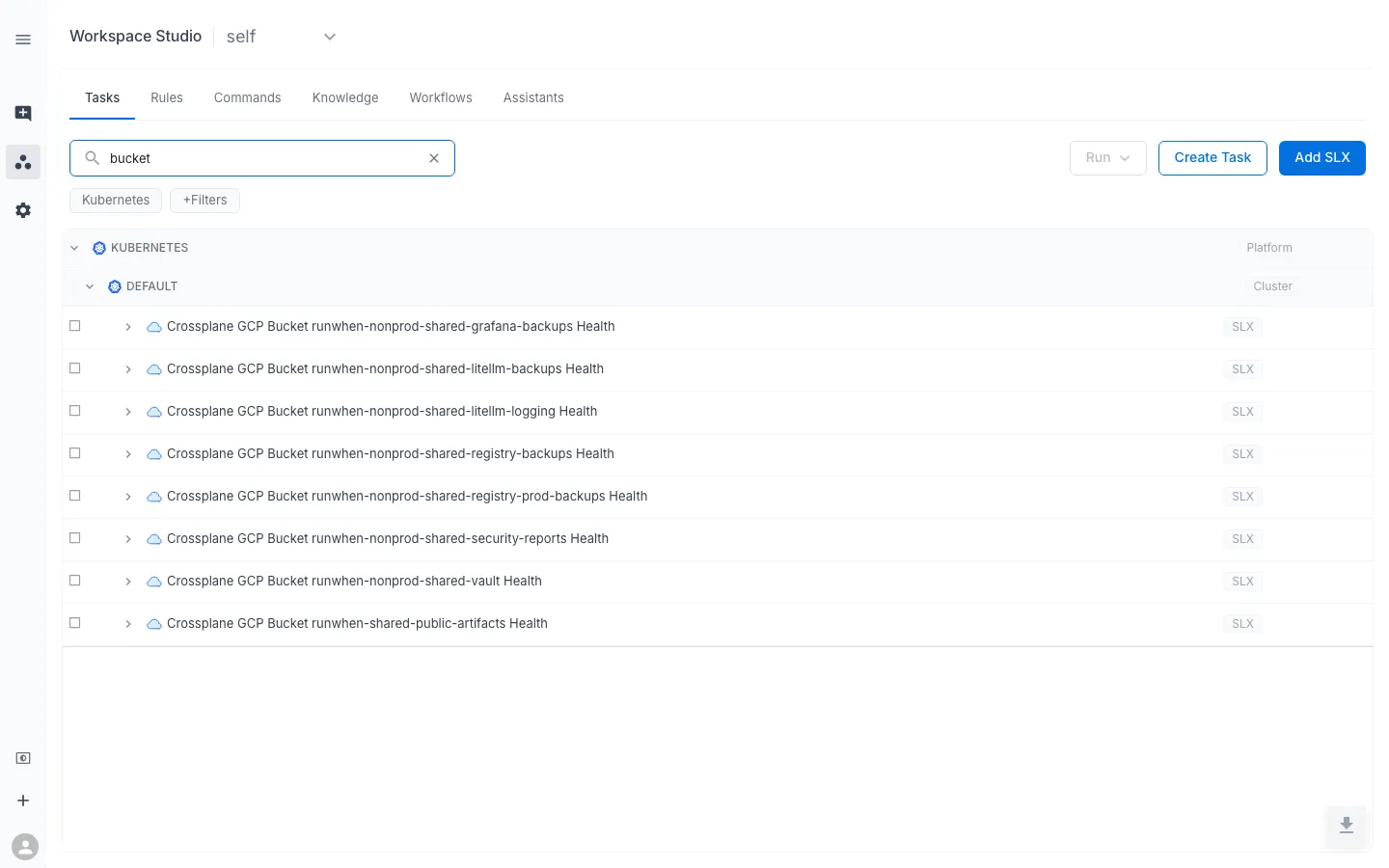
Click the eye icon on any SLX to open the Preview dialog. The four tabs give you the whole health picture:
- Health — the SLI graph. Populates after the runner has completed at least one interval; each point is the fraction of
.status.conditions[]in stateTrue. - Tasks — the tasks defined in this SLX. You’ll see the single “Inspect Crossplane GCP Bucket … conditions” task with its last-run timestamp.
- RunSessions — historical executions, once you’ve run the task at least once.
- Metadata — everything the tags and hierarchy includes emitted: SLX name, owners, tags, and additional context.
The Metadata tab is the fastest way to confirm the workspace-builder rendered the SLX with the identity you expected:
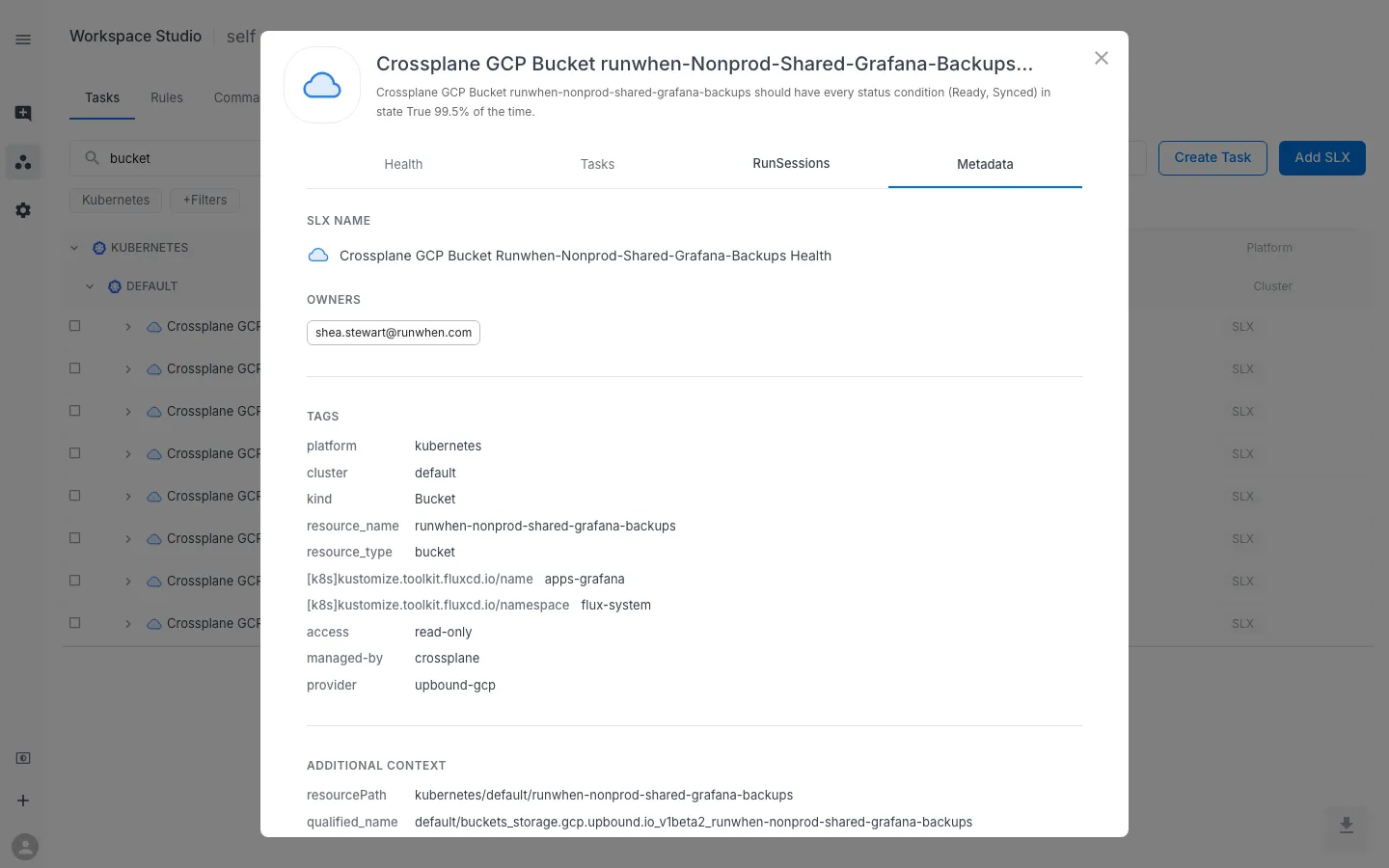
The tags come from three sources you controlled:
platform,cluster,kind,resource_name,resource_type, and any Kubernetes labels prefixed with[k8s]— all emitted by thekubernetes-tags.yamlinclude.- The
access,managed-by, andprovidertags — added by your SLX template. - The
resourcePathandqualified_nameunder Additional Context — a stable identity RunWhen uses to correlate this SLX with the underlying Kubernetes object.
The Tasks tab shows the runbook task ready to execute:
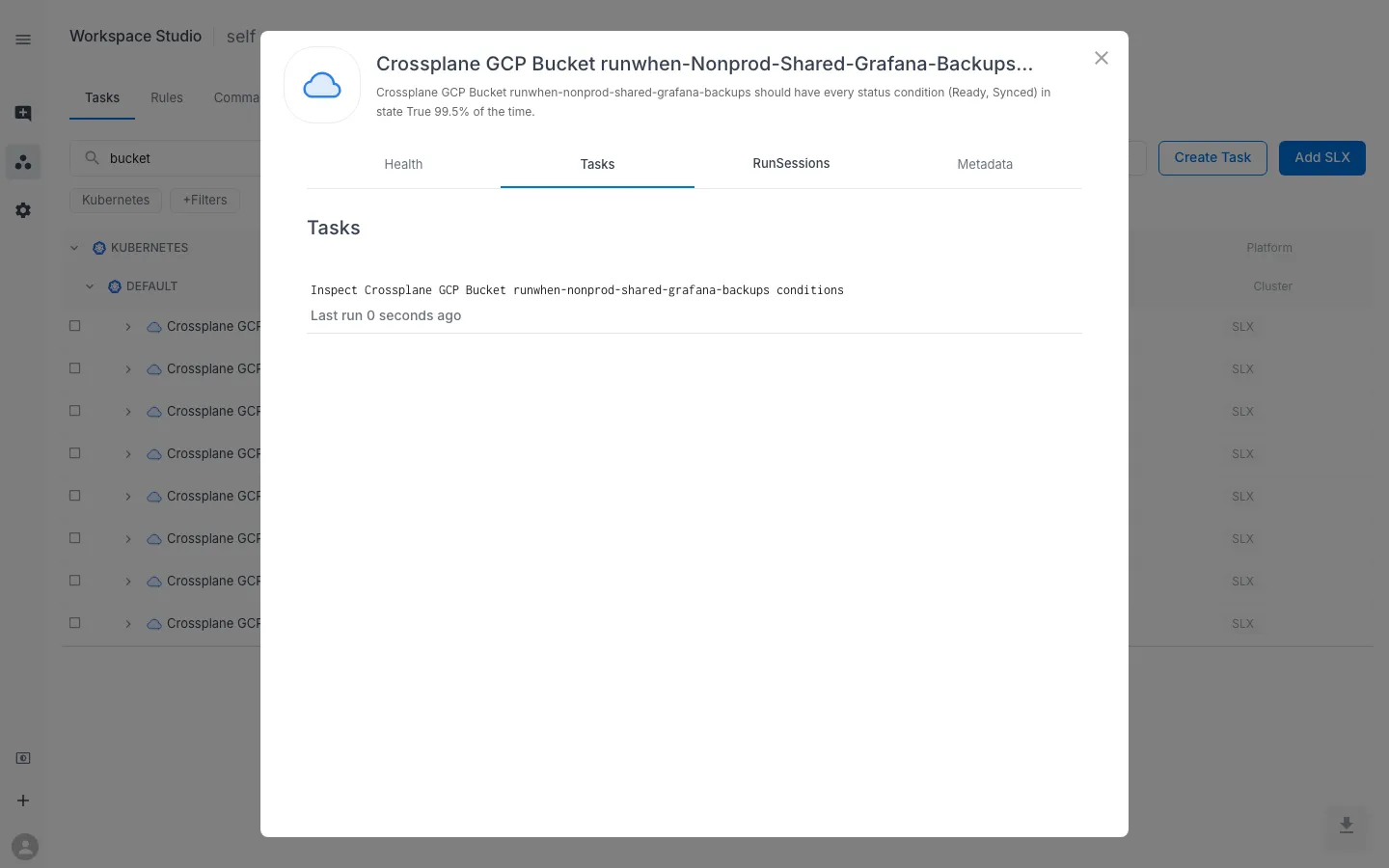
Select the task’s checkbox back in the Studio tree and click Run to execute it. When the RunSession finishes:
- If every condition is
True, the report shows the rawkubectloutput and no issues are filed. - If any condition is
False(or missing), one issue is filed per non-True condition — Ready failures at severity 2, others at severity 3 — with the reproduce hint and next-steps text baked into thejqexpression.
To exercise the failure path deliberately, patch a Bucket’s spec so the provider can’t reconcile it (for example, point it at a nonexistent GCP project via a bogus ProviderConfig). Wait a reconcile interval, then re-run the task from the UI — you’ll see the issue appear with the condition detail in actual.
Complex logic: use tool-builder
When your check outgrows a single kubectl … | jq invocation — multi-step logic, cross-resource comparisons, arithmetic that jq makes ugly — swap the runtime to tool-builder. It runs an arbitrary Bash or Python script that you supply, passed as a base64-encoded string in the GEN_CMD config value. Everything else about the Custom Discovery CodeCollection pattern stays the same — your CodeCollection still ships only rules and templates, and each rendered SLX still delegates execution to the RunWhen Generic CodeCollection.
For the end-to-end authoring flow — script contract, base64 encoding step, per-resource env vars via CONFIG_ENV_MAP, secrets via SECRET_ENV_MAP, a copy-pasteable worked example, and dev → stage → prod promotion — see the Author Custom Tasks with MCP guide. The runtime’s config surface is also documented on the tool-builder Skill Template page in the RunWhen Skills Registry.
Where to go from here
You now have a repeatable pattern for turning any Kubernetes CRD into a monitored SLX with no Robot code of your own. From here:
- Add more rules to the same CodeCollection. Anything that lives at
.runwhen/generation-rules/*.yamlinside anycodebundles/*/folder gets picked up. Add a rule forbucketiammembers,hmackeys, or any other CRD in the same repo. - Swap the runtime. For AWS or Azure resources, point the SLI/TaskSet’s
codeBundle.repoUrlat the same RunWhen Generic CodeCollection but changepathToRobottocodebundles/aws-cmd/sli.robot(seeaws-cmd) orcodebundles/azure-cmd/runbook.robot(seeazure-cmd), and provide the corresponding CLI command inconfigProvided. - Layer in an SLO. Once the SLI has some history, add an
outputItems: - type: sloentry to the rule with a burn-rate objective. See SLOs (Objectives). - Browse the registry for more Skill Templates. The RunWhen Skills Registry catalogs every published Skill Template across all CodeCollections. Filter to the RunWhen Generic CodeCollection to find other reusable runtimes (for example
k8s-stdout-issue) that a rules-only CodeCollection can delegate to. - Let an MCP agent do the authoring. For custom scripts that don’t fit an existing runtime, the Author Custom Tasks with MCP guide walks through writing, live-testing, and rendering a bundle into this same CodeCollection from Cursor or Claude Desktop — with a round-trip check that keeps the base64-encoded
GEN_CMDhonest at PR review. - Manage the CodeCollection as code. The Managing Context as Code (GitOps) guide covers keeping your generation rules, tasks, and knowledge under version control end-to-end.