

Runtime Architecture
Every RunWhen Skill Template runs inside a container built from the same layered stack. Understanding the layers helps you know what’s available at runtime and how dev mode differs from production.
The layers
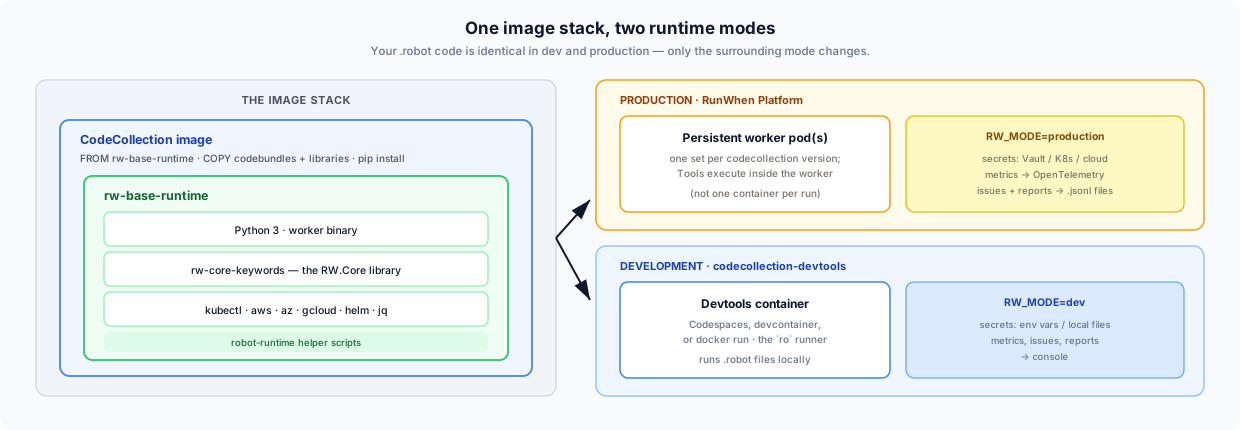
| Layer | Repo | What it provides |
|---|---|---|
| rw-base-runtime | rw-base-runtime | Python, the worker binary, all cloud CLIs, rw-core-keywords installed system-wide, robot-runtime helper scripts |
| rw-core-keywords | rw-core-keywords | RW.Core — the Robot Framework keyword library for secrets, metrics, issues, reports, services |
| CodeCollection image | e.g. rw-cli-codecollection | FROM rw-base-runtime, adds codebundles + libraries + codecollection-specific pip deps |
Dev vs production
| Dev | Production | |
|---|---|---|
| Image | codecollection-devtools | CodeCollection image (FROM rw-base-runtime) |
| Mode | RW_MODE=dev | RW_MODE=production (default) |
| Secrets | Env vars / local files | Vault, Kubernetes secrets, cloud providers |
| Metrics | Logged to console | Pushed to OpenTelemetry Collector |
| Issues | Logged to console | Written to issues.jsonl |
| Reports | Logged to console | Written to report.jsonl |
Both modes use the same RW.Core keyword library — the behavior difference is
handled internally by rw-core-keywords based on the RW_MODE environment
variable. Your .robot code doesn’t change between dev and production.