

Anatomy of a Skill Template
A Skill Template (CodeBundle) is a Robot Framework .robot file plus optional
Jinja templates and generation rules. Every Skill Template follows the same
structure.
The two types
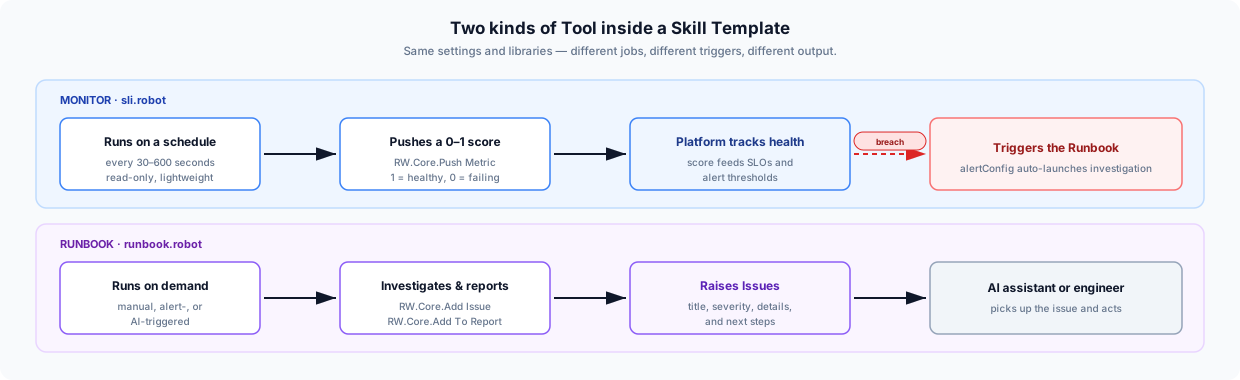
A Skill Template can contain a Monitor, a Runbook, or both. They share the same file layout but do different jobs:
| Type | File | When it runs | What it produces |
|---|---|---|---|
| Monitor (SLI) | sli.robot | On a schedule (every 30–600 seconds) | A 0–1 health score pushed to the platform |
| Runbook (TaskSet) | runbook.robot | On-demand (manual, AI-triggered, alert-triggered) | Issues with titles, descriptions, next steps, and report content |
The Monitor watches; the Runbook investigates. A failing Monitor score can automatically trigger the Runbook.
.robot file structure
Using the curl-http-ok
example:
*** Settings ***Documentation       Checks if an HTTP endpoint returns a healthy response code...                 within an acceptable latency threshold.Metadata            Author    runwhenMetadata            Display Name    HTTP OK CheckMetadata            Supports    HTTP,WebLibrary             RW.CoreSuite Setup         Suite Initialization
*** Keywords ***Suite Initialization    ${URL}=    RW.Core.Import User Variable    URL    ${TARGET_LATENCY}=    RW.Core.Import User Variable    TARGET_LATENCY    default=500    ${DESIRED_RESPONSE_CODE}=    RW.Core.Import User Variable    DESIRED_RESPONSE_CODE    default=200    Set Suite Variable    ${URL}    Set Suite Variable    ${TARGET_LATENCY}    Set Suite Variable    ${DESIRED_RESPONSE_CODE}
*** Tasks ***Checking HTTP URL Is Available And Timely    ${result}=    RW.Core.Shell    curl -s -o /dev/null -w "%{http_code} %{time_total}" ${URL}    # Parse response code and latency, compare against thresholds    # Push metric: 1.0 if healthy, 0.0 if not    RW.Core.Push Metric    ${score}
Settings
- Documentation — brief summary of what the Skill Template does
- Metadata —
Author,Display Name,Supports(platforms/technologies) - Library —
RW.Core(always), plus any codecollection-specific libraries - Suite Setup — runs once before any Task; imports variables and secrets
Keywords
Reusable blocks. The Suite Initialization keyword imports user variables
and secrets that all Tasks need.
Tasks
Each Task is independently executable. In a Monitor (sli.robot), the Task
checks health and pushes a metric. In a Runbook (runbook.robot), each Task
investigates a specific aspect and raises issues when problems are found.
Key libraries
| Library | Purpose |
|---|---|
RW.Core | Secrets, metrics, issues, reports, logging, services — see RW.Core Reference |
RW.CLI | Shell command execution with structured output |
BuiltIn | Standard Robot Framework keywords |
CodeCollection layout
your-codecollection/├── codebundles/│ └── your-bundle/│ ├── sli.robot # Monitor (optional)│ ├── runbook.robot # Runbook (optional)│ └── .runwhen/│ └── generation-rules/│ └── *.yaml # Generation rules├── libraries/│ └── YourKeywords/ # Shared keyword libraries├── requirements.txt└── Dockerfile # FROM rw-base-runtimeSee the Development Environment page for how to run and test, and the Generation Rules examples for how to wire discovery.