

From Laptop to Production Ops in One Prompt — Using the RunWhen Platform MCP Server
Introducing the RunWhen Platform MCP Server
The Knowledge Gap Between Engineers and Their Tooling
Every engineer on your team learns things about your infrastructure that the team’s tooling does not know. The on-call responder who figures out that pod evictions in staging are caused by nightly batch jobs. The developer who discovers that checkout failures always trace back to the payment gateway’s connection pool. The SRE who knows that node pressure alerts in the lab cluster are never worth investigating.
This knowledge is valuable. It is also, almost always, trapped — in someone’s head, in a Slack thread that scrolls away, in a post-incident review that nobody re-reads. The team’s operational tooling keeps reporting the same noise, asking the same questions, and missing the same context, because there is no low-friction way for the engineer who just learned something to feed it back into the system.
That gap is what the RunWhen Platform MCP server closes. It is an open-source Model Context Protocol server that connects your AI coding agent — Cursor, Claude Desktop, Continue, GitHub Copilot — to your team’s RunWhen workspace. Any engineer, from the same editor where they just discovered something, can share that knowledge with the rest of the team’s operational tooling. No context switch. No ticket. No waiting for the ops team to update a config.
The server is available on PyPI and GitHub, licensed under Apache 2.0.
Setting Up
pip install runwhen-platform-mcpAdd it to your MCP client configuration. For Cursor, create or edit your mcp.json:
{ "mcpServers": { "runwhen": { "command": "runwhen-platform-mcp", "env": { "RW_API_URL": "https://papi.beta.runwhen.com", "RUNWHEN_TOKEN": "your-jwt-token", "DEFAULT_WORKSPACE": "your-workspace" } } }}You need Python 3.10+ and a RunWhen API token. The DEFAULT_WORKSPACE is the same workspace your team uses in the RunWhen web UI. Once configured, your coding agent can reach the full workspace — assistants, tasks, issues, rules, commands, and knowledge — through natural language.
Remote URL instead of a local install
For beta, RunWhen hosts the Platform MCP for you at https://mcp.beta.runwhen.com/mcp (no trailing slash after mcp). In Cursor, VS Code with GitHub Copilot, or Claude Desktop, add a server entry that uses url and headers.Authorization instead of command and env:
{ "mcpServers": { "runwhen": { "url": "https://mcp.beta.runwhen.com/mcp", "headers": { "Authorization": "Bearer your-runwhen-token" } } }}Use the same Personal Access Token or JWT you use for the RunWhen beta app, or use your client’s remote OAuth flow if it supports authorization-server discovery (RunWhen publishes metadata at https://mcp.beta.runwhen.com/.well-known/oauth-authorization-server alongside the MCP URL above). For details, client-specific config paths, and self-hosted deployments, see the MCP Server installation guide and the runwhen-platform-mcp README.
Investigating Infrastructure Without Switching Tools
Your editor’s AI agent can now reach your team’s RunWhen AI Assistants, giving you the same investigation capabilities as Workspace Chat — issue search, diagnostic tasks, run session history, resource discovery, knowledge base lookups, and generated diagrams — inline in your editor.
You do not need to know which tools exist or how to call them. You describe what you want and the coding agent handles the rest.
Broad health check:
” What’s unhealthy in the online-boutique-dev namespace?”
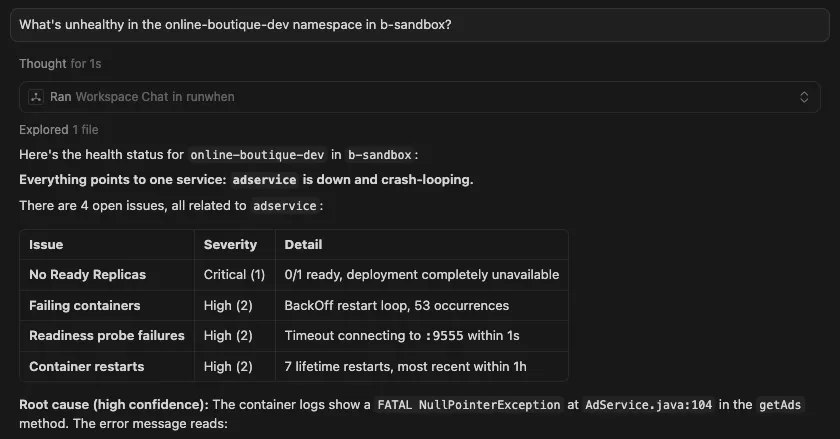
You get back a structured summary with cited findings, affected resources, and remediation steps — the same response you would see in the RunWhen web UI, but without the context switch.
Targeted investigation with a specific assistant persona:
“Have Cautious Cathy investigate why the checkout service is failing in prod”
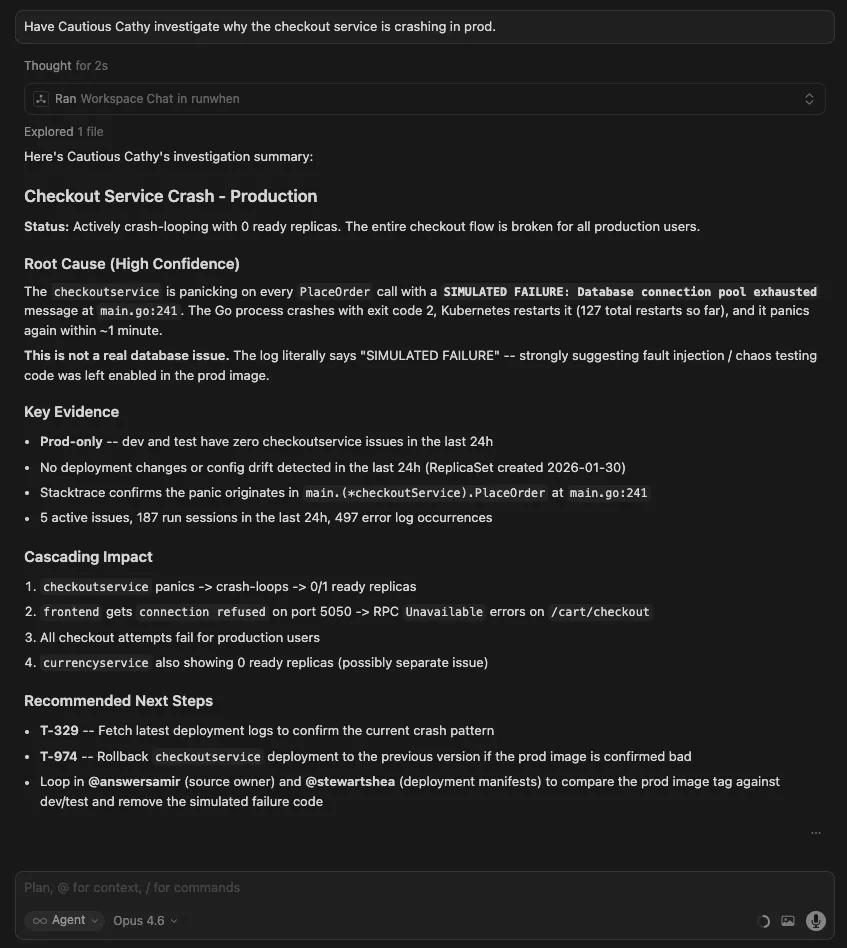
Your agent routes the question to Cautious Cathy specifically, giving you her conservative investigation style — appropriate for production.
Visualizing dependencies:
“Show me a diagram of the service dependencies in the checkout flow.”
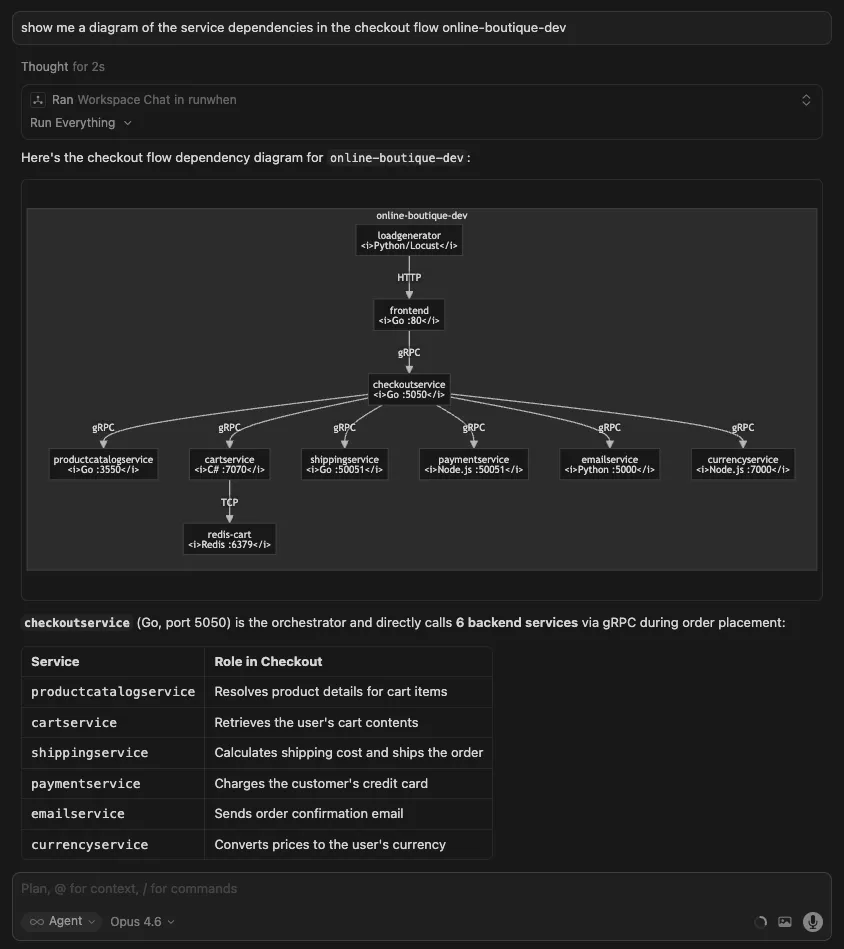
The response includes a Mermaid diagram of the service graph, helping you understand the blast radius before you start debugging.
Spotting patterns across time:
“What issues have been recurring across sessions this week?”
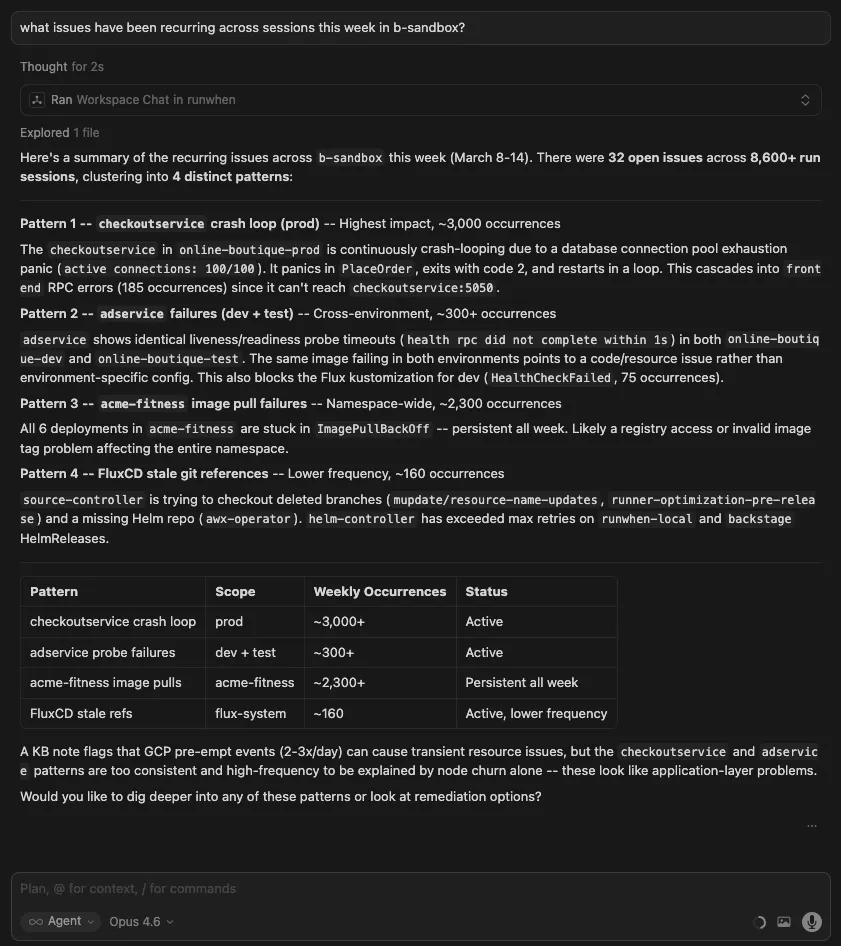
Instead of reviewing individual sessions, you get a cross-session summary that surfaces repeat offenders.
Sharing What You Know — Contributing Rules and Commands
This is where the MCP server changes how teams build operational knowledge together. Rules and commands are the mechanisms RunWhen uses to capture what your team knows about your environment. For the full guide on how they work, see Workspace Studio and AI Assistants. Here is what contributing them looks like in practice.
Rules — Teaching the Tooling What Your Team Already Knows
Rules are contextual instructions that get loaded into every assistant’s prompt. When an engineer adds a rule, every assistant in the workspace — and every team member who uses them — benefits immediately. Rules are how individual knowledge becomes shared context.
An on-call engineer learns that staging noise is expected:
“Our namespace runs nightly batch imports between 2-4AM UTC. Pod restarts during that window are expected. Add a workspace rule so our assistants know this.”
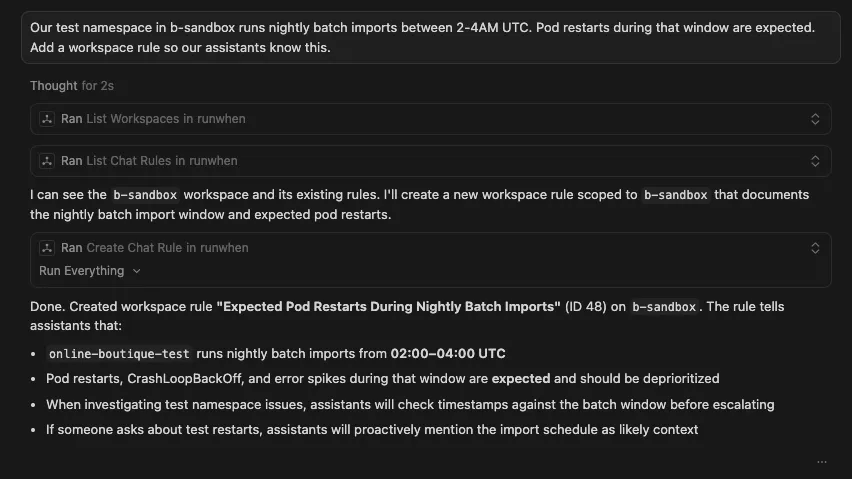
Before this rule existed, every staging investigation during the batch window wasted time diagnosing expected behavior. Now every assistant, for every engineer on the team, knows to deprioritize it.
A developer discovers a service dependency that matters:
“Cautious Cathy should always check upstream connectivity to the external payment gateway before diagnosing application errors in the payment namespace.”
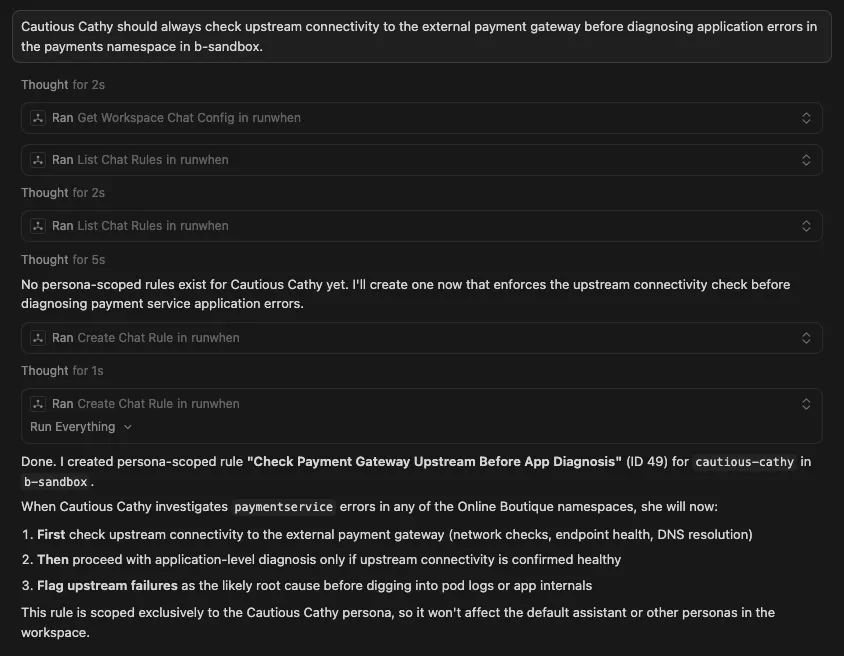
This becomes a rule scoped to Cautious Cathy only. The developer who discovered the pattern does not need to write a runbook or file a ticket — they share the insight directly with the assistant that investigates payments.
An SRE standardizes how investigations are reported:
“I want all of our assistants to group findings by service name and always include the namespace, pod, and container when reporting issues.”
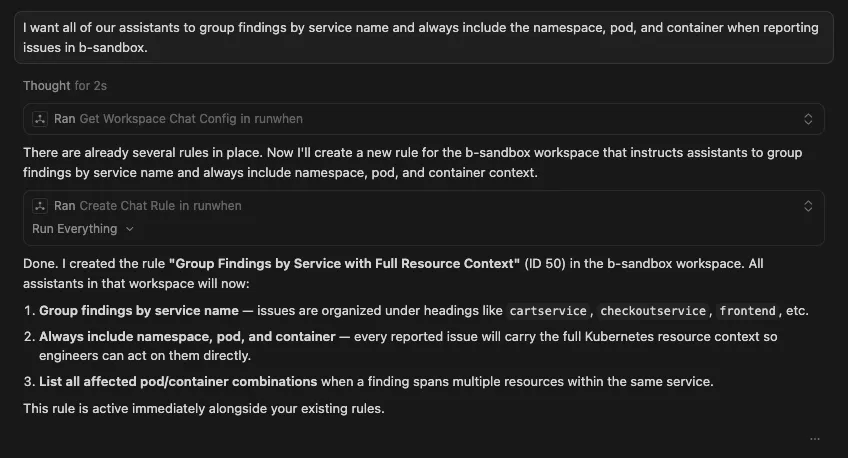
Every investigation across the team now produces output structured for the incident ticket workflow. One engineer’s preference becomes the team standard.
A platform engineer suppresses known infrastructure noise:
“Our lab cluster uses spot instances that get preempted regularly. Add a workspace rule so assistants acknowledge preemption events as expected and deprioritize them.”
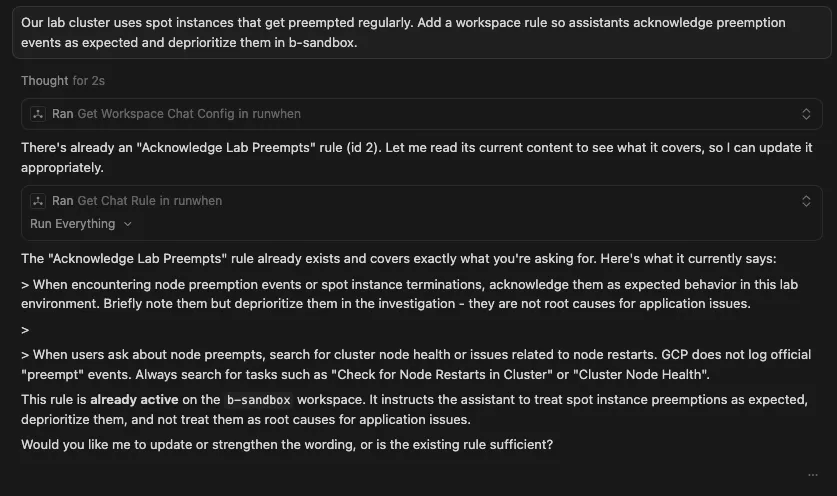
The rule is live immediately. No deploy, no PR, no restart. Every assistant picks it up on the next query, and if it already exists there is no need to create another one.
Commands — Turning Repeated Patterns into Shared Procedures
Commands are structured investigation patterns that any team member can invoke. When one engineer notices themselves repeating the same type of investigation, they can turn it into a command that the whole team benefits from.
A senior engineer codifies their investigation pattern:
Make a workspace command for namespace health checks
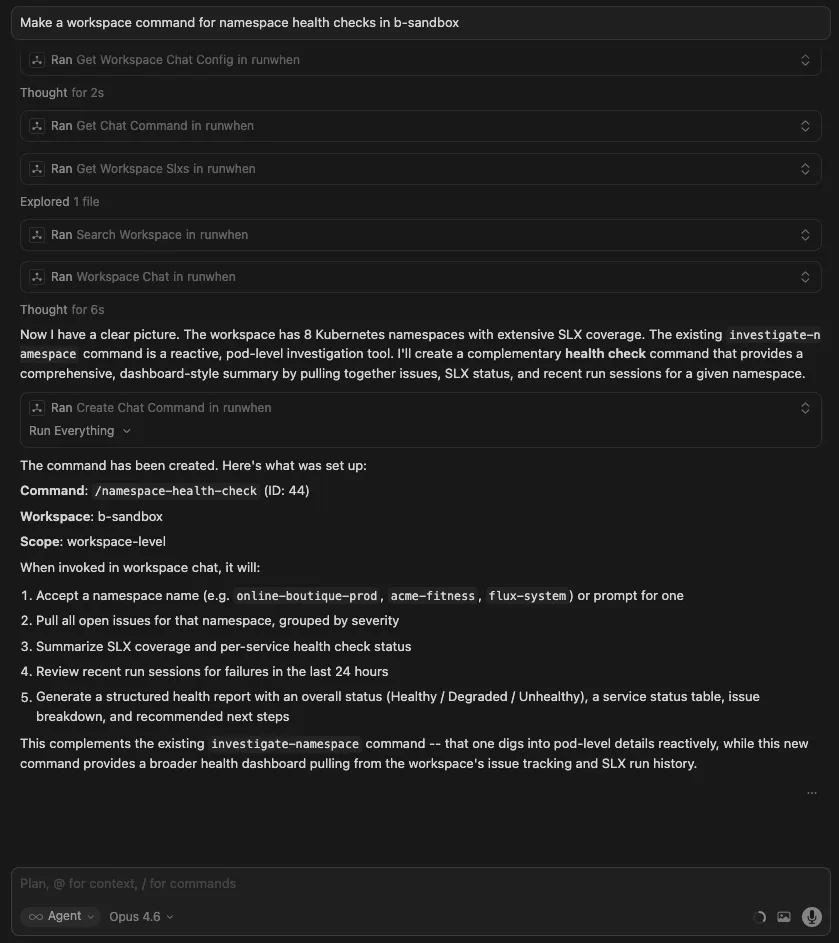
Now a new hire, a developer from another team, or an automated workflow all get the same thorough, consistent investigation — without needing to know the steps themselves.
A developer creates a comparison tool for their workflow:
“Eager Edgar should have a command that compares a service across two namespaces — environment variables, image versions, replica counts, resource limits — and highlights the differences.”
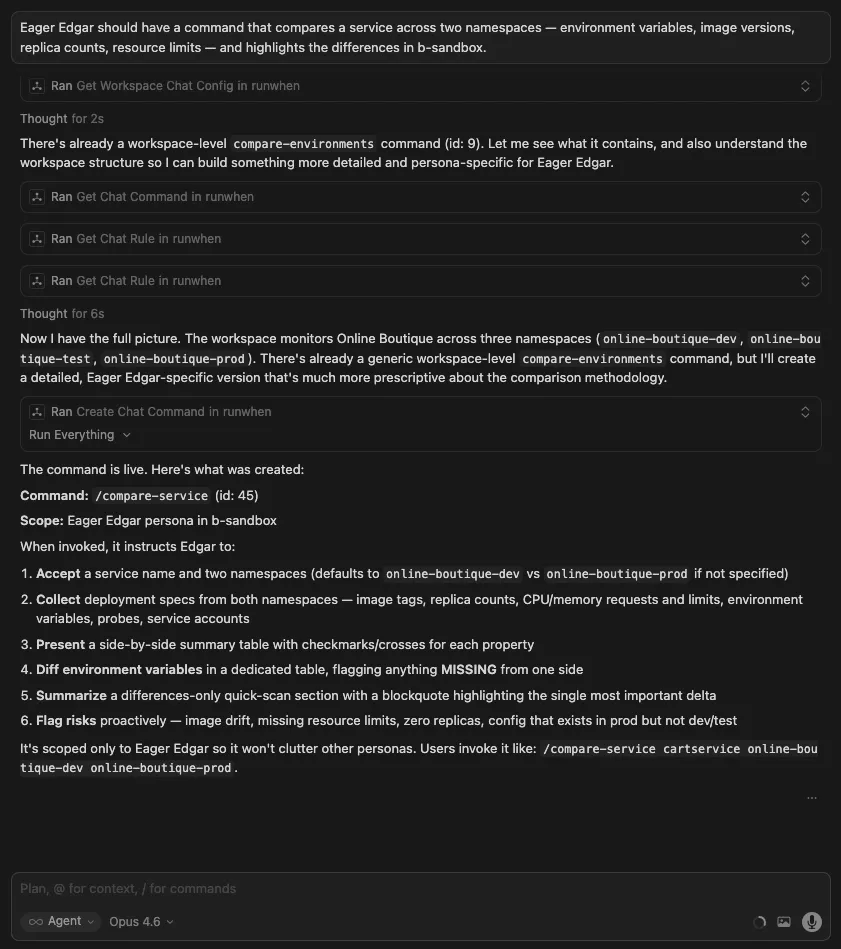
The command appears for Eager Edgar only, scoped to the persona developers use most. It encodes a pattern the developer was doing manually, and makes it available to everyone who works with that assistant.
Writing Automation That Matches Your Team’s Standards
When you ask your coding agent to help write a new diagnostic or remediation task, it can pull your workspace’s conventions — error handling patterns, output formatting, secret access, infrastructure idioms — so the result matches what your team already has in place.
Authoring a new task:
“I need a health check for the Redis cluster in the payments namespace. Check what conventions our workspace uses, and write it following our existing patterns.”
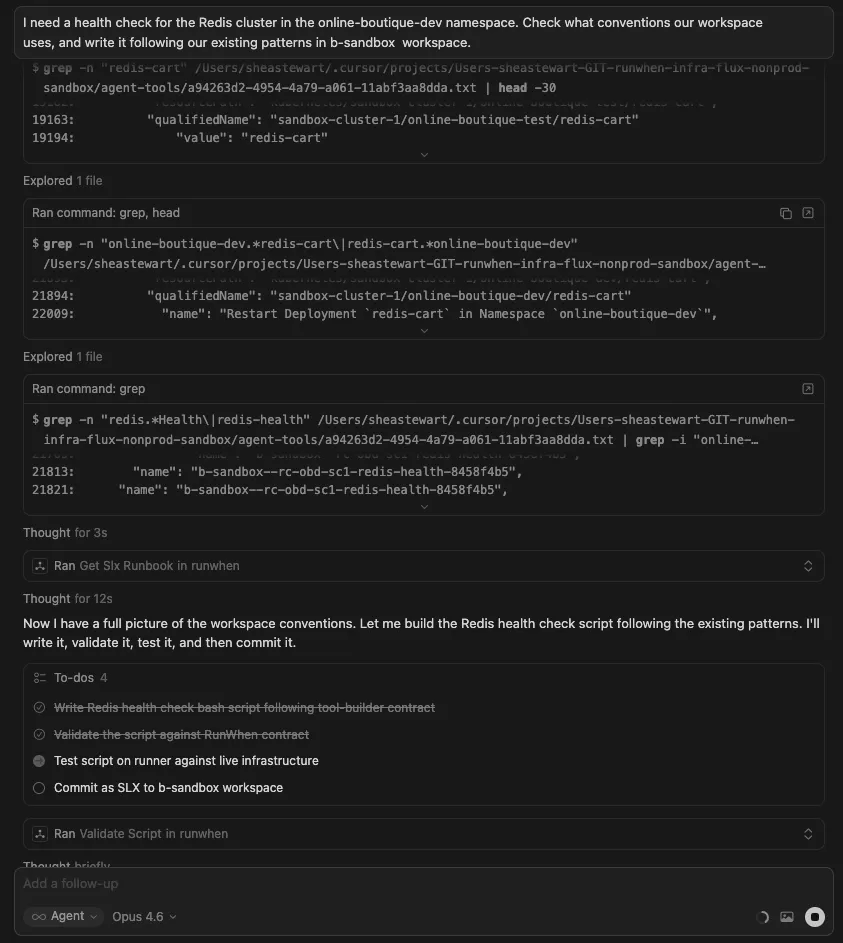
The agent loads your workspace standards, then produces a bash or Python script that conforms to them. You can validate it against live infrastructure and commit it as an SLX — all from your editor.
Checking what already exists:
“Are there any existing tasks related to Redis health checks? I don’t want to duplicate something we already have.”
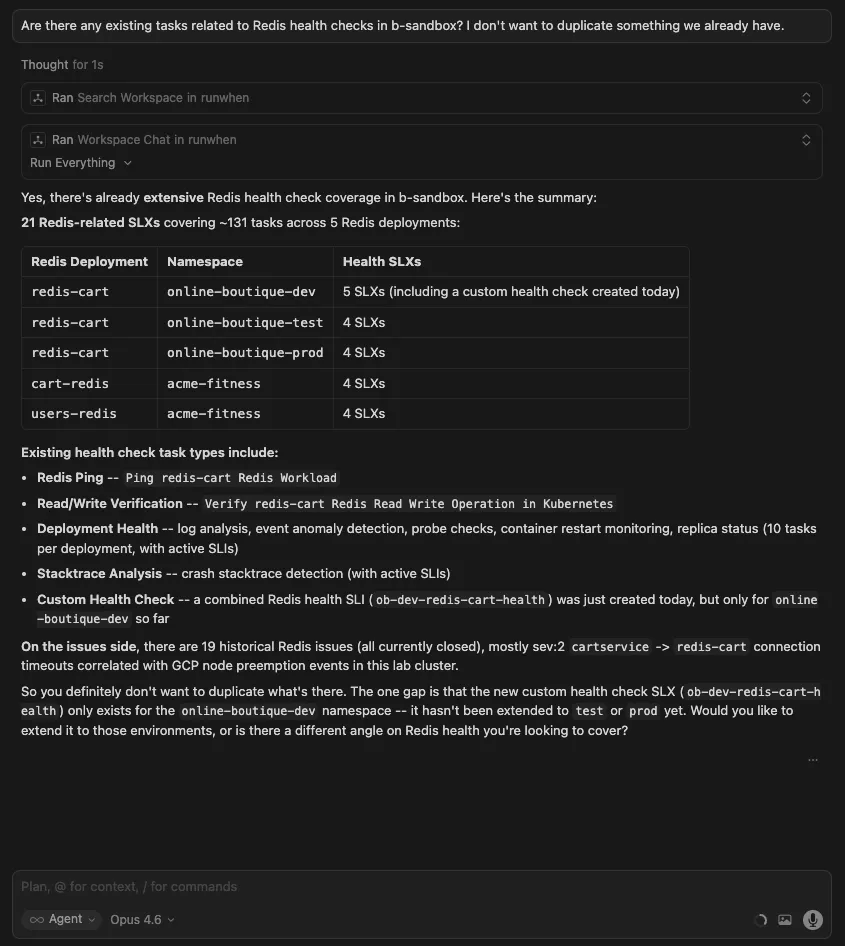
The agent searches the RunWhen registry and your workspace’s existing SLXs, surfacing what is available before you write something new.
Quick Workspace Queries
Sometimes you just need a quick answer without a full investigation:
“What issues are currently open in my workspace?”
“Show me the most recent run sessions for the online-boutique-prod namespace.”
“What SLXs are configured for the payments service?”
Direct answers, no investigation overhead.
Why This Changes How Teams Work
The traditional model for improving operational tooling is centralized: the platform or SRE team maintains the configuration, and everyone else files requests. That model creates a bottleneck. The people who discover operational insights (developers, on-call responders, anyone debugging at 2 AM) are rarely the same people who have access to update the tooling.
A RunWhen workspace is already a shared team boundary — the same assistants, tasks, rules, and commands are available to every engineer. The MCP server removes the last piece of friction: it lets any engineer contribute back to that shared context from where they already work.
When one engineer creates a rule from Cursor, every team member’s next investigation benefits. When someone defines a command from Claude Desktop, that command is available in the web UI, in automated workflows, and in every other MCP-connected editor on the team. The workspace gets smarter as a side effect of the team’s normal workflow.
Over time, this compounds. Rules accumulate to suppress known noise across environments. Commands standardize investigation patterns that used to live in individual engineers’ heads. Knowledge entries capture institutional context that survives team turnover. What was once scattered tribal knowledge becomes a shared operational resource that every team member — and every assistant — draws from.
Get Started
- Connect: either
pip install runwhen-platform-mcpand use a localcommandin MCP config, or use RunWhen’s hosted beta MCP athttps://mcp.beta.runwhen.com/mcpwithAuthorization: Bearer …in headers (see the MCP Server installation guide). - Configure your RunWhen API token and default workspace (local
env) or token in headers (remote). - Ask your assistant what is unhealthy in a namespace.
- Share something you know: add a rule that deprioritizes known noise in your environment.
- For the full guide on rules, commands, and knowledge, see Workspace Studio.
The server is open source at runwhen-contrib/runwhen-platform-mcp. Issues and contributions are welcome.