

Our Favorite Slash Commands — A Series on How We Actually Operate
Why we started encoding our rituals as slash commands
Every team has rituals. Standup questions that follow the same pattern. Pre-release checklists that live in someone’s head. Troubleshooting steps that a senior engineer rattles off from muscle memory but a new hire has never seen.
In most organizations, these rituals are either undocumented or buried in runbooks that nobody reads until something is already broken. The knowledge exists, but it is not accessible at the moment it matters.
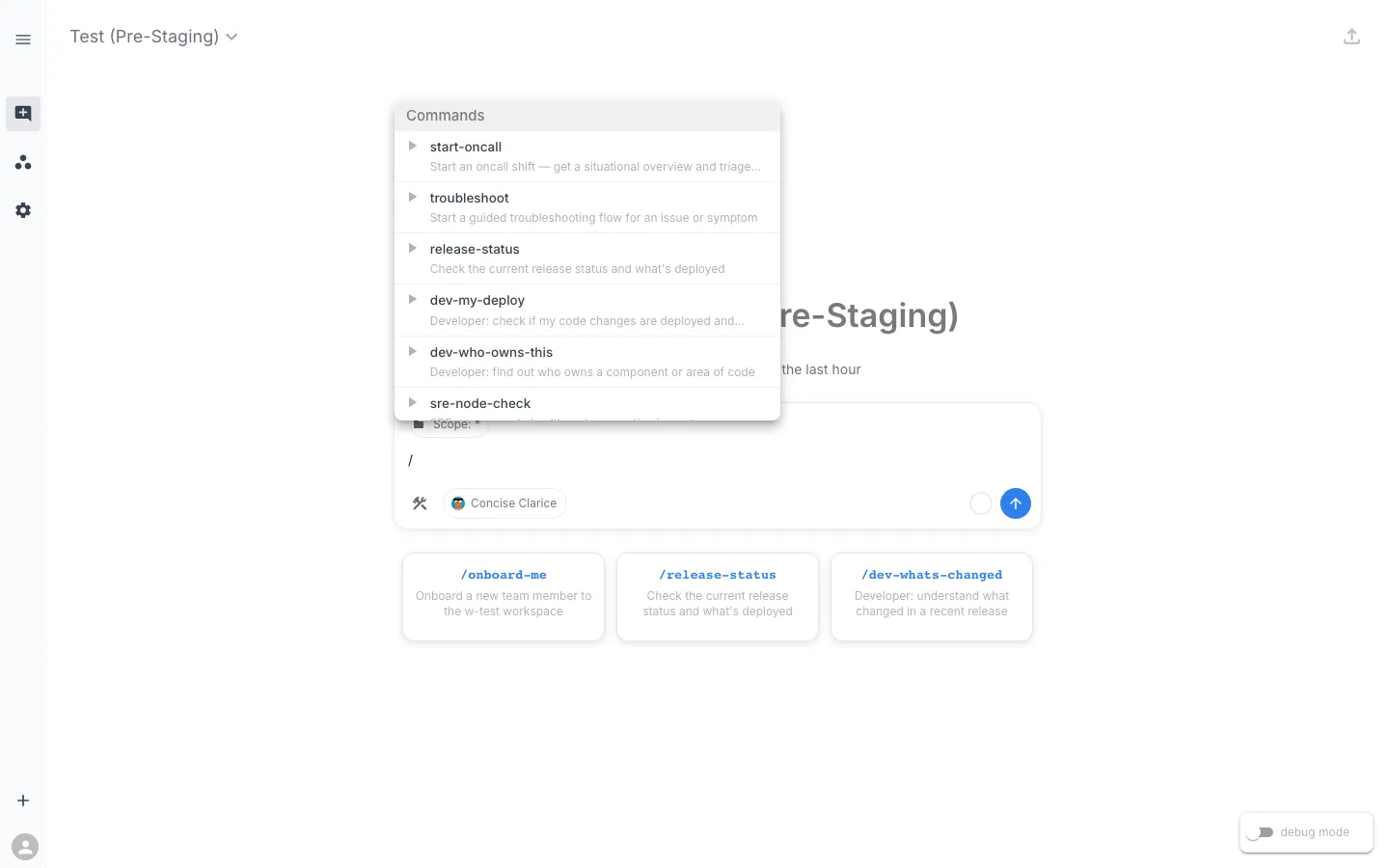
Slash commands in RunWhen are how we encode those rituals. A command is a natural language instruction set that tells an AI Assistant exactly how to investigate a specific class of question. When someone types /mgr-release-readiness in Workspace Chat, the assistant does not improvise. It follows a structured procedure — checking open issues, verifying deployment health, assessing stability over time, and producing a go/no-go recommendation.
The assistant has access to the full inventory of tasks already deployed in the workspace. It does not need to be told which health checks exist or how to run them. It searches, correlates, and synthesizes — the same way a senior SRE would, but consistently, every time.
What makes a good slash command
After building and iterating on 22 commands for our own workspace, a few patterns emerged:
They encode a question, not a tool. The best commands are named after the question someone would ask: “Is this release ready?” (/mgr-release-readiness), “What changed?” (/dev-whats-changed), “Who owns this?” (/dev-who-owns-this). The assistant figures out which tools to use.
They are written in natural language. A command is not a script. It is a set of structured instructions — written in plain English — that guide the assistant’s investigation. This means anyone on the team can read, modify, or create a command without writing code. When the process changes, you update the words, not a codebase.
They are backed by narrowly focused tasks. The assistant’s power comes from the hundreds of small, composable tasks already running in the workspace. Each task does one thing well: check replica status, analyze log patterns, inspect certificate health, verify Flux reconciliation. A single slash command might draw on dozens of these tasks to produce a comprehensive answer.
They have a persona. Our commands are prefixed by role — mgr- for managers, dev- for developers, sre- for SRE workflows. This is not access control; it is audience. A manager asking “is the release ready?” wants a different level of detail than an SRE running a pre-promotion checklist. Both can use either command, but the output is tuned for the audience.
The commands we built
Here is our current command library, grouped by persona:
Manager commands
| Command | Purpose |
|---|---|
/mgr-release-readiness | Go/no-go assessment for promoting a release |
/mgr-release-readiness-infra-review | SRE/infra team’s view on release readiness |
/mgr-platform-summary | Executive health overview in plain language |
/mgr-team-activity | Who is working on what |
/mgr-incident-report | Generate a structured incident summary |
/mgr-coverage-gaps | Identify monitoring blind spots |
Developer commands
| Command | Purpose |
|---|---|
/dev-my-deploy | Did my changes land and are they healthy? |
/dev-whats-changed | Understand what changed in a recent release |
/dev-check-logs | Investigate errors or unexpected behavior |
/dev-who-owns-this | Find the right person for a component |
/dev-migration-check | Verify FastAPI migration parity |
/dev-fix-prompt | Generate a coding prompt from triage data |
SRE commands
| Command | Purpose |
|---|---|
/sre-promote-release | Step-by-step environment promotion guide |
/sre-namespace-health | Deep health check on a specific namespace |
/sre-node-check | Assess node health and preemption impact |
/sre-db-health | Check all data stores (Postgres, Redis, Neo4j, Qdrant) |
/sre-flux-status | GitOps reconciliation health |
General commands
| Command | Purpose |
|---|---|
/onboard-me | New team member orientation and workspace tour |
/start-oncall | Situational awareness briefing for an on-call shift |
/troubleshoot | Guided investigation flow for any issue |
/release-status | What is currently deployed |
/generate-release | Start the release generation process |
What this series covers
In the posts that follow, we will take specific commands from this list and walk through how they actually work against our live environment. Not a demo. Not staged data. Real results from the workspace our engineering team uses every day.
The first post in the series — Release Readiness: The Slash Command That Replaced Our Pre-Release Checklist — breaks down /mgr-release-readiness in detail: what it checks, what tasks it draws on, and what the output looks like when you run it right now.
Each post will include:
- The command’s full natural language definition
- A live run against our environment with real output
- The underlying tasks the assistant used
- How we have iterated on the command over time
If you have already built commands for your own workspace, we would love to hear what patterns you have landed on. If you have not started yet, this series should give you a concrete sense of what is possible.
Posts in this series: