

What Changed? The Slash Command for Catching Up
This is the second post in our Favorite Slash Commands series, where we walk through the commands our team uses daily against our real environment.
The question every engineer asks on Monday
You come back from a long weekend. Or a week of vacation. Or jury duty. Or one of those stretches where your calendar was meetings-all-day-every-day and you genuinely could not tell you what shipped on Thursday even though you were technically at work. You open the laptop and you feel it — the slightly anxious pause before touching anything.
The first question in your head is not “what is on fire?” — that’s what /oncall-whats-burning is for. The first question is: what changed while I was not looking?
That question is harder than it sounds. The answer lives across multiple repos, multiple services, and multiple people’s recent memories. Our platform alone spans four separate repos (backend-services, agentfarm, usearch, webhooks), a React frontend, Go controllers, a Flux delivery pipeline, and a cluster that any one of a dozen engineers might be Okteto-ing into at any moment. No single person tracks all of it.
Before this command existed, catching up after a few days out meant the same ritual every time:
- Open four GitHub tabs, one per repo, and scan the last week of merged PRs.
- Skim
#engand#platformSlack for anything with a lot of reactions. - Ask whichever senior engineer happens to be online “did anything weird ship while I was out?”
- Guess about what is actually running in the test cluster, because commit-on-main is not the same as deployed-in-test.
- Eventually give up and just start looking at the code you were working on, hoping nothing landed underneath you.
The answer to “what did I miss?” depended entirely on who happened to be around and how recently they had paid attention. If the person you asked had been on their own leave last week, you were out of luck.
We replaced all of that with a slash command.
The command
Here is the full text of /dev-whats-changed — the natural-language instruction set the assistant follows when anyone on the team types it:
# `/dev-whats-changed` — Catching up on the test environment
A developer is trying to catch up. They want to know what code isrunning right now and what changed to get us here. They do NOTprimarily want a health triage — that's /mgr-release-readiness.
Answer in three ordered layers. Do not reorder them. Do not leadwith infra or issue counts.
## Layer 1 — What is running right now
Run `w-test--detect-dev-activity`. Return:
1. Current SHA per repo family (backend-services, agentfarm,   usearch, webhooks). Authoritative "what code is live" answer.2. Okteto workloads — which developers are currently dev-ing in   the cluster. Mention them by handle.3. Unusual tags on key components — anything NOT `main-<sha>` or   release-format. Flag these, but remember that PR/branch tags   are usually normal testing and only become interesting if the   workload is logging errors or stacktraces.
## Layer 2 — What changed in the code
For each repo family with live SHAs, show the commit historyfrom the last release tag to the current main SHA.
- backend-services → run `w-test--github-platform-changelog`- For agentfarm / usearch / webhooks — if changelog tasks exist,  run them. Otherwise cite the SHA and offer to build one.
Summarize per repo:- Which release is the comparison base.- Grouped highlights by area (API / models / UI / agents / infra).- Risky changes — migrations, behavioral backend changes, new  configs, cross-cutting refactors.- Top contributors for this diff so the developer knows who to ping.
Link the GitHub compare URL.
## Layer 3 — Optional deeper dive
Only if the developer asks, OR if there is a clear cause-and-effectsignal (e.g. "SHA X went live 30 min ago and issues Y and Z openedin its namespace right after"), offer:
> Want me to dive into recent issues for key components only? Or> issues across infra dependencies (vault, gitlab, llm-gateway,> redis, postgres)?
Do NOT automatically enumerate infra issues in the first response.They are a dive, not the lede.
## Hard rules
- Never treat `main-<sha>` tags as "off release" or suggest rollback.- Never lead with infra dependency issues. Presume they did not change.- Never conclude something is "out of sync" because SHAs differ across  repo families — they are independent repos.- Always mention Okteto users by handle if present.- Always cite the SHA and the release tag being compared.
Two hard rules are worth calling out: main-<sha> image tags are the normal state for this environment, and infra dependencies (vault, gitlab, llm-gateway, redis, postgres) are never the lede. Both rules live in the workspace chat configuration alongside the command itself, which means they also apply to adjacent questions — a plain “what’s going on in papi today?” gets the same framing without needing the slash command.
That framing is the whole point. An earlier version of this command would happily flag main-<sha> as “not on release” and bury the actual catching-up answer under a list of infra alerts that have been firing for weeks. The rules are what keep it dev-first.
What happened when we ran it today
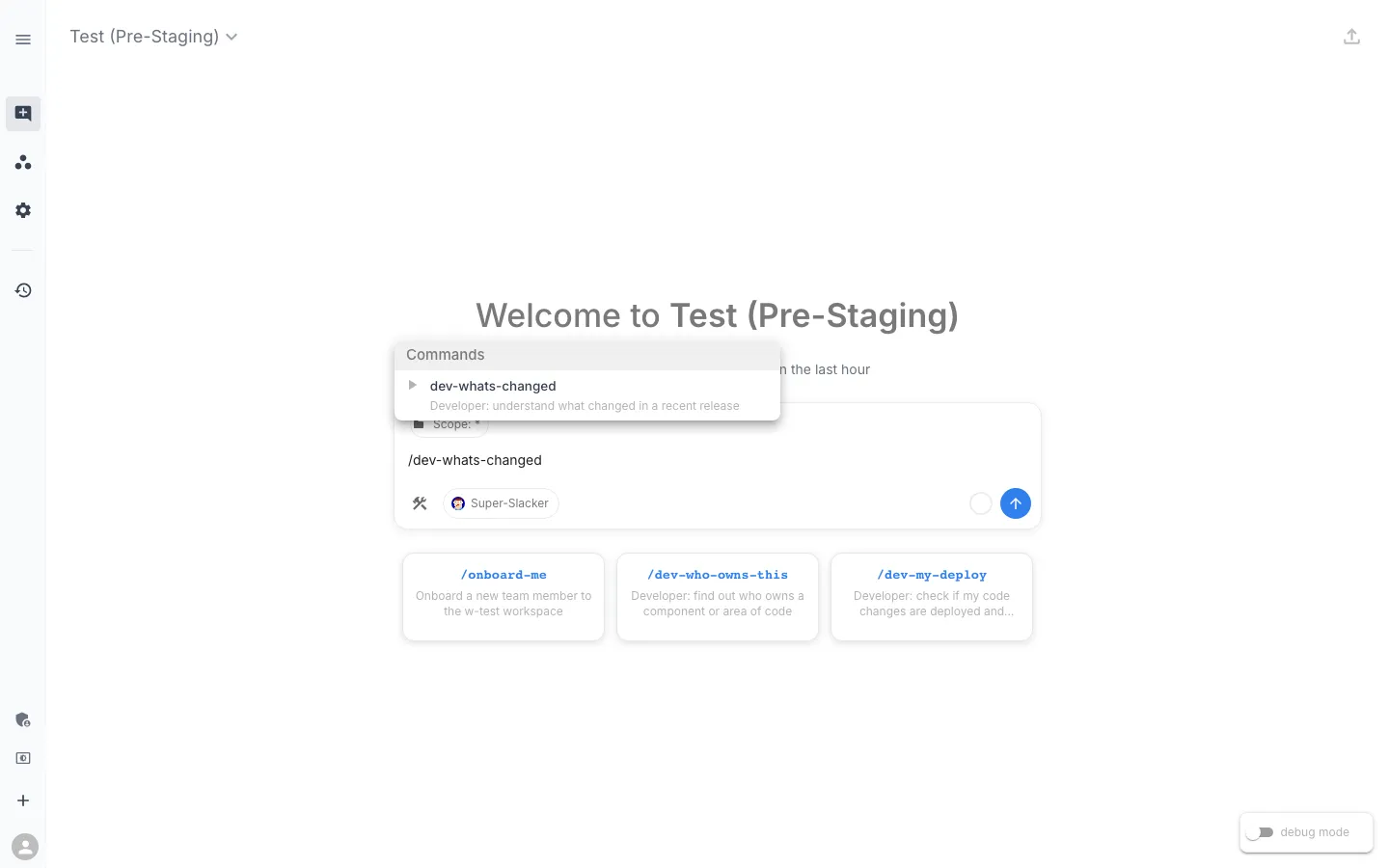
We typed /dev-whats-changed into workspace chat against our test workspace. The moment the command fires, the assistant starts working.
The plan, with a Run button
When you type the command, the assistant does not immediately answer. It plans — finds the two tasks it needs, checks whether a recent runsession already has the output, and hands you a button to kick things off.
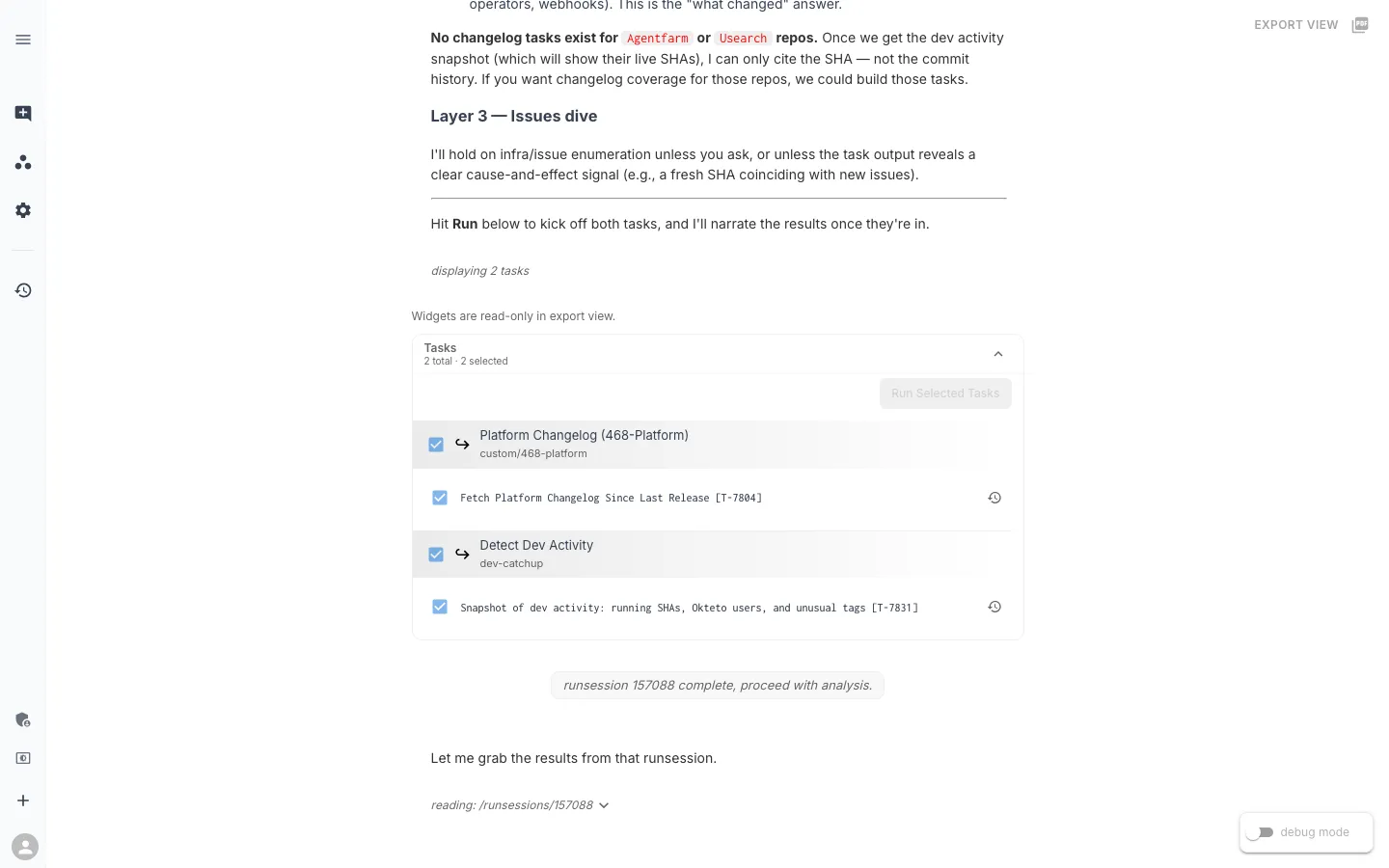
Two small behaviors here are worth calling out.
First: the assistant is honest about coverage gaps. “No changelog tasks exist for agentfarm or usearch repos.” Rather than silently skipping those repos and pretending nothing shipped there, it tells you upfront. We will see in a minute that it also offers to build those missing tasks at the end of the response.
Second: the Run button. The slash command is about to fan out into live infrastructure — a kubectl scan of the cluster and a round-trip to the GitHub API — so the assistant proposes a plan and waits for the developer to agree. A command that quietly makes those calls without asking is a worse experience than one that surfaces intent. It also means the user can uncheck a task they do not want to run, or add context before kicking off (for example, “also check webhooks”).
Layer 1 — what code is live right now
After the Run button, the first thing the assistant produces is a single table of what is actually running.
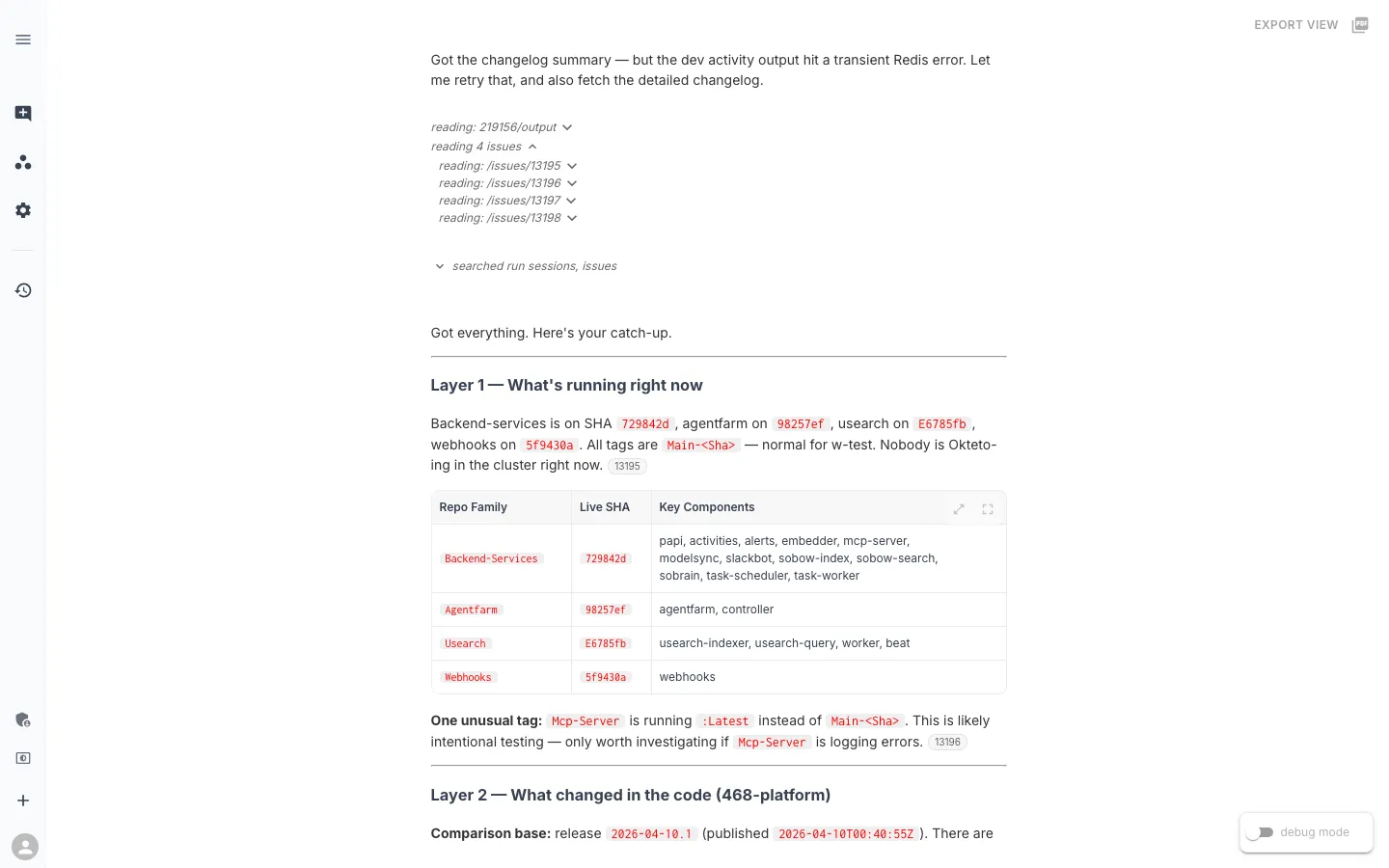
Four repo families, four SHAs, one unusual tag. A returning engineer reads this in about ten seconds and knows what code is live.
Two details are worth noticing.
The Repo Family grouping exists because backend-services is a monorepo — papi, activities, alerts, modelsync, slackbot, sobrain, sobow-index, sobow-search, task-scheduler, task-worker, and more all share a release cadence and ship a common SHA. Grouping by repo family produces one row instead of a dozen. That knowledge (which container name belongs to which repo) lives in a knowledge-base article so the assistant can fall back to it for adjacent questions too.
The unusual tag callout is where the chat rule earns its keep. mcp-server is running :latest instead of main-<sha>. The rule says: PR/branch/latest tags on a key component are usually expected testing activity; only become concerned if the workload is logging errors. So the assistant flags it once, with the right context, and moves on. Without the rule, an earlier version of this command would have treated that one line as an urgent finding and buried the rest of the answer beneath it.
Nobody is Okteto-ing in the cluster right now, which also gets a one-liner. When there are active dev sessions — and on a normal weekday there usually are — the assistant names them by Slack handle so you know who to ping about live testing before you go touching those services yourself.
Layer 2 — what changed in the code
This is the dev-first payoff.
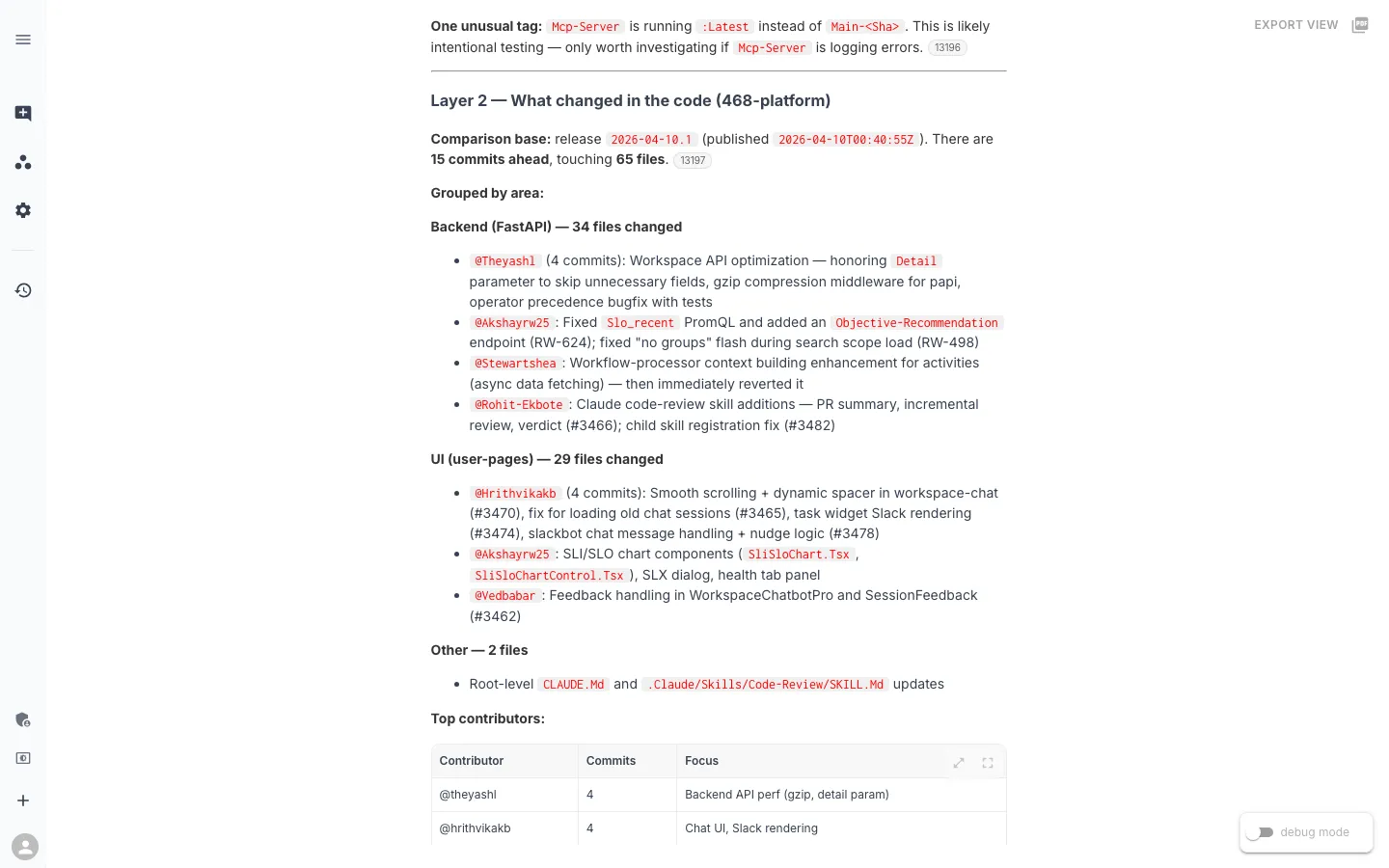
Fifteen commits, sixty-five files, grouped by area. The shape is what makes this usable: every bullet is keyed to a contributor and describes what they did this week in one line. Four PRs from Hrithvika get collapsed into “Smooth scrolling + dynamic spacer in workspace-chat, fix for loading old chat sessions, task widget Slack rendering, slackbot chat message handling + nudge logic.” Four PR titles become a single sentence about what that person was focused on.
That compaction is the whole value. A raw git log between two refs is 15 lines of noise — merge commits, typo fixes, prefixes like feat(workspace-chat): that do not tell you what the feature actually does. Layer 2 is eight lines of “here is what each human on the team shipped since we last cut a release.”
The comparison base is also explicit. The assistant treats release 2026-04-10.1 as the baseline — the last production release tag — and describes everything between it and main-729842d as “what’s new since we last shipped.” It is not comparing against yesterday’s main, or against some arbitrary rolling window. It is comparing against the point the developer last treated as a stable reference, which is what a catching-up question actually needs. If you have been out for a week, that’s the release before you left. If you have been out for three days, it’s the release you last saw deploy.
Who to talk to, and what to watch for
Below the grouped breakdown the assistant produces two more compact things that save a lot of Slack messages.
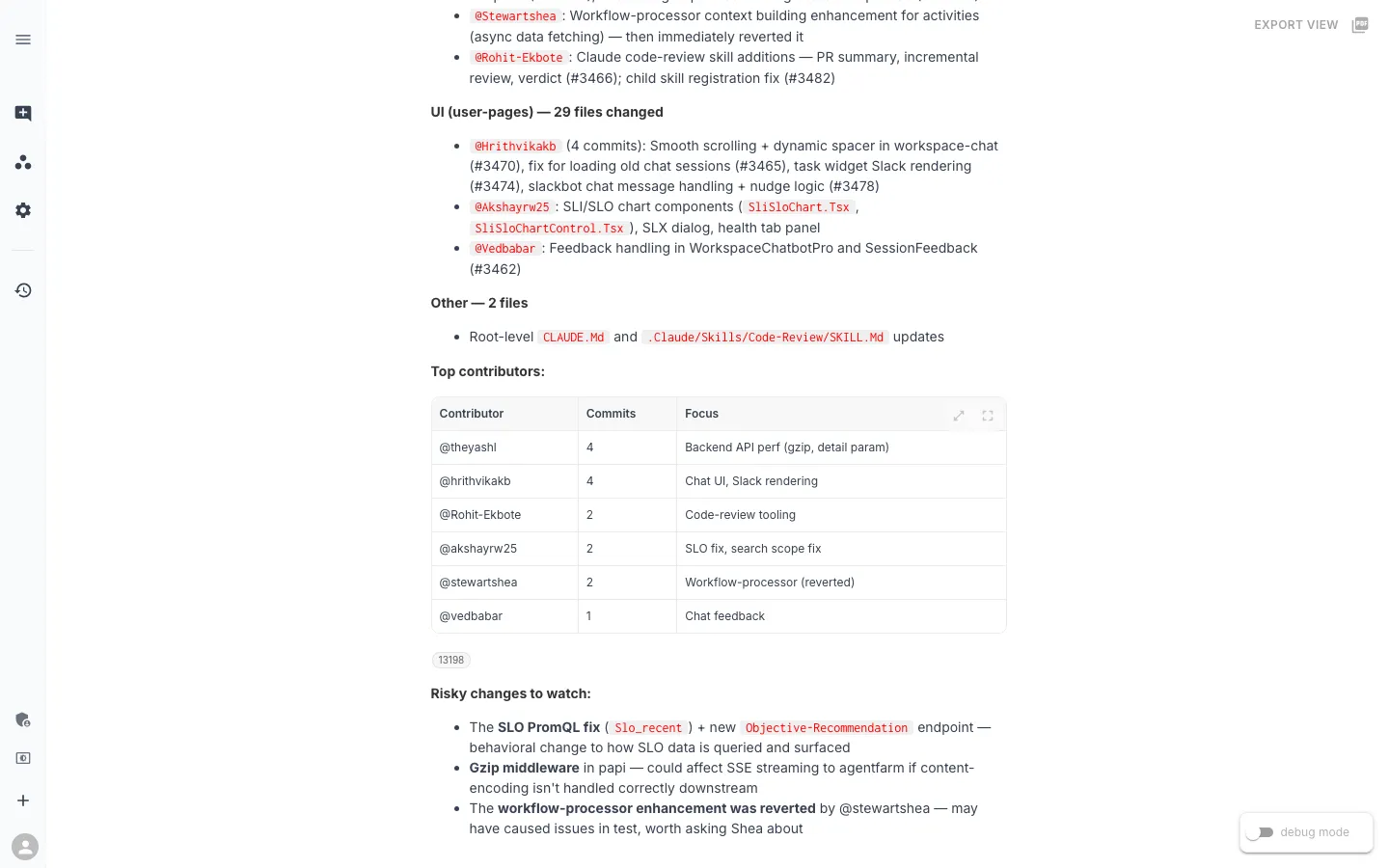
The Top Contributors table is a routing table. Six people shipped code in this window, each row pairs a handle with one or two focus areas, and it tells you who to ask about what. If something looks off in Slack rendering, you ping Hrithvika. If the SLO data on your dashboard looks weird, that’s Akshay. If you notice the workflow processor behaving strangely, that’s me — the revert row is a hint that something did not land cleanly in test, and saves you a “hey, did you mean to ship that?” Slack message.
The Risky changes to watch list is the assistant’s own inference. Nothing about it is hardcoded. It reads the Layer 2 output and calls out three things worth a second look — the SLO PromQL fix (behavioral change to how SLO data is queried), the gzip middleware in papi (could interact badly with SSE streaming to agentfarm downstream), and the reverted workflow-processor enhancement. None of those ripples are obvious from a flat commit list. They come from the assistant reasoning about what could propagate outward.
Layer 3 — only if you want to go further
By this point the command has answered the catching-up question: what is live, what changed in the code, who to ping, what to watch. It does not dump the workspace’s open issues list on you.
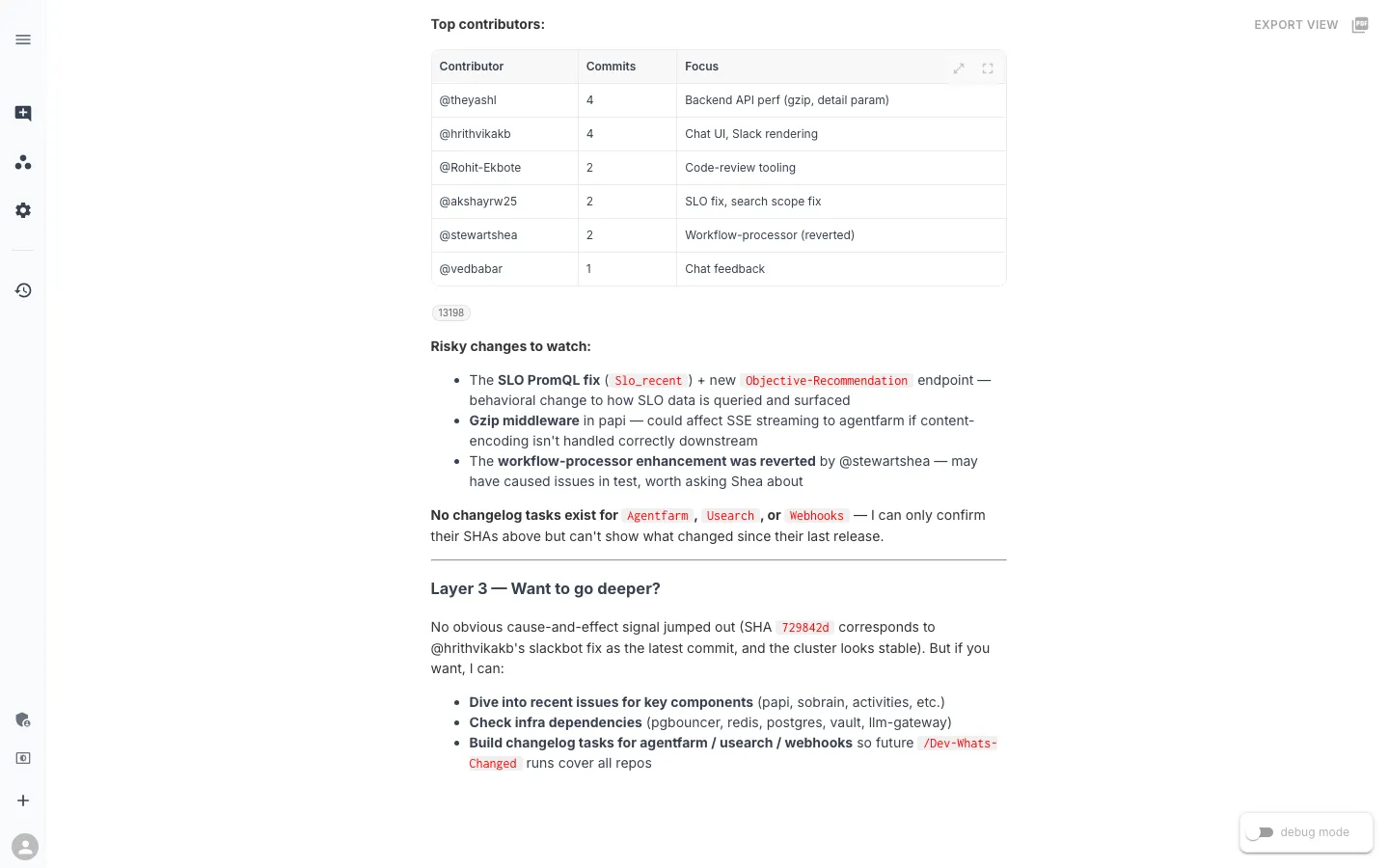
Three explicit offers. Two of them are deeper dives — issues scoped to key components, or a broader look at infra dependencies (pgbouncer, redis, postgres, vault, llm-gateway). The third is different: it is an offer to close a gap the command just exposed. “No changelog tasks exist for agentfarm or usearch” came up in the plan. Now, at the end, the assistant suggests fixing it.
That third option is what makes this command improve over time rather than stay stuck. The next developer to come back from vacation will get Layer 2 coverage for three repos instead of one, because someone — possibly the assistant itself, in five more minutes of pairing — will have built those tasks.
The real ingredient: small tasks that compose
The output above is not the result of a single cleverly-worded prompt. Everything the assistant produced — the repo-family table, the grouped commit summary, the contributor routing — comes from two small Python tasks that the command strings together:
detect-dev-activityreads the cluster viakubectlto get the live SHA per repo family and any Okteto workloads.github-platform-changeloghits the GitHub Compare API to diff the last release tag againstmain.
Both are under a hundred lines of standard-library Python. Both were written in an afternoon and committed as SLXs through the normal workspace flow — the same flow any engineer can use from their own editor via the RunWhen Platform MCP server. There is nothing exotic in the code; the value is in how cleanly they compose under a command that asks the catching-up question.
The command text itself is natural language. When we wanted to shift from a triage-shape to a catching-up shape, we rewrote the instruction in English and the next run produced the new output — no code deploy, no task rebuild. The command also adapts as the workspace does: if someone builds a changelog task for the webhooks repo tomorrow, /dev-whats-changed starts including it automatically. That is visible in the Layer 3 screenshot above, where the assistant explicitly offers to build the missing agentfarm and usearch tasks so the next developer gets fuller coverage.
Related commands
/dev-whats-changed sits in a small family of orientation commands that each answer a different flavor of “what is going on right now?”:
| Command | Audience | Question it answers |
|---|---|---|
/dev-whats-changed | Developer | What code is live, what changed since the last release, who to ping |
/oncall-whats-burning | On-call engineer | What is firing right now, scoped to priority-1/2 signals |
/mgr-release-readiness | Release manager | Is the test environment in a shape that supports promoting |
/release-status | Anyone | What is deployed in each environment right now |
/dev-whos-in-the-cluster | Developer | Who is Okteto-ing which service, so I don’t step on their session |
Each command references the others — the assistant knows which one to suggest when a developer asks a question that is actually a different shape. If you type /dev-whats-changed during an incident, the assistant notices the firing alerts and points you at /oncall-whats-burning before it answers. If you ask about readiness, it redirects to /mgr-release-readiness. The set composes.
What else could an orientation command answer?
Catching up after time away is one pattern. The underlying principle — an AI assistant composing signals from source-control, cluster state, and workspace context to answer a “what is going on?” question — applies to a lot of questions that teams are still answering manually.
- Onboarding a new hire — “Show me what the team has shipped this quarter, grouped by area, with the major architectural moves called out.” Same two data sources as
/dev-whats-changed, wider window. - Pre-1:1 prep — “What has this person shipped since we last talked? What are they currently focused on?” A per-contributor version of Layer 2.
- Post-incident context — “What shipped in the 24 hours before the incident started, filtered to services on the impact path?” Layer 2 scoped to a time window and a service list.
- Dependency drift checks — “Are our internal libraries the same version across services? Which services are behind?” Layer 1 semantics applied to library versions instead of image tags.
- Returning from a branch — “I’ve been heads-down on a feature branch for two weeks. What has moved in main that I need to rebase against?” The same command, with the baseline being the branch-point instead of the release tag.
The common thread: all of these are orientation questions, not decisions or triage. The developer does not want a recommendation; they want enough context to pick up where they left off. That shape of question is everywhere in a software team’s daily life, and almost all of it is currently handled by manually-pieced-together notes and Slack threads.
A slash command gives the team a shared answer. The next developer who comes back from vacation types the same six keystrokes, gets the same structured output, and starts their week on the same page as everyone else.
This post is part of the Favorite Slash Commands series. The first post covered Release Readiness — the command that replaced our pre-release checklist. Up next, we will look at how SRE commands like /sre-namespace-health turn deep infrastructure diagnostics into something any engineer on the team can run.