

Don't Make Your Best Model Grep
Token-light production operations — let code do the searching, and spend the model on judgment.
Where are you spending your token budget?
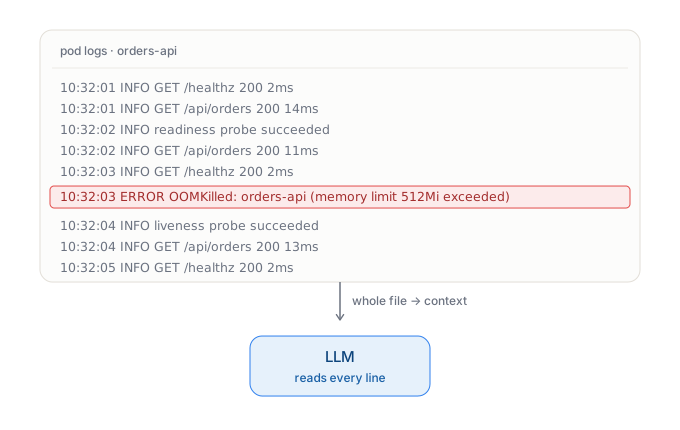
Of everything an AI agent does, production operations and troubleshooting is the work most likely to bury a model in a haystack of data.
When something breaks, the reflex — human or agent — is to pull everything: the full log stream, a metrics dump, recent events, the config. Telemetry is already the most voluminous and repetitive data an org produces, and an incident is exactly the moment you fetch the most of it. Then the whole raw pile goes straight into the model’s context, and your most expensive reasoning engine spends its token budget reading timestamps, request IDs, and the same stack frame a thousand times over — hunting for the one line that actually matters.
You’re paying frontier token rates for a search a grep could have done. And in operations you’re paying it on every alert, across the fleet, all day.
Does programmatic tool calling solve this?
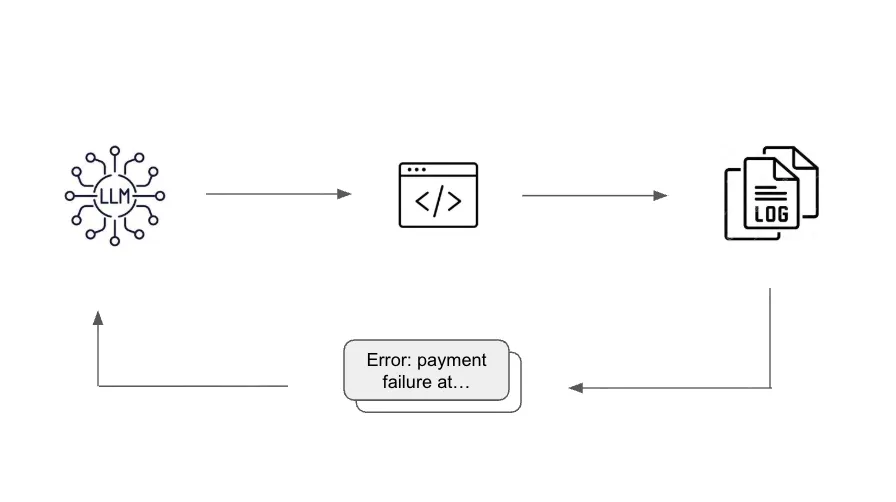
A common sense approach to this is programmatic tool calling: let code, not the model, do the data wrangling. The agent runs code to pull, filter, and shape the data, and the model only ever sees the distilled result — not the raw firehose. Both Anthropic and Cloudflare explained the pattern here.
The principle underneath is simple: searching is not reasoning. Pulling and parsing data is the most deterministic work in the loop — push it into code and the model spends its budget on judgment, not grep.
Limitations of runtime-generated code in production
Programmatic tool calling has the model generate the code at runtime, on every run. For exploration and one-off analysis that’s exactly right. Used for daily production operations, the approach starts to show some limitations:
- Unreviewed code runs in prod. The code is improvised on the spot; no human has seen it before it executes in your environment.
- Security posture is decided at runtime. What the code is allowed to reach is set by the model in the moment — not by an RBAC policy or a blast radius anyone signed off on in advance.
- Untested queries/code. A generated query is a hypothesis; it hasn’t been proven against real systems. And because the code differs from run to run, the same incident can be investigated differently each time — hard to reproduce, hard to audit.
- The same work is re-derived on every run, by every agent. Nothing is cataloged, so each session — and each engineer’s agent — regenerates the same initial data-gathering code, paying the tokens and risking inconsistency again and again. The technique optimizes a single call, not an organization.
How RunWhen Solves This
RunWhen keeps the core of programmatic tool calling — code does the wrangling, the model only ever sees the output of scripts — but changes when the code is written and who owns it. Instead of a model regenerating investigation code at runtime, RunWhen turns each piece of investigation into a skill: reviewed, reusable code that lives on the platform and is shared across every agent in the org. That one shift answers each of the limitations above.
In this section we will discuss the 4 core capabilities through which RunWhen solves it:
- Skills are authored once, reviewed, and deterministic
- The registry: tools become shared, org-wide assets
- Structured extraction: needles, not the haystack
- When no skill exists yet, build one in about 10 minutes
Skills are authored once, reviewed, and deterministic
A skill is pre-authored code, not improvised on the spot. It’s written and tested up front, reviewed before it ever runs in production, and it executes the same way every time — which closes the first three gaps directly:
- Reviewed before it ships. A human signs off on the code before it ever runs in your environment — no model-improvised code executing in prod.
- Governed by policy, not by the model. Skills execute through the Runner, a single path with scoped, least-privilege access. What a skill is allowed to reach is set by RBAC and policy in advance — the security posture is decided before an incident, not by a model during one.
- Access and connectivity, solved once. The credentials, network access, and connectivity needed to reach a target — usually the slowest, hardest part of writing any automation — are handled by the platform, not re-solved on every run.
- Auditable by construction. Because the same skill runs the same way every time, every investigation traces back to exactly the code that ran — auditing an action means reading one reviewed skill, not reconstructing improvised, run-specific code.
Each skill is code — CLI calls, platform APIs, SQL, queries against whatever observability happens to be deployed — with the first-level analysis logic (the queries, the thresholds, the shape of the answer) written and tested up front. Author it once, run it against every occurrence, on every alert, across the fleet.
Here is an excerpt from a log-parsing skill:
# Search for error fields and stringsecho "---"echo "Query for generic error logs with lnav and sort"for FILE in "${LOG_FILES[@]}"; do    echo "$FILE"    ERROR_SUMMARY=$(lnav -n -c ';SELECT error, COUNT(*) AS count FROM http_logrus_custom WHERE error IS NOT NULL GROUP BY error;' $FILE)    echo "$ERROR_SUMMARY"    ERROR_FUZZY_STRING+=$(echo "$ERROR_SUMMARY" | head -n 3 | tr -d '":' | tr ' ' '\n' | awk '{ for (i=1; i<=NF; i++) if (i != 2) print $i }')doneERROR_FUZZY_STRING=$(echo "$ERROR_FUZZY_STRING" | sort | uniq)
# Additional lnav queries for enhanced analysisecho "---"echo "Query for API response time analysis"for FILE in "${LOG_FILES[@]}"; do    echo "$FILE"    # Analyze slow API responses (>1000ms)    SLOW_RESPONSES=$(lnav -n -c ';SELECT "http.req.path", AVG("http.resp.took.ms") as avg_duration, COUNT(*) as count FROM http_logrus_custom WHERE "http.resp.took.ms" > 1000 GROUP BY "http.req.path" ORDER BY avg_duration DESC LIMIT 5;' $FILE)    if [[ -n "$SLOW_RESPONSES" && $(echo "$SLOW_RESPONSES" | wc -l) -gt 1 ]]; then        echo "Slow API endpoints detected:"        echo "$SLOW_RESPONSES"        issue_descriptions+=("Slow API responses detected in ${WORKLOAD_TYPE} ${WORKLOAD_NAME}")        recommendations+=("Investigate performance bottlenecks for slow API endpoints in ${WORKLOAD_TYPE} ${WORKLOAD_NAME}")    fidone
echo "---"echo "Query for database connection issues"for FILE in "${LOG_FILES[@]}"; do    echo "$FILE"    # Look for database-related patterns    DB_ISSUES=$(lnav -n -c ';SELECT log_line, COUNT(*) as count FROM logline WHERE log_line MATCH "(?i)(database|mysql|postgres|sql|connection pool|deadlock|timeout)" AND log_line MATCH "(?i)(error|fail|timeout)" GROUP BY log_line ORDER BY count DESC LIMIT 5;' $FILE)    if [[ -n "$DB_ISSUES" && $(echo "$DB_ISSUES" | wc -l) -gt 1 ]]; then        echo "Database issues detected:"        echo "$DB_ISSUES"        issue_descriptions+=("Database connectivity or performance issues detected")        recommendations+=("Review database connection pool settings and query performance for ${WORKLOAD_TYPE} ${WORKLOAD_NAME}")    fidone
The registry: tools become shared, org-wide assets
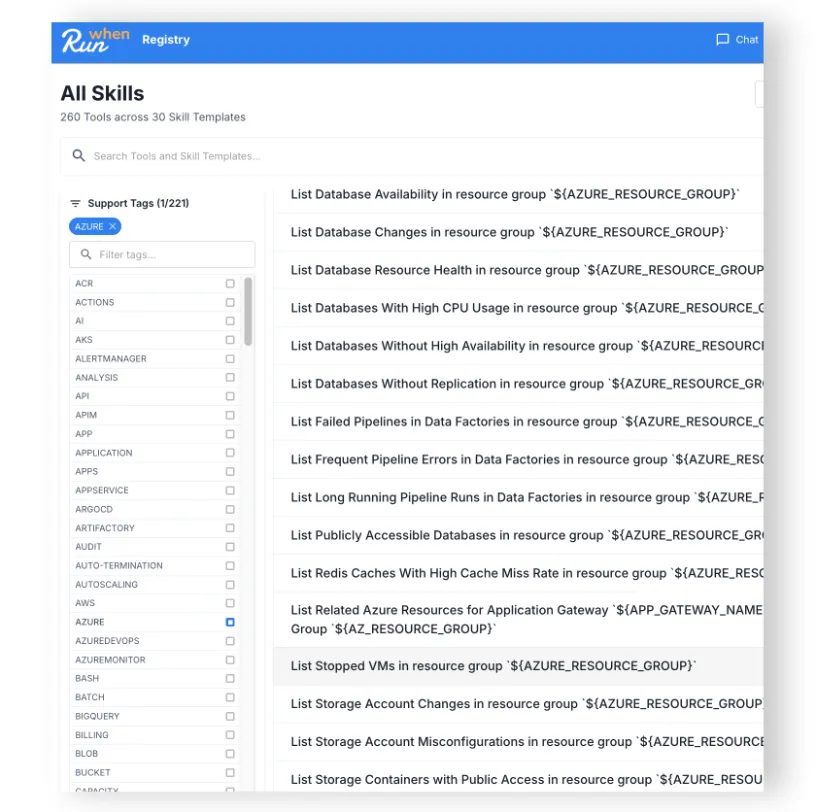
Because a skill is written once, it’s never re-derived on every run — or by every engineer’s agent. It’s cataloged in the RunWhen platform and reused everywhere. There’s already a public library of hundreds of them at registry.runwhen.com — each one a haystack somebody already searched. This is where the platform stops being one agent’s trick and becomes an organization’s. When a team builds a skill for their slice of the environment, it’s published on the RunWhen platform and every other RunWhen agent across the org can use it — tools built by one agent become tools for all of them. Investigative capability compounds as new skills are chained onto existing ones.
Structured extraction: needles, not the haystack
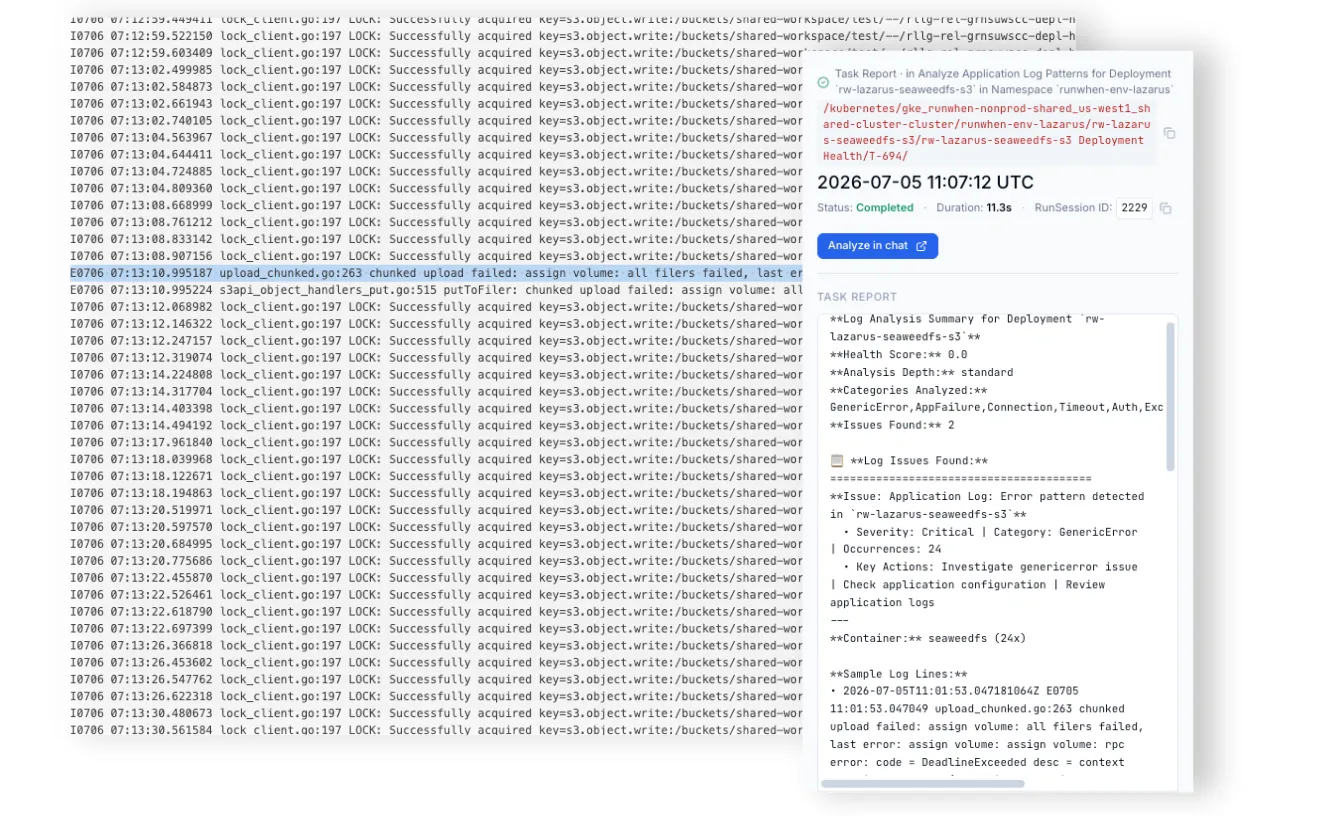
A skill doesn’t hand its raw output to the model either. It bounds and structures what it returns — capped to where the signal lives and shaped through a schema-constrained call — so the model receives a handful of structured findings in a fixed form, not a log dump it has to pay to read and parse. The haystack never enters the context window; only the needles do.
When no skill exists yet, build one in about 10 minutes — and everyone gets it
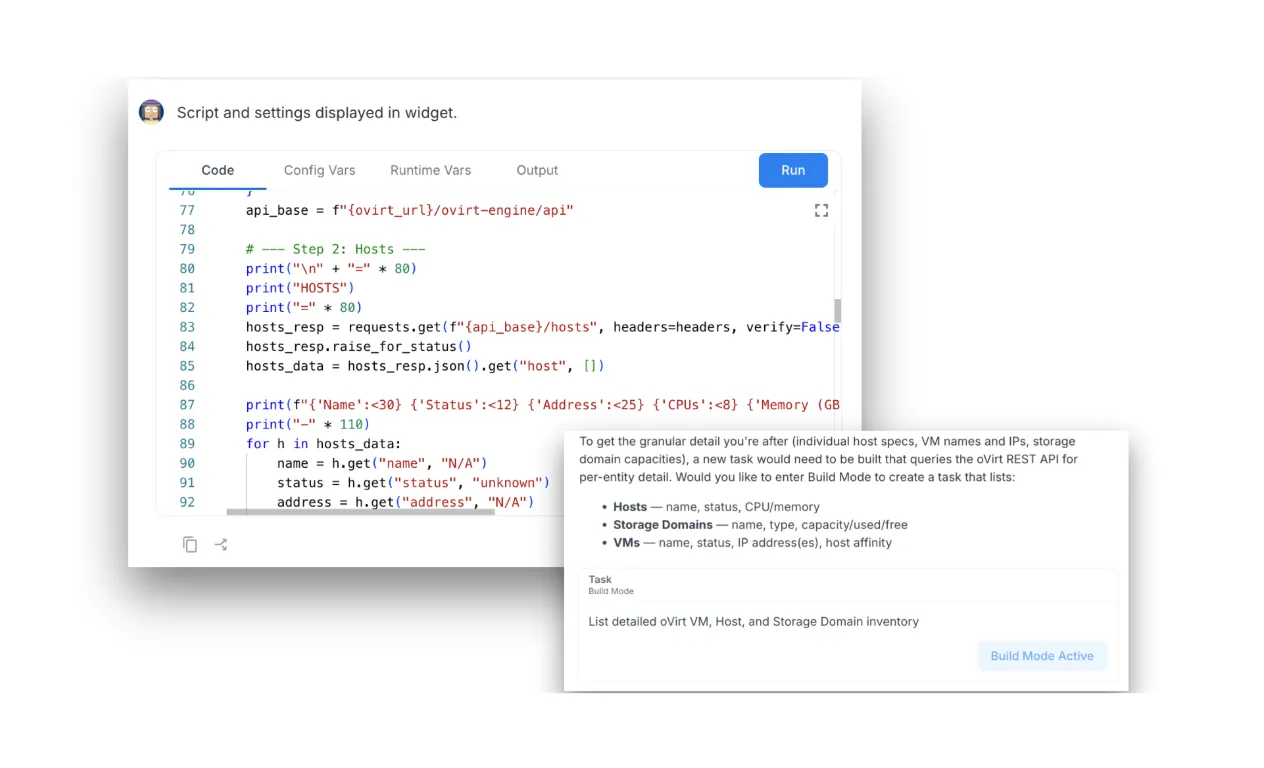
The registry doesn’t have to already contain a skill for your stack. When an agent hits a question nothing in the workspace can answer — an older platform, a system with no observability agent anywhere near it — RunWhen recognizes the gap and helps you build the task right there, against the live environment. A typical task takes about 10 minutes.
And this is the part that makes it hold up: once built, the skill is saved to the registry like any other — reviewed, guardrailed, and available to every agent across the org. Even a skill an agent had to generate from scratch is generated at most once, then becomes shared infrastructure. The estate no one has automated yet gets automated once, by whoever hits it first, for everyone.
The through-line
None of this is exotic. It’s the same instinct good engineers have always had about expensive resources: don’t spend the costly one on work a cheap one can do. Programmatic tool calling applies that to a tool call. RunWhen applies it to the hardest place to hold the line — production troubleshooting, on every alert, across a heterogeneous estate — with pre-authored skills that return needles, structured extraction that bounds every result, and the ability to grow a new skill in minutes.
Tokens are just the newest commodity on the list you were already budgeting. Same as it ever was for CPU and memory — you just have to decide it’s a resource worth designing for.
Write 30 skills in 30 days
If this pattern makes sense to you, learn more about writing safe-for-production skills for your team at runwhen.com.